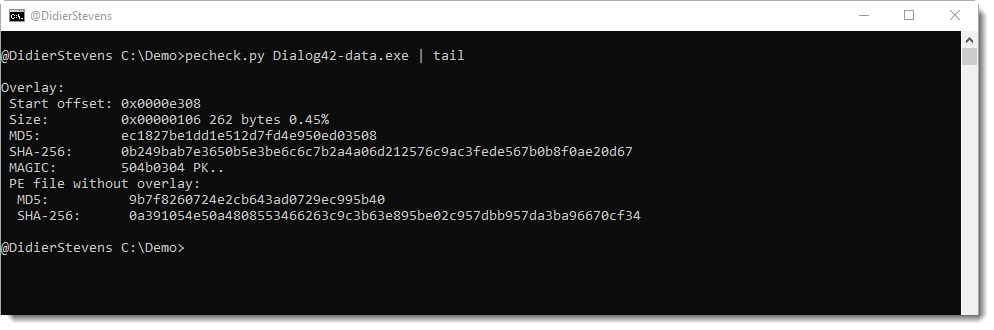
During recent malware analysis, I had a need to quickly extract overlays from a bunch of PE files. This can be done with this new version: use option “-g o” to get the overlay:
Option -A (rle ASCII dump) is also new.
And option -y (yara) supports regex (#r#) and hexadecimal (#x#) ad-hoc rules.
This version comes with a major update of the BIFF plugin (for Excel files). New features for plugin_biff.py will be discussed in detail in next blog post.
And there are 2 minor changes to oledump itself.
A warning is displayed when an Office file format without macro-support is selected, like .docx files:
In prior versions, no output was produced at all when files like .docx files were processed.
And there’s a bug fix when selecting non-existing streams:
In this update, you can also save your library with custom regular expressions in the working directory (in prior versions, it would only take it from the application directory).
Here is an example with a regular expression for MAC addresses:
And there’s a small fix for URL regex: a – character was not considered to be part of the query of a URL.
This new version of pdf-parser brings support for analysis of stream objects (/ObjStm). Use new option -O to enable this mode.
Stream objects (/ObjStm) are objects that contain other objects: they have a stream, containing other objects. These contained objects can not have a stream.
pdfid.py detects the presence of stream objects:
But pdfid can not look inside a stream, to figure out what objects are inside. That’s why I always say to use pdf-parser to select and decompress stream objects, and then pipe this through pdfid:
When pdf-parser parses a stream object, it does not parse the content of its stream:
This changes with this new version of pdf-parser. When option -O is used, pdf-parser extracts objects from /ObjStm streams and handles them like normal objects. In the following example, object 2 is contained in object 1:
pdf-parser provides statistics for a PDF’s content with option -a:
Combining option -a with option -O includes objects present inside stream objects (this is an alternative for combining both tools: pdf-parser -s objstm -f a.pdf | pdfid -f):
This output shows that /JavaScript can be found in object 7. We need to use option -O to find object 7 “hiding” in object 1:
If we forget to use option -O, object 7 is not found:
I added function ZlibRawD to translate.py to decompress Zlib compression without header (ZlibD already exists, and is for Zlib compression with header).
This compression is sometimes used in malicious PowerShell scripts:
I show how to use this option in a malicious document analysis video below. If you want to jump straight to the point where I use option -C with a UNICODE string, go to 9:16.
This is a bug fix update: for agile encryption, Python module msoffcrypto does not throw an exception in method load_key when an invalid password is provided. It throws an exception when an attempt is made to decrypt the file.
I added a call to method decrypt to handle this case.
-e takes a text file and extracts all words from this text file to be used in the dictionary attack. Words are strings delimited by space characters. Words between single or double quotes, and words after string “password” are put at the beginning of the list for the dictionary attack.
The idea for option -e, is that you give it the content of an email message that contains the password of the encrypted attachment(s).
-c takes the password to decrypt the document. You use this option after the password was recovered (with option -p or -e for example), and need to run the tool again to decrypt the document. You can run the password cracking each time when you need to decrypt the document, but if this takes too long, then you just run it once and from then on provide the recovered password with option -c.
Password VelvetSweatshop was added to the embedded password list.