Didier Stevens

Wednesday 27 March 2013

Cisco IOS Patching: Defense and Offense

Filed under: Forensics,Hacking,Networking,Reverse Engineering — Didier Stevens @ 22:39

I will give a talk on network forensics at my local ISSA chapter.

I’m preparing it with a couple of PoCs.

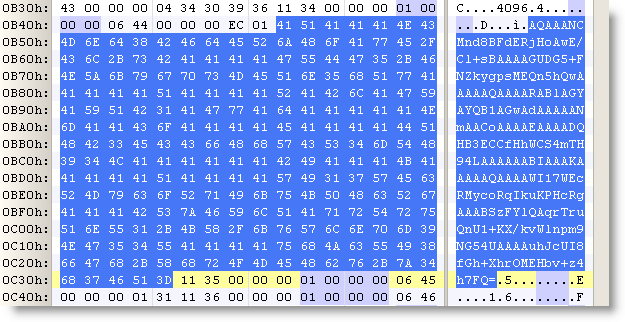
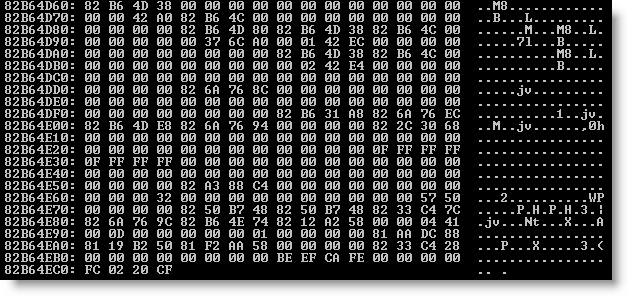
First PoC is how changing the canary value 0xFD0110DF to another value can provide defense against exploits like FX explained in this paper. I changed the appropriate instructions so that IOS uses canary value OxFC0220CF. You can see it at the bottom of this memory dump:

20130327-232310

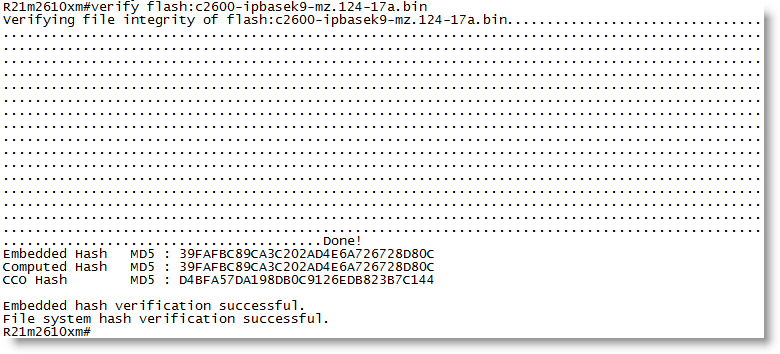
Second PoC is how I can change the behavior of an IOS command for offensive purposes. Topo mentioned this idea at Black Hat. The verify command checks the embedded MD5 signature in an IOS image. I patched the appropriate instructions so that the verify command always reports a valid signature, regardless of the actual embedded value:

20130327-233004

I did not change CCO hash. This is the MD5 hash of the complete IOS image. I did not change this on purpose, but it would be as easy as changing the embedded hash. If you lookup this CCO hash with Cisco, you will not find it.

Wednesday 20 February 2013

Update XORSearch V1.8.0: Shifting

Filed under: My Software,OSX,Reverse Engineering,Update — Didier Stevens @ 21:32

This new version of XORSearch comes with a new operation: shifting left.

It comes in handy to reverse engineer protocols like TeamViewer’s remote access protocol.

Here’s an example. When you run TeamViewer, your machine gets an ID:

20-02-2013 22-11-39

We capture some TeamViewer traffic with Wireshark, and then we use XORSearch to search for TeamViewer ID 441055893 in this traffic:

20130216-231230

And as you can see, XORSearch finds this ID by left-shifting the content of the pcap file with one bit.

Thursday 14 February 2013

Quickpost: TeamViewer and Proxies

Filed under: Forensics,Networking,Reverse Engineering — Didier Stevens @ 22:15

Sorry for the lack of recent posts, I’ve been ill and had to catch up with a lot of work.

Braden Thomas wrote an interesting series of posts on reversing the TeamViewer protocol.

I want to add my own observation: when TeamViewer is forced to communicate over an HTTP proxy, it will issue GET statements with parameter data that can be decoded in a similar way as Braden describes for the direct protocol (i.e. without proxy).

First of all, to identify TeamViewer traffic in proxy logs, you look for this User Agent String: “Mozilla/4.0 (compatible; MSIE 6.0; DynGate)”.

You will see HTTP GET requests like this one:

hxxp://178.77.120.6/dout.aspx?s=55194936&p=10000001&client=DynGate&data=FyQSAAExtjSytzoeqisTMbe3NzKxujS3tza3sjKemJMzHqkyu…

When you decode the value of the data= parameter as base64, you can identify the version of the protocol (first 2bytes) and the command (3rd byte):

0x1724 0x12

0x12 is a CMD_MASTERCOMMAND. By left-shifting the data from the 5th byte with 1 bit, you can decode the arguments of a MASTERCOMMAND, like this:

client=TV&connectionmode=1&f=RequestRoute2&homeserver=&ic=708710721&id=123456789&id1=123456789&id2=987654321&licensecode=…

When parameter f (the function) is RequestRoute2, you know that the TeamViewer user issued a command to connect to another TeamViewer client. Parameter id identifies the originating client (123456789 in my example), and parameter id2 identifies the destination (987654321 in my example).

Tuesday 21 October 2008

The Case of the Corrupted Stream Object

Filed under: Malware,PDF,Reverse Engineering — Didier Stevens @ 21:38

A malicious PDF file I analyzed a couple of months ago (the one featured in this video) had a corrupted stream object. It uses a /FlateDecode filter, but I could not find a way to decompress it with the zlib library. Back then, I wrote it off as an error of the malware author.

Lately, I’ve been analyzing some shellcode, and while looking at the shellcode in said malicious PDF, I saw it! The second-stage shellcode, a egghunt shellcode, is searching through process memory for the 8 bytes at the beginning of the corrupted stream object.

The malware author knows that the PDF reader loads the PDF document in memory, so he just overwrote the stream object with his third-stage shellcode. This way, his third-stage shellcode is already in memory, waiting to be found by his second-stage shellcode. And the size of his third-stage shellcode is not limited by the buffer he is overflowing.

Monday 29 September 2008

Quickpost: SQL Server 2005 Management Studio and Password Management

Filed under: Encryption,Quickpost,Reverse Engineering — Didier Stevens @ 16:06

Another stored password question I was asked: where does SQL Server 2005 Management Studio store the passwords, and are they encrypted?

When you set the Remember Password toggle:

the password is saved in this file (default install, Administrator account):
C:\Documents and Settings\Administrator\Application Data\Microsoft\Microsoft SQL Server\90\Tools\Shell\mru.dat

The password is not stored in cleartext. The file contains a BASE64 blob, strongly resembling a DPAPI protected data blob.

Convert it to hex:

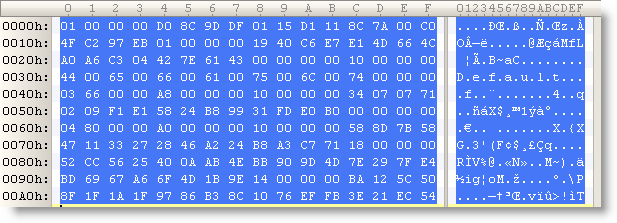
(all the protected DPAPI data blobs I’ve seen start with byte sequence 01 00 00 00 D0 8C 9D…)

Let’s decode this with CryptUnprotectData (all optional parameters set to NULL):

We get no error, proving that it’s indeed data protected by DPAPI on this machine for this user. The content is just the password in UNICODE.

The nice thing for a software developer, is that DPAPI allows him to encrypt/decrypt data without having to worry about encryption keys. For details on all the keys used by DPAPI, read this MSDN article.


Quickpost info


Tuesday 19 August 2008

A Third SpiderMonkey Trick

Filed under: Malware,My Software,Reverse Engineering — Didier Stevens @ 22:51

This escaped my attention, but SpiderMonkey 1.7 has been released for some time now.

I patched this new version (download on my SpiderMonkey page), and decided to add another small trick: implement the window object with the navigate method:

Thursday 31 July 2008

F-Secure Reverse Engineering Challenge 2008

Filed under: Reverse Engineering — Didier Stevens @ 13:41

It’s back: http://www.khallenge.com.

And here’s a promo video I made last year.

Wednesday 12 March 2008

bpmtk: DisableAMD

Filed under: Hacking,My Software,Reverse Engineering — Didier Stevens @ 0:43

Remember my DisableAMD post? In stead of patching the EXE file, you can also use my Basic Process Manipulation Tool Kit to patch the running process.

There is a small difficulty, however. The check for the DisableCMD key is done when CMD.EXE is started, so to be successful, we have to start the program and change the DisableCMD string in memory before the check is made. Sounds impossible? Not really, the CreateProcess function allows you to create a new process with its main thread in a suspended state (this means that the program is not running). This gives you the opportunity to change the string in memory before it is used.

Use the start statement to start a new process in suspended state:

start cmd.exe

Change the string in memory:

search-and-write module:. unicode:DisableCMD unicode:DisableAMD

The main thread will be resumed after the last statement was executed (search-and-write in our example):

start-cmd-w2k8.png

The cmd.exe window in the background was launched from the start menu (showing you that cmd.exe is disabled), while the cmd.exe window in the foreground was launched with the bpmtk (showing you the bypass of the GPO).

And did you notice that this screenshot is taken on a Windows 2008 server?

Next time, I’ll show some tricks to use the bpmtk in a restricted environment, like a Terminal Server.

Thursday 6 March 2008

bpmtk: Replacing Gpdisable

Filed under: Hacking,My Software,Reverse Engineering — Didier Stevens @ 8:52

Gpdisable is a tool to bypass group policy as a limited user, posted by Marc Russinovich on his blog when he was still the owner of Sysinternals. But now that Sysinternals is owned by Microsoft, the tool is not available anymore.

My Basic Process Manipulation Tool Kit can replace Gpdisable, I’ll show how and give you one more trick.

LikeMarc did, you can inject a DLL that will patch the IAT to subvert NtQueryValueKey, but I’ll leave this technique for an upcoming post.

My example doesn’t require you to program a DLL to inject: since we want to hide the TransparentEnabled registry key, we will just rename the key in the process memory of the programs that impose Software Restriction Policies on us (like explorer.exe). Here is the bpmtk config file to achieve this goal:

dll-name advapi32.dll
#rename TransparentEnabled to AransparentEnabled
search-and-write module:. unicode:TransparentEnabled ascii:A

This will patch each process you’ve rights to and who has loaded advapi32.dll (this DLL enforces SRP).

But as Mark writes in his blog, this will not work for running processes because they have already cached the value of TransparentEnabled and are thus not querying the registry anymore. This is why many people reported that Gpdisable didn’t work for them. Gpupdate /force will force a refresh of the policies, and invalidate the cache.

But if you’re in a restricted environment, there’s a chance you’re prevented from doing a gpupdate. Here’s another way: set the variable _g_bInitializedFirstTime to 0, this will also invalidate the cache. For advapi32.dll version 5.1.2600.2180, this variable is at address 77E463C8. Our script becomes:

dll-name advapi32.dll
#rename TransparentEnabled to AransparentEnabled
search-and-write module:. unicode:TransparentEnabled ascii:A
write version:5.1.2600.2180 hex:77E463C8 hex:00

Thursday 28 February 2008

Introducing the Basic Process Manipulation Tool Kit

Filed under: Forensics,Hacking,My Software,Reverse Engineering — Didier Stevens @ 10:01

For about a month or two now, I’ve been working on a toolkit to manipulate processes (running programs) on Windows. I’ve been using it mainly to research security mechanisms implemented in user processes, like Microsoft .NET Code Access Security.

Here are some of the design goals of the toolkit:

  • the toolkit must support limited accounts (accounts that are not local administrators) as much as possible
  • flexibility: provide a set of commands that can be assembled in a configuration file to execute a given task
  • the toolkit must be able to operate as a single EXE, without requiring the installation of supporting environments like Python
  • it must be a command-line tool

The toolkit has commands to search and replace data inside the memory of processes, dump memory or strings, inject DLLs, patch import address tables, … I’ll be posting examples in the coming weeks, illustrating how these commands can be used.

I’m releasing a beta version of the toolkit now, you can download it here.

This is an example of a configuration file (disable-cas.txt) to disable CAS for a given program (exactly like CASToggle does):

process-name CASToggleDemoTargetApp.exe
write version:2.0.50727.42 hex:7A3822B0 hex:01000000
write version:2.0.50727.832 hex:7A38716C hex:01000000
write version:2.0.50727.1433 hex:7A3AD438 hex:01000000

It looks for processes with the name CASToggleDemoTargetApp.exe, and will then write to the memory of these processes to set a variable to 1 (hex:01000000). The address to write to depends upon the version of the DLL containing the variable. If the DLL has version 2.0.50727.42, we will write to address 7A3822B0. For version 2.0.50727.832, we will write to 7A38716C, … So in this configuration file, at most one write command will be successful and write to memory.

Launch the toolkit with the configuration file like this:

bpmtk disable-cas.txt

You can also use the toolkit to audit programs, for example to check if they protect secrets correctly. Let’s investigate how Firefox keeps passwords (I tested this with Firefox 2.0.0.12 English on Windows XP SP2):

I created a new Firefox profile, defined a master password and stored two passwords: one for Google (BigSecretGoogle) and one for WordPress (BigSecretWordpress).

This is the config file:

process-name firefox.exe
strings address:on memory:writable regex:BigSecret

This config file will search inside the memory (only the writable virtual memory) of Firefox for strings containing the string BigSecret, and dump them to the screen, together with the address where they were found.

Let’s start Firefox and search inside the memory (bpmtk demo-firefox-passwords.txt):

bpmtk-0009.png

No BigSecrets here. Now let’s navigate to Google mail. We are prompted for the master password, so that Firefox can complete our credentials on the login screen:

bpmtk-0010.png

bpmtk-0012.png

Let’s take another peek inside the memory of the Firefox process:

bpmtk-0013.png

It should be no surprise that we find our Google password in memory (at 2 different addresses, the U indicates that we found a Unicode string).

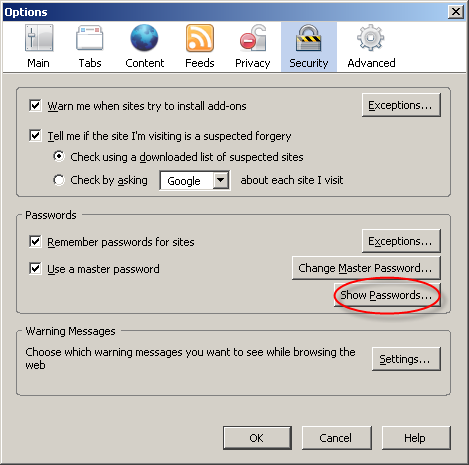
Now let’s go to Firefox’s options and display the passwords:
bpmtk-0014.png

bpmtk-0015.png

The password manager displays the stored URLs and the usernames, but not the passwords. Let’s take another peek inside the memory of the Firefox process:

bpmtk-0016.png

This time, Firefox has also decrypted our WordPress password (BigSecretWordpress), although it’s not displayed. It’s only displayed if we provide the master password a second time:

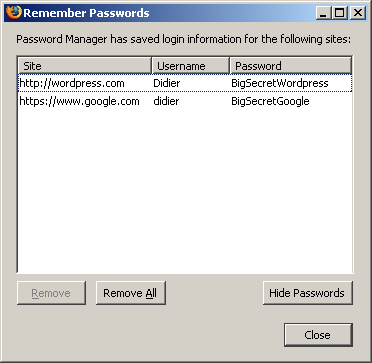
bpmtk-0017.png

bpmtk-0018.png

So although Firefox prompts you a second time for the master password to display all the passwords, the passwords have already been decrypted in memory before you provided the master password a second time.

Now I don’t have issues with this behavior of the password manager of Firefox, I don’t think it’s a security issue (I’ve an idea why it was programmed like this). But if Firefox was a perfect program, all passwords would only be decrypted when a user explicitly asks to display all passwords.

Do you make online payments with your credit card? Now that I’ve showed you how you can look for specific strings inside a running program with my toolkit, you should know how to use it to check how long your browser keeps your credit card number inside its memory. And can you find out how to use bpmtk to erase that number from your browser’s memory?

Let me finish with an appetizer: I’ve also developed a DLL that, once injected inside a process, will instantiate a scripting engine inside said process, and start executing a script inside the process. This allows you to inject a script inside a process, which can be handy for rapid prototyping or when you’re operating in a limited environment where you don’t have a C compiler to develop a custom DLL to inject. Of course, a script is not as powerful as a compiled C program, but I’m adding some objects to provide some missing functionality.

This script injector will be released with an upcoming version of the bpmtk.
« Previous PageNext Page »

Blog at WordPress.com.