Didier Stevens

Tuesday 6 January 2009

Quickpost: Running BackTrack 3 on a Eee PC

Filed under: Eee PC,Quickpost — Didier Stevens @ 20:44

I want to run the BackTrack 3 Live CD on my new Eee PC 901. Here is how I configured a SD card to boot the BackTrack 3 USB Version (not the same as installing the BackTrack 3 distro on a SSD or SD card).

  • start Windows XP on Eee PC
  • download the BackTrack 3 USB version
  • use unetbootin to install the BackTrack 3 iso file to the SD card
  • copy 901_net_gfx.lzm to the \BT3\optional directory on the SD card (details and download here)
  • edit file /boot/syslinux/syslinux.cfg on the SD card to add these lines after the LABEL… line:
LABEL EEE
MENU LABEL BT3 EEE Mode
KERNEL /boot/vmlinuz
APPEND vga=785 initrd=/boot/initrd.gz ramdisk_size=6666 root=/dev/ram0 rw load=901_net_gfx autoexec=startx

The following step is only needed if you want to change the keyboard. I use a Belgian keyboard, so I want the default KDE keyboard to be the BE keyboard, not the US keyboard. We will update the kxkbrc file in the root.lzm compressed directory. sda1 is the SD card I booted from, adapt according to your configuration.

  • Boot BackTrack 3 from the SD card and get a root shell
  • cp /mnt/sda1/BT3/base/root.lzm .
  • mv /mnt/sda1/BT3/base/root.lzm /mnt/sda1/BT3/base/root.lzm.original
  • mkdir newroot
  • lzm2dir root.lzm newroot
  • edit file newroot/root/.kde/share/config/kxkbrc
  • edit the LayoutList property and move the be value to the beginning of the comma-separated list, like this:
    • LayoutList=be,us,ch,br,cz,fr,de,it,pl,sk,gb,dk,de
  • save file kxkbrc
  • dir2lzm newroot root.lzm
  • mv root.lzm /mnt/sda1/BT3/base

You can use the same procedure to edit other (config) files, or add files like your favorite utilities.
Quickpost info


Sunday 30 November 2008

Quickpost: Citibank Phishing E-mails

Filed under: Quickpost,Spam — Didier Stevens @ 11:28

On November 23th 2008, the US Government rescued Citigroup by investing an additional $25 billion.

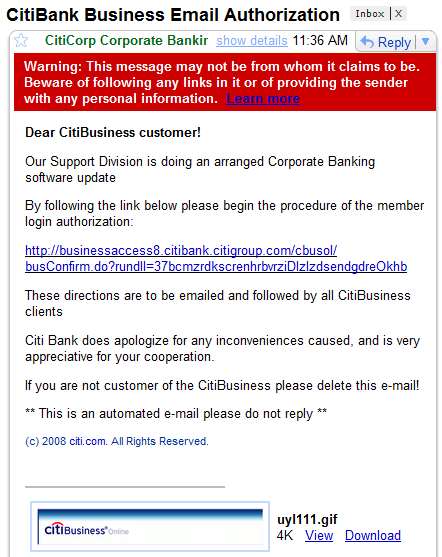
On November 25th 2008, I started to receive Citibank phishing e-mails in my “SPAM-trap”. At the time of writing, the spam campaign is still active and I’ve received 300+ e-mails, like this one:

20081130-105959

This can’t be a coincidence. Although the phishing e-mails don’t mention the financial problems of Citigroup, I’m sure the scammers started this phishing campaign to benefit from the uncertainty surrounding the future of Citigroup.

I want to be sure that I can get my money out if things start to go really wrong” will be the reaction of many people falling for this scam. The timing and design of this campaign reveals an understanding of the psychology of fear by these scammers. The fear of losing their money due to a Citibank bankruptcy, will blind some people for the signs of a scam. People who would be more suspicious under normal circumstances.

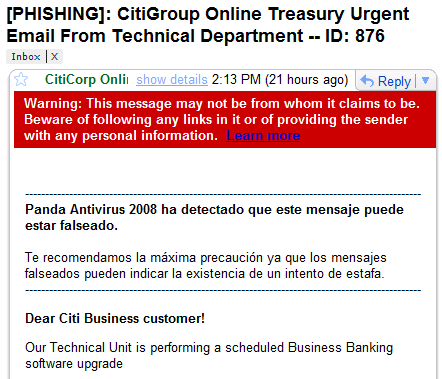
BTW, one particular Citibank phishing e-mail caught my eye. Its subject starts with [PHISHING] and the body starts with a Panda Antivirus warning:

20081130-113325

Pedro Bustamante from Panda security told me that this default message is added by Panda Antivirus 2008 to incoming and outgoing phishing e-mails.

This e-mail was probably send from a botnet member with an installion of Panda Antivirus 2008. As I have only the e-mail and no other info on the botnet member, I can’t analyze why the botnet software isn’t being neutralized by the AV. There can be many reasons.

Many malware uses a brute-force approach to attack AV software. One simple trick I’ve seen many times in malware assembler listings, is enumerating all services and disable those who match an “AV blacklist”. Recent AV products contains many components. It’s likely that in this case, the botnet malware neutralized the AV engine but missed the spam engine.

Anyways, this particular e-mail provided me some WTF entertainment 😉 .


Quickpost info


Sunday 23 November 2008

Quickpost: WiFi Availability

Filed under: Quickpost,WiFi — Didier Stevens @ 11:01

This new video shows how a WiFi camera can be jammed by another wireless device. I produced it for my last talk at the office, illustrating the concept of availability in secure systems.

A WiFi camera, operating on channel 1, is streaming video. When I switch on an analogue, wireless babycam, you see a strong signal appearing near channel 9 (watch the SPECTRAL VIEW of the Wi-Spy spectrum analyzer, e.g. the window in the upper-left corner). After some time, I switch the babycam to a channel near channel 1 of the WiFi camera. Now the transmission of the babycam jams the transmission of the WiFi camera, and we lose connectivity.

Powering off the babycam restores the WiFi connection.

YouTube, Vimeo and XviD hires.


Quickpost info


Monday 3 November 2008

Quickpost: Remember FireOx?

Filed under: Hacking,Quickpost — Didier Stevens @ 17:05

Remember FireOx?

This time, I tested my Excel scripts on a CommNet machine, here at TechEd Barcelona. Worked without problem.

Saturday 1 November 2008

Quickpost: “An Old IE Trick” Revisited

Filed under: Malware,Quickpost — Didier Stevens @ 22:30

One year ago I blogged about an old IE trick still being used by malware. What can be said now that I resubmitted my test files to Virustotal (VT)? Not much, because VT is not an anti-virus test tool (it’s a virus test tool).

More AV products detect my test files now; and test files with longer zero byte sequences, that weren’t detected a year ago, are getting detected now. So I’m not really going out on a limb here when I say that the detection has improved. But there’s no way to quantify this improvement with VT results alone.

My test file with 255 contiguous zero bytes, which wasn’t detected by VT one year ago, is being detected by 6 AV products now. But it must be clear that I can’t conclude from this that only 6 AV products have been improved in the past year.

First of all, we can’t know if all AV products that have been improved in the past year, have been upgraded on the VT site. It’s very likely that some new engines have not been installed on VT yet.

Second, this improvement might not come to expression on VT. VT uses command-line scanners, and many AV protection features are not present in the command-line versions.

Third, the improved detection could just be the result of new signatures for the very same test files I submitted. Just out of curiosity, I created a new file with 543 contiguous zero bytes. It gets detected by some AV products.

If you’re interested in the detailed detections, here are the links to the VT results:


Quickpost info


Quickpost: Fingerprinting PDF Files

Filed under: Malware,PDF,Quickpost — Didier Stevens @ 11:57

Per request, a more detailed post on how I use my pdf-parser stats option.

I have two malicious PDF files with a different title, different size (100K and 700K) and different content. But they share an identical internal PDF structure, because they have exactly the same number and type of fundamental elements:

These statistics were generated with the following command:

pdf-parser.py --stats malware.pdf

As both malicious PDF files produce identical stats (or fingerprint), I can assume they share the same origin.


Quickpost info


Thursday 9 October 2008

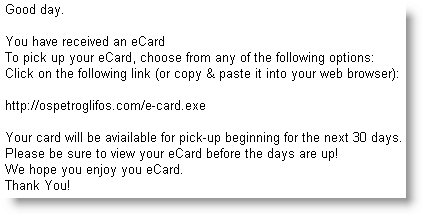
Quickpost: Another E-card Malware Spam Campaign

Filed under: Malware,Quickpost — Didier Stevens @ 8:12

Another e-card e-mail is being spammed right now

Subject: You have received an eCard

Spoofed sender: 123Greetings.com

MD5 51c2c1e82bc8c89dd831494689341147

VirusTotal

Monday 29 September 2008

Quickpost: SQL Server 2005 Management Studio and Password Management

Filed under: Encryption,Quickpost,Reverse Engineering — Didier Stevens @ 16:06

Another stored password question I was asked: where does SQL Server 2005 Management Studio store the passwords, and are they encrypted?

When you set the Remember Password toggle:

the password is saved in this file (default install, Administrator account):
C:\Documents and Settings\Administrator\Application Data\Microsoft\Microsoft SQL Server\90\Tools\Shell\mru.dat

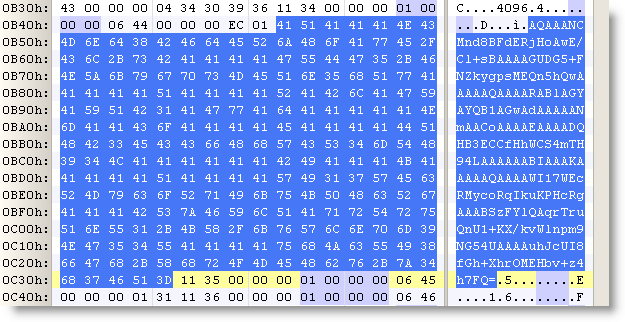
The password is not stored in cleartext. The file contains a BASE64 blob, strongly resembling a DPAPI protected data blob.

Convert it to hex:

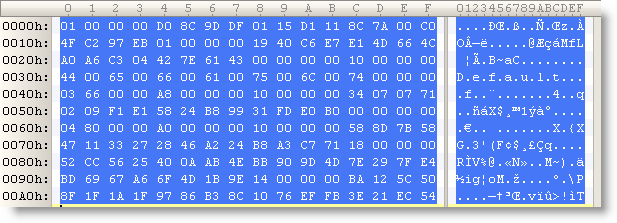
(all the protected DPAPI data blobs I’ve seen start with byte sequence 01 00 00 00 D0 8C 9D…)

Let’s decode this with CryptUnprotectData (all optional parameters set to NULL):

We get no error, proving that it’s indeed data protected by DPAPI on this machine for this user. The content is just the password in UNICODE.

The nice thing for a software developer, is that DPAPI allows him to encrypt/decrypt data without having to worry about encryption keys. For details on all the keys used by DPAPI, read this MSDN article.


Quickpost info


Friday 26 September 2008

Quickpost: Stored User Names and Passwords

Filed under: Encryption,Quickpost — Didier Stevens @ 19:05

“Where does Windows store this password?” “Is it safe there?”

I regularly get asked these questions, and they frequently appear on forums.

Microsoft has developed several technologies to store and protect credentials, and to add to the confusion, Microsoft has renamed some of these technologies over the years…

A list: LSA, Protected Storage, Windows Data Protection (DPAPI), Stored User Names and Passwords, …

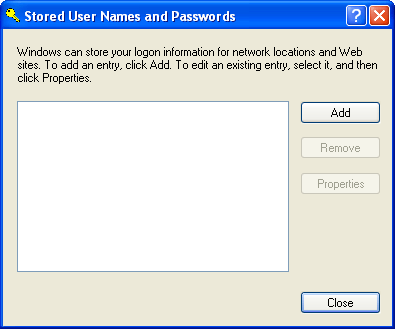
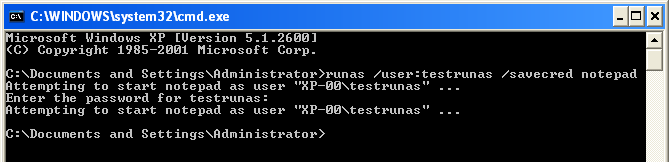
Last question I read was: where does runas /savecred store the password? It gets stored in Stored User Names and Passwords. Before storing the password:

And after:

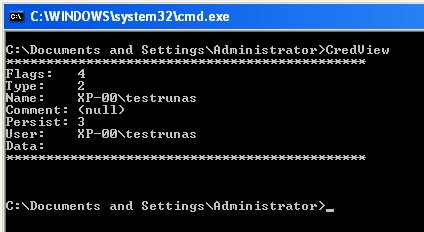
Nirsoft has a tool (CredView) to dump passwords stored in Stored User Names and Passwords:

The CredRead function (used by CredView) will not retrieve Windows passwords (domain and local) unless it is called from the LSA process. That’s why CredView doesn’t display the testrunas password (data).

If you convert CredView to a DLL and inject it in the LSA process, you’ll be able to retrieve the passwords. This is exactly what Cain & Abel does, and why you need admin rights (SeDebugPrivilege to be precise).


Quickpost info


Monday 22 September 2008

Quickpost: WiFi Antenna With 360° Servo

Filed under: Hardware,Quickpost,WiFi — Didier Stevens @ 10:17

Last weekend, I’ve been playing with a RC servo to automate the recording of wsrradial plots. Metlstorm has presented a solution to do this with Lego Mindstorms, but I present a solution if you don’t want to use Lego components.

RC servos are easy to find, and you can find many servo controllers for PCs (a typical RC servo is controlled with a PWM signal). Though most RC servos though are limited to 180° rotations, there are 360° servos on the market.

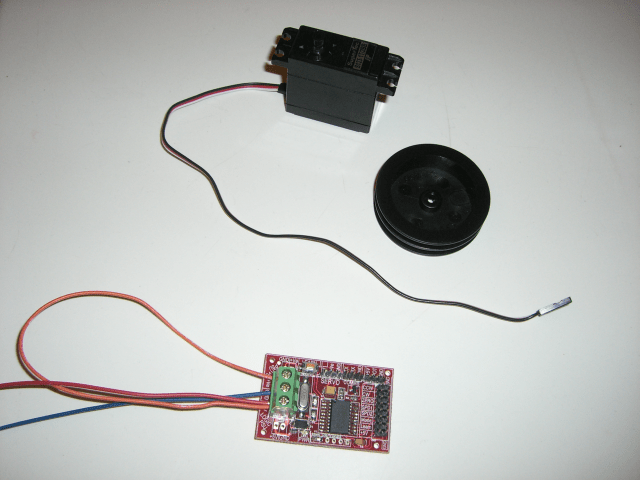
Here is a picture of my 360° RC servo, togheter with a servo controller.

The servo in action:


Quickpost info


« Previous PageNext Page »

Blog at WordPress.com.