Didier Stevens

Friday 28 December 2012

Crossbreeding Spiders: Baiduspider And Googlebot

Filed under: Networking — Didier Stevens @ 0:03

While reviewing my webserver’s logs with InteractiveSieve, I noticed a peculiar User Agent String:

Mozilla/4.0 (compatible; +Baiduspider/2.0;++http://www.baidu.com/search/spider.html +Googlebot/2.1;++http://www.google.com/bot.html)

Why would Baidu and Google share a spider?

They don’t. It’s a fake User Agent String. I’ve 12 IP addresses in my logs that use this User Agent String, all from China, but none resolving to a hostname, and certainly not to domains baidu.cn or google.com.

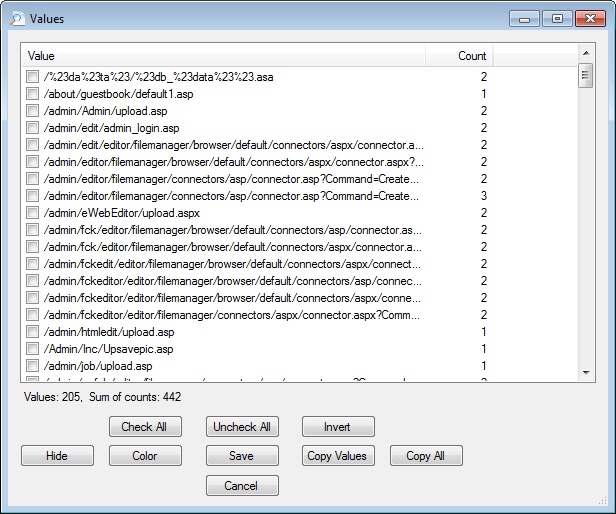
And this fake spider doesn’t make any requests for existing documents, not even robots.txt. It’s only looking for ways to attack my sites:

20121228-005548

Friday 30 November 2012

Nmap 6.25 With McAfee ePO Agent Script

Filed under: My Software,Networking — Didier Stevens @ 13:04

This new release of Nmap includes the McAfee ePO Agent Script I blogged about.

Thursday 5 July 2012

Nmap McAfee ePO Agent Script

Filed under: My Software,Networking — Didier Stevens @ 19:13

I’ve worked together with Daniel Miller (@bonsaiviking) on an Nmap version script to identify the McAfee ePO Agent. By default, this agent listens on port 8081 and replies to HTTP requests.

You can find the script here on the nmap site.

PORT      STATE SERVICE VERSION
8081/tcp  open  http    McAfee ePolicy Orchestrator Agent 4.5.0.1852 (ePOServerName: EPOSERVER, AgentGuid: D2E157F4-B917-4D31-BEF0-32074BADF081)
Service Info: Host: TESTSERVER

Monday 12 March 2012

NAFT Release

Filed under: My Software,Networking — Didier Stevens @ 19:41

You can find a first release of my Network Appliance Forensic Toolkit here. This first release contains a tool for generic network appliances, but also works on memory dumps of PC operating systems like Windows.

Monday 20 February 2012

Peeking at NAFT

Filed under: My Software,Networking — Didier Stevens @ 20:02

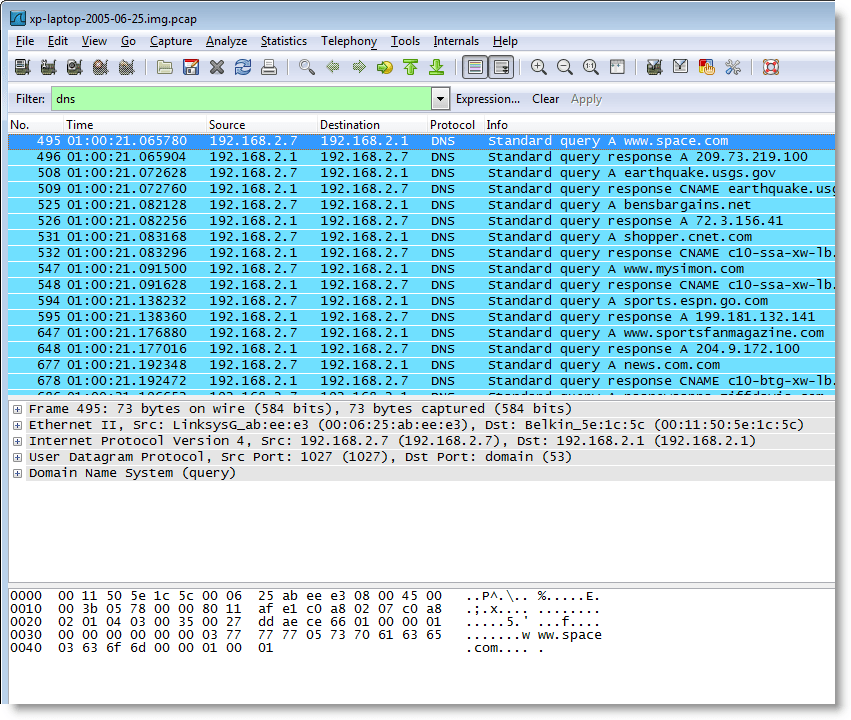
Here are DNS queries issued by a Windows XP machine:

And here is a command history of a Cisco router:

What do these results have in common?

Both were produced by analyzing RAM dumps with a new forensic toolkit I’m developing, the Network Appliance Forensic Toolkit, or NAFT.

More to be published soon.

But if you want a beta version now, provide me a Cisco core dump in exchange 😉

Monday 23 January 2012

IOS: Let Me Truncate That Password For You…

Filed under: Networking — Didier Stevens @ 0:40

When I configured this Cisco router (IOS version 15.0(1)M5) with dynamic dns, it failed to properly update its public IP address on the dynamic dns site. Turning on debugging (debug ip ddns update) revealed an authentication issue:

*Jan 20 22:53:55.591: HTTPDNSUPD: DATA START badauth

A simple test confirmed what I suspected: IOS truncates the password. In can’t be longer than 15 characters.

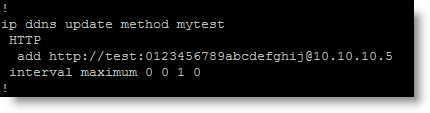
Here’s the config of my test, with username test and a 20 character password:

And here’s what the web server receives:

The password received by the webserver is 0123456789abcde. In other words, IOS has truncated the password to the first 15 characters and included it in headers of the http(s) GET request that updates the dynamic dns info.

It’s possible that the username also gets truncated to 15 characters, however I’ve not tested this.

The Cisco bug ID is CSCtx50249.

Friday 6 January 2012

Identifying IOS

Filed under: Forensics,Networking — Didier Stevens @ 10:33

Did you ever had to identify a Cisco IOS image when you couldn’t rely on the filename?

Look for strings starting with CW_ between strings CW_BEGIN and CW_END in the image file, for example like this:

You will find strings like CW_IMAGE, CW_FAMILY, CW_FEATURE, CW_VERSION, CW_MEDIA, CW_SYSDESCR and CW_MAGIC between strings CW_BEGIN and CW_END.

In this example, the IOS version is 12.4(6)T5 (CW_VERSION) and it is designed to run on 870 routers (CW_FAMILY).

The nice thing about these CW_ strings is that you will also find them in a core dump (in the data region), thus allowing you to identify the IOS version that was running on a router when the core dump was produced (provided the image runs from RAM, indicated by a letter m in the filename).

And they are also present in the uncompressed image (compressed image files are identified by a letter z in the filename).

Soon I will release a tool to validate IOS image files, you can use it to extract these CW_ strings too.

Sunday 1 January 2012

Calculating a SSH Fingerprint From a (Cisco) Public Key

Filed under: Forensics,Networking — Didier Stevens @ 17:03

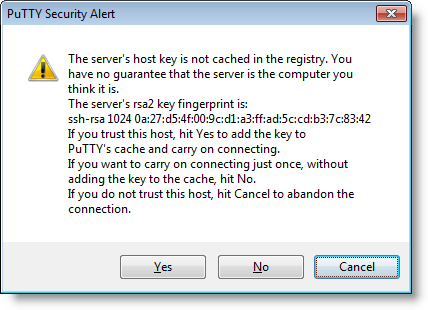
I’m sure some of you verify SSH fingerprints before you use a SSH server for the first time. You obtain the fingerprint via another channel, and you compare it with the fingerprint your SSH client presents you.

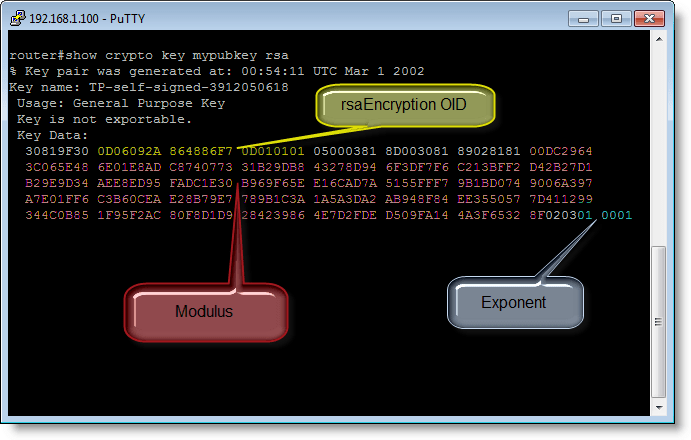
But have you done this with Cisco devices too? Recently I tried to obtain the SSH fingerprint of a Cisco router while connected via the serial console. Turns out there is no CLI command to display the fingerprint (well, at least I didn’t find one). What you can do, is dump the public key with command “show crypto key mypubkey rsa”.

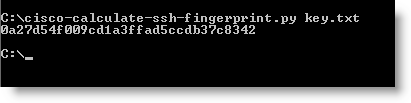
So I developed a small Python program that calculates a SSH fingerprint from the public key. You store the public key in hex format in a file and use that with this new tool.

To calculate the fingerprint, I extract the modulus and exponent from the public key, store them in another format (ssh-rsa) and calculate the MD5 hash.

So now I can connect to a router via the serial console while there’s no “man in the middle”, obtain the public key and calculate the fingerprint. Next when I connect to the same router over SSH, I can validate the fingerprint my SSH client presents me. It’s too bad Cisco provides no feature to get the fingerprint directly.

cisco-calculate-ssh-fingerprint_V0_0_1.zip (https)
MD5: 5A6C3A2C466908EE7EFB06727E8D02B7
SHA256: 831CAF7BBF0F6C584436C42D9CEB252A089487B715ADBB81F9547EEB3ED6B0B8

Saturday 24 December 2011

Happy New Router

Filed under: Entertainment,Hacking,Networking — Didier Stevens @ 0:00

Wednesday 5 October 2011

The Matryoshka Router

Filed under: Networking — Didier Stevens @ 0:00

I had an unpleasant surprise when I connected a new Cisco 887W router I had just configured to the Internet via its ADSL interface.

As it was the first time I worked with a 887, I did an nmap scan of its ADSL interface to check that I had closed all ports. Surprise: ports 2002, 4002, 6002 and 9002 were open. Even bigger surprise: I could logon via telnet to these ports with the default password, although I had changed it…

I’m omitting the details of how I figured out what went wrong, so here is the explanation.

The 887W has a wireless interface. But in this particular router, the wireless interface is not integrated in IOS (that’s Cisco’s IOS, not Apple’s iOS) like in other wireless routers like the 877W. In the 887W, the wireless interface is a service module with its own IOS and configuration. Both devices communicate with each other via a Gigabit interface.

The router IOS can be accesses via the serial console. The wireless IOS not (at least not directly).

To list the installed service modules, you issue the service-module ? command on the router CLI:

  wlan-ap  Service module interface to embedded AP

To access the wireless CLI, you issue the command service-module wlan-ap0 session command on the router CLI, and you get a telnet session on the wireless CLI. After I configured and hardened the wireless IOS, the ports were still open. The service-module wlan-ap0 status command displays the following information:

Service Module is Cisco wlan-ap0
Service Module supports session via TTY line 2
Service Module is in Steady state
Service Module reset on error is disabled
Service Module heartbeat-reset is enabled
Getting status from the Service Module, please wait..

  Image path       = flash:/ap801-k9w7-mx.124-21a.JA1/ap801-k9w7-mx.124-21a.JA1
  System uptime    = 1 day, 6 hours, 0 minutes, 51 seconds

Notice that the session is accessible via the router’s TTY line 2. After I put an ACL on this tty (with the router CLI) to deny all traffic not originating from the internal network, all 4 ports were closed on the ADSL interface.

Another detail good to now: when you are connected to tty2, all ports are closed (because you can have only one session on tty2).
« Previous Page

Blog at WordPress.com.