Didier Stevens

Monday 25 November 2013

Quickpost: nmap & xml

Filed under: Networking,Quickpost — Didier Stevens @ 20:46

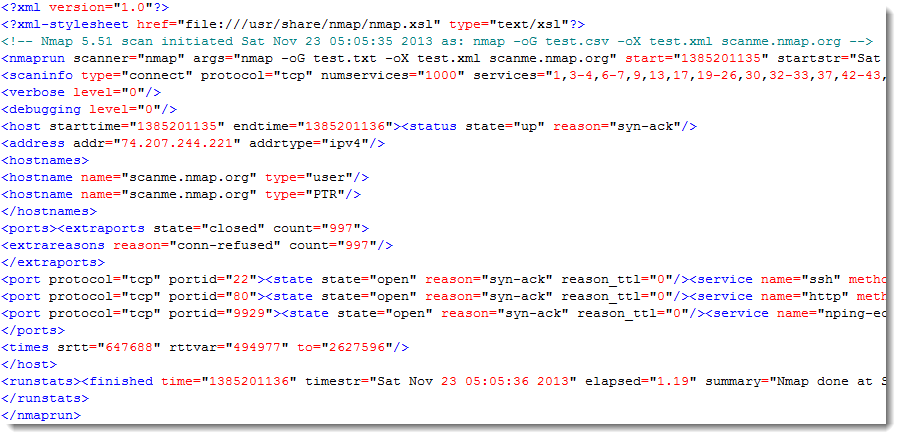
A quick tip: since more than a year now I’ve been including xml output with each nmap scan I perform. I discovered that the xml output contains more (explicit) data than the other forms of output.

Example:

nmap -oG test.csv -oX test.xml scanme.nmap.org

Starting Nmap 5.51 ( http://nmap.org ) at 2013-11-23 05:05 EST
Nmap scan report for scanme.nmap.org (74.207.244.221)
Host is up (0.65s latency).
Not shown: 997 closed ports
PORT     STATE SERVICE
22/tcp   open  ssh
80/tcp   open  http
9929/tcp open  nping-echo

Nmap done: 1 IP address (1 host up) scanned in 1.19 seconds

The grepable output:

20131125-214105

The xml output:

20131125-214254


Quickpost info


Monday 4 November 2013

Update: naft-gfe.py

Filed under: Forensics,My Software,Networking,Update — Didier Stevens @ 20:49

This new version of the generic frame extraction tool (naft-gfe) can handle files (RAM dumps) that are too large to fit into memory.

20131028-211806

Use option -b for buffered reads. By default, the file will be read and analyzed in blocks of 101MB (100MB buffer + 1MB overlap buffer).

Since the file is not read completely in memory, there is a possibility that some frames/packets are not completely read in memory. For example, a frame starts in the first block of 100MB, and ends in the second block of 100MB. The analysis routines would miss this frame.

To avoid this, the program reads the first block of 100MB (block A) plus an extra block of 1MB (block B). This block of 101MB (A + B) is analyzed. Then, the second block of 100MB (block C) is read, and the extra block B is prepended to block C for analysis (B + C). Hence the overlap buffer is analyzed twice, but packets are only extracted once from this buffer. This procedure is repeated for the complete file.

It is important that the overlap buffer is large enough to accommodate the largest possible frame or packet. That’s why by default, it is 1MB.

Use options -S and -O to choose your own size for buffer and overlap buffer.

Monday 28 October 2013

NAFT: The Movie

Filed under: Forensics,My Software,Networking — Didier Stevens @ 18:46

I made a video of the Network Appliance Forensic Toolkit demo I gave at my local ISSA chapter.

Saturday 24 August 2013

Quickpost: Proxy Cookies

Filed under: Forensics,Networking,Quickpost — Didier Stevens @ 11:20

Cookies set bij network proxies can be identified by their name.

BlueCoat proxy cookies start with BCSI-CS-.

Cisco IronPort proxy cookies start with iptac-. The string after iptac is the serial number of the device.

Google for these and you’ll find some examples.

More info later.


Quickpost info


Sunday 4 August 2013

Quickpost: Rovnix PCAP

Filed under: Forensics,Malware,Networking,Quickpost — Didier Stevens @ 21:04

Microsoft’s Malware Protection Center has a blogpost on a version of Rovnix that uses its own TCP/IP stack.

I used Wireshark to capture the network traffic generated by this sample when it is executed in a VMware guest.

20130804-225716

I ran the sample on a XP SP3 guest machine in VMware. The hostname is XPPROSP3 (this name will appear in the HTTP GET request).
The guest uses NAT.
I ran the Wireshark capture on my host machine on the VMware Virtual Ethernet Adapter.
I removed some traffic coming from my host machine (NetBIOS Name Service and DHCPv6 to be precise).

When I executed the sample on XPPROSP3, it rebooted after a few seconds.

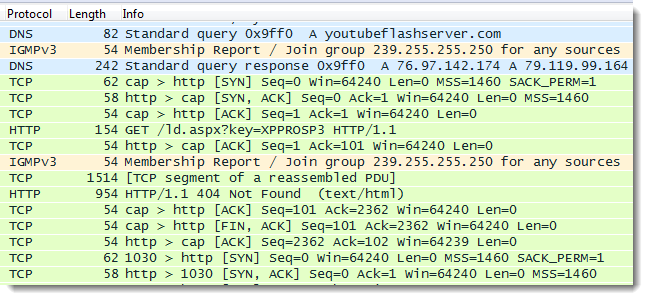
The trace:
The 37 second gap between packet 6 and 7 is due to the reboot of XPPROSP3
Packet 44: DNS request for youtubeflashserver
There are 3 HTTP requests. Notice User-Agent FWVersionTestAgent in all 3 GET requests.
Packet 50: first GET request with hostname XPPROSP3 as a parameter. Response: 404
Packet 61: second GET request, malformed. Response: 400
Packet 70: third GET request, malformed. Response: 400

rovnix-capture-filtered.zip (https)
MD5: C941D1716B6248C3FBFB4DFFA8AD2E86
SHA256: 51EDA61199DD9EDC1E50C5A9B5A4B69F32DB74E90CF098849554C56217D06EFD


Quickpost info


Thursday 25 July 2013

Update: Lookup Tools

Filed under: My Software,Networking,Update — Didier Stevens @ 20:11

It looks like I didn’t release this update to my lookup tools.

lookup-hosts.py has a new argument: -R. This does a reverse lookup of the IP addresses (thus after it resolved the hostname).

20130725-220124

And now you can also use letters as a counter: test-[a-z].com

lookup-tools_V0_0_2.zip (https)
MD5: 310904722F900FA34C567FC38634124E
SHA256: 85626574A99BF4D2AB786D8C2FF5B8F6649F1FC7410F1786A24EF0201AAF64AA

Wednesday 27 March 2013

Cisco IOS Patching: Defense and Offense

Filed under: Forensics,Hacking,Networking,Reverse Engineering — Didier Stevens @ 22:39

I will give a talk on network forensics at my local ISSA chapter.

I’m preparing it with a couple of PoCs.

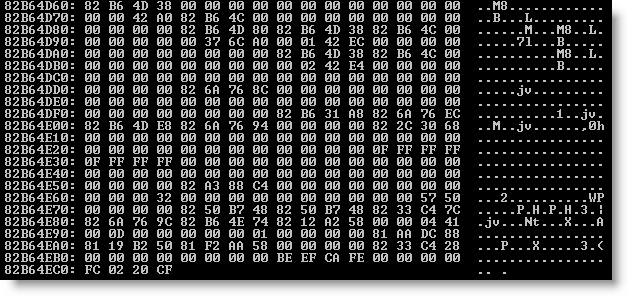
First PoC is how changing the canary value 0xFD0110DF to another value can provide defense against exploits like FX explained in this paper. I changed the appropriate instructions so that IOS uses canary value OxFC0220CF. You can see it at the bottom of this memory dump:

20130327-232310

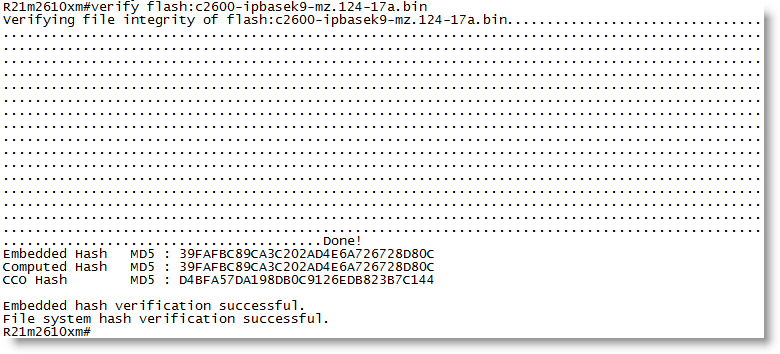
Second PoC is how I can change the behavior of an IOS command for offensive purposes. Topo mentioned this idea at Black Hat. The verify command checks the embedded MD5 signature in an IOS image. I patched the appropriate instructions so that the verify command always reports a valid signature, regardless of the actual embedded value:

20130327-233004

I did not change CCO hash. This is the MD5 hash of the complete IOS image. I did not change this on purpose, but it would be as easy as changing the embedded hash. If you lookup this CCO hash with Cisco, you will not find it.

Monday 25 February 2013

Looking Up Hosts and IP Addresses: Yet Another Tool

Filed under: My Software,Networking — Didier Stevens @ 19:30

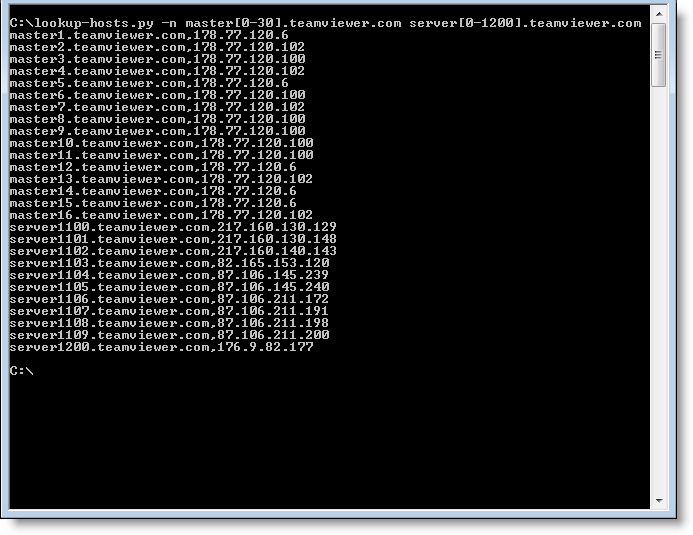
One last thing regarding my TeamViewer research: I had to resolve a bunch of hostnames and IP addresses, so I quickly wrote a Python program that did just that. Later I took the time to make some generic and versatile programs: lookup-hosts.py and lookup-ips.py.

lookup-hosts.py takes hostnames or files with hostnames via arguments or stdin, and then uses getaddrinfo to lookup the IP addresses. And you can use a counter if you need to lookup sequentially numbered hosts, like this: master[0-20].teamviewer.com. This will instruct the program to lookup master0.teamviewer.com, master1.teamviewer.com, … and master20.teamviewer.com. If you need a leading zero, use this syntax: master[0-20:2].teamviewer.com

The programs take options, use the -h option to explore them.

As it names implies, lookup-ips.py does the opposite of lookup-hosts.py by using gethostbyaddr. You provide it IP addresses and/or subnets (like X.X.X.X/24).

20130225-194749

lookup-tools_V0_0_1.zip (https)
MD5: EB9C5BEF25EC5ED0F44297AA8A04679E
SHA256: 755E98BA0BC09C31E58ED4BF7B08CD42467BBF9B129C77DD6D558FD6B6E27124

Thursday 14 February 2013

Quickpost: TeamViewer and Proxies

Filed under: Forensics,Networking,Reverse Engineering — Didier Stevens @ 22:15

Sorry for the lack of recent posts, I’ve been ill and had to catch up with a lot of work.

Braden Thomas wrote an interesting series of posts on reversing the TeamViewer protocol.

I want to add my own observation: when TeamViewer is forced to communicate over an HTTP proxy, it will issue GET statements with parameter data that can be decoded in a similar way as Braden describes for the direct protocol (i.e. without proxy).

First of all, to identify TeamViewer traffic in proxy logs, you look for this User Agent String: “Mozilla/4.0 (compatible; MSIE 6.0; DynGate)”.

You will see HTTP GET requests like this one:

hxxp://178.77.120.6/dout.aspx?s=55194936&p=10000001&client=DynGate&data=FyQSAAExtjSytzoeqisTMbe3NzKxujS3tza3sjKemJMzHqkyu…

When you decode the value of the data= parameter as base64, you can identify the version of the protocol (first 2bytes) and the command (3rd byte):

0x1724 0x12

0x12 is a CMD_MASTERCOMMAND. By left-shifting the data from the 5th byte with 1 bit, you can decode the arguments of a MASTERCOMMAND, like this:

client=TV&connectionmode=1&f=RequestRoute2&homeserver=&ic=708710721&id=123456789&id1=123456789&id2=987654321&licensecode=…

When parameter f (the function) is RequestRoute2, you know that the TeamViewer user issued a command to connect to another TeamViewer client. Parameter id identifies the originating client (123456789 in my example), and parameter id2 identifies the destination (987654321 in my example).

Wednesday 16 January 2013

ISSA Journal Article ; HITB PDF Training

Filed under: Announcement,Forensics,Hacking,Networking,PDF — Didier Stevens @ 8:39

The ISSA Journal featured my article on Network Device Forensics, making it available to everyone.

And I’m giving a 2-day training on PDF at Hack In The Box Amsterdam 2013.

« Previous PageNext Page »

Blog at WordPress.com.