Didier Stevens

Monday 6 June 2011

Update: vs.py

Filed under: Hardware,My Software — Didier Stevens @ 18:46

I’ve updated my Python program to take surveillance pictures from IP-cameras. This updated version is multi-threaded. For each picture to retrieve, you can specify a thread.

Each line in vs.config requires a 4th parameter now, the name of the thread:

Hall.jpg    http://192.168.1.1/IMAGE.JPG    -    Thread1

This name can be anything. If you use the same name for different pictures, then these pictures will be retrieved sequentially by this thread.

vs_v0_4.zip (https)

MD5: A2AFAD9E581798F1D986A0AE9DF64577

SHA256: C3AC4892A71DF79E3BA87714CB6323D157C7E74C838EDE81013C96DD4EAD0238
Wednesday 27 April 2011

Suspender.dll

Filed under: My Software — Didier Stevens @ 16:12

When the suspender DLL is loaded inside a process, it will wait for 60 seconds and then suspend all the threads of the host process. If you want another delay, just change the name of the file by appending the number of seconds to sleep. For example, suspender10.dll will wait for 10 seconds before suspending the process.

To resume the process, you can use Process Explorer.

I’ve used this DLL to analyze malware and to disable some unwanted programs without killing them.

And from now on, I’ll try to release 32-bit and 64-bit versions of my tools.

Download:

Suspender_V0_0_0_3.zip (https)

MD5: C87FCAB2586C6154B58FB0F95FBB1FBE

SHA256: 56D0C641569E99AC31C7590DE513025E21166747565B73C5EBE34346616FFB2F

Tuesday 19 April 2011

Signed Spreadsheet with cmd.dll & regedit.dll

Filed under: Hacking,My Software — Didier Stevens @ 14:05

Remember my Excel with cmd.dll & regedit.dll?

Paul Craig has a signed version of my spreadsheet on his iKAT site. Download ikat3.zip and look for officekat.xls.

These signed macros are handy when you’re working in a restricted environment that requires Office macros to be signed.

Monday 14 March 2011

HeapLocker: Null Page Allocation

Filed under: My Software,Vulnerabilities — Didier Stevens @ 5:03

Just like EMET, HeapLocker can allocate a page at address 0 (null or 0x00000000) to mitigate null pointer dereferencing.

I actually implemented this code in HeapLocker because I wanted to find out how one can allocate a page at address 0. You see, when you call VirtualAlloc with address 0, VirtualAlloc will allocate a page at an address chosen by VirtualAlloc, and not at address 0. So I would think that the trick is to call VirtualAlloc with address 1, and that VirtualAlloc will allocate a page that contains address 1, and that this page must start at boundary 0.

But the problem is that you get an error when you try to allocate a page at address 1 with VirtualAlloc. Ivanlef0u explains this in his blogpost (French). VirtualAlloc rejects addresses inferior to 0x1000, one must use NtAllocateVirtualMemory to successfully allocate address 1.

Tuesday 8 March 2011

DumpStrings.1sc

Filed under: Forensics,My Software — Didier Stevens @ 0:00

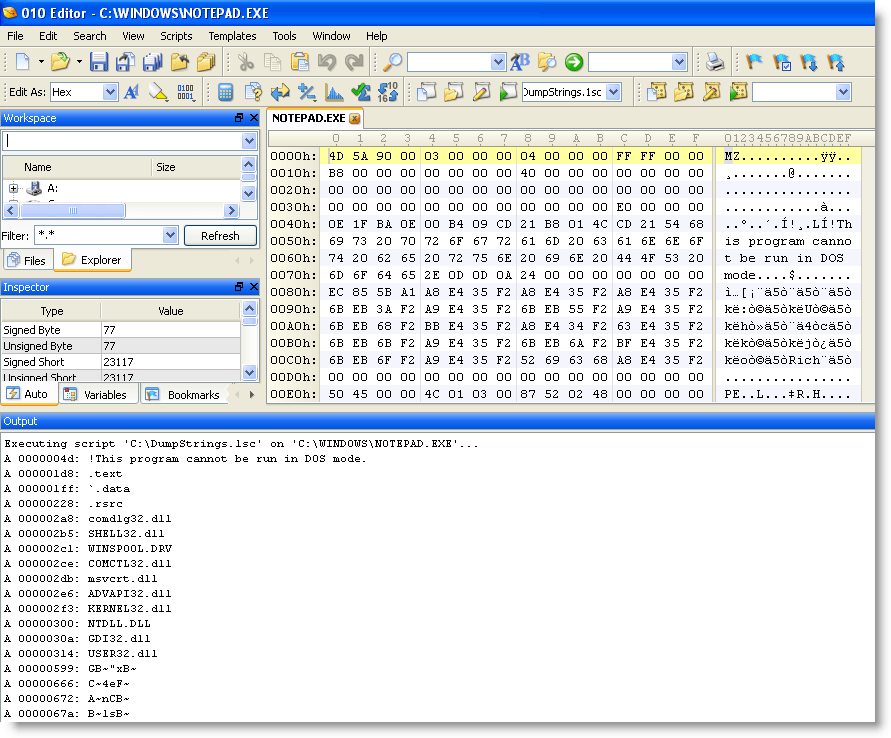
I wrote another script for my 010 Editor.

Like its name implies, DumpStrings will dump all the strings (ASCII and UNICODE) found in a file, or a selection in a file, to the output tab.
Strings must be at least 5 characters long (defined with a #define statement in the script).
UNICODE support is very simple for the moment: 7-bit values in a 16-bit character (MSB or LSB).

Take into account that this is not designed for large files: it will take too long. But its easy to analyze partial files without having to save the selection for analysis with another strings tool.

Download:

DumpStrings_V0_0_1.zip (https)

MD5: 50C0C92F28020E7BCABBF46CA8775CCE

SHA256: 7EC688DBB0FD95C828067662C9ED8BBCFFEFBE5EA37B607DC8DFA1BDCB94365C

Tuesday 1 March 2011

Update: TaskManager.xls Version 0.0.3

Filed under: My Software,Update — Didier Stevens @ 11:47

My TaskManager.xls spreadsheet is very popular, so here’s a new version.

I’ve added a couple of columns with info I need (the Filename, the process Creation time and a 32/64 bit indicator).

And this new version also enables the debug privilege to display info for processes of other users. Of course, you need the debug privilege in first place for this to work. So you have to be a local admin, and if you use an OS with UAC, you have to elevate the Excel application (run as administrator).

TaskManager.xls works on 64-bit Windows, provided you use 32-bit Excel. It doesn’t work on 64-bit Excel yet, I’ll release a new version that does later.

Download:

TaskManager_V0_0_3.zip (https)

MD5: BF40B4317C7E04E1F65B8CEE55ED3A7A

SHA256: 0D48C2E6986F1DD8FA3A0671A1A53F0FC489923701963031FDC4FA516603EEC1

Friday 18 February 2011

HeapLocker: String Detection

Filed under: My Software,Vulnerabilities — Didier Stevens @ 12:43

A third protection technique I implemented in HeapLocker is string detection.

When you enable string monitoring, HeapLocker will create a new thread to periodically check (every second) newly committed virtual pages that are readable and writable. When a specific string (configured in the registry) is detected inside these pages, HeapLocker will suspend all threads (except this monitoring thread used by HeapLocker) and warn the user that the string was detected.

I’ve had very good result with this technique searching for string “unescape” in Adobe Reader (the string “unescape” must be preceded by an equal sign or followed by a left parentheses). Almost all malicious PDF documents in my collection were detected by this. But like NOP-sled detection, it’s not 100% reliable. Sometimes HeapLocker will scan a page before the string “unescape” has been written to that page.

Friday 11 February 2011

Update: WhoAmI? Version 0.1.5

Filed under: My Software,Update — Didier Stevens @ 10:05

I’ve updated my WhoAmI? Firefox add-on for Firefox version 4.

You can get it from the Mozilla site.

Thursday 3 February 2011

TaskManager.xls

Filed under: My Software — Didier Stevens @ 9:45

TaskManager.xls is a simple taskmanager implemented in Excel/VBA. It can list the running processes; and terminate, suspend or resume selected processes.

I wrote this script because I was in a restricted environment where I could not use Task Manager or Process Explorer. It will also come in handy when fixing an infected machine, where the malware prevents one from launching Task Manager or Process Explorer.

Push  button “List processes” to list all processes:

Here’s how you would use it to disable malware. List processes, identify malicious processes, type command s (suspend) in column Command for the malicious processes you want to disable. Push button “Execute commands”, this will suspend the selected processes.

Now terminate them with the t command:

Doing this in 2 steps (suspend and terminate) in stead of just terminating, is more suited for multi-process malware that monitors itself.

Download:

TaskManager_V0_0_1.zip (https)

MD5: A0A7584C83F4DD85F57F8511E332893B

SHA256: A0A128DA6297968CB2F434628AD4F045E14EBDC8AE3B05DD3D0F21CC954C13CE

Wednesday 12 January 2011

HeapLocker: NOP Sled Detection

Filed under: My Software,Vulnerabilities — Didier Stevens @ 0:00

A second protection technique I implemented in HeapLocker is NOP sled detection.

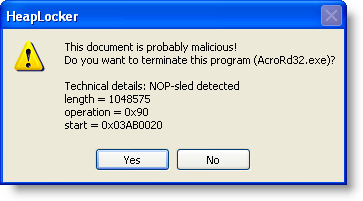
When you enable NOP sled monitoring, HeapLocker will create a new thread to periodically check (every second) newly committed virtual pages that are readable and writable. When a NOP sled is detected inside these pages with a length equal to or longer than  NOPSledLengthMin, HeapLocker will suspend all threads (except this monitoring thread used by HeapLocker) and warn the user that a NOP-sled was detected.

For HeapLocker, a NOP sled is a sequence of single-byte instructions; these may be different or the same instructions. For a list of all single-byte instructions recognized by HeapLocker, take a look array abNOPSledDetection in the source code.

With a classic heap spray, the NOP sled will be detected long before the vulnerability is exploited. But with more sophisticated techniques, it is possible that the NOP sled is detected too late, i.e. that the shellcode already executed. Or it’s also possible that HeapLocker is too early, i.e. that it scans the new page before the NOP sled was written to it. But to prevent this, I wait 1 second between the detection of a new page and the NOP sled scan of that page.

I’ve had some false positives with this detection, that’s why you can configure HeapLocker to ask the user for confirmation.

« Previous PageNext Page »

Blog at WordPress.com.