Didier Stevens

Friday 13 July 2012

InstalledPrograms.xls

Filed under: My Software — Didier Stevens @ 13:01

Here is a new spreadsheet that lists all installed programs. It does this by enumerating registry key HKLM\SOFTWARE\Microsoft\Windows\CurrentVersion\Uninstall.

This spreadsheet works on 32-bit and 64-bit Excel.

InstalledPrograms_V0_0_1.zip (https)
MD5: 0BF27B9D4B6316381E0AADC1777B7F8F
SHA256: 60AF8234BD10E12221CAD3D2544222819CB0CC0834E339084590860F30E0D580

Thursday 5 July 2012

Nmap McAfee ePO Agent Script

Filed under: My Software,Networking — Didier Stevens @ 19:13

I’ve worked together with Daniel Miller (@bonsaiviking) on an Nmap version script to identify the McAfee ePO Agent. By default, this agent listens on port 8081 and replies to HTTP requests.

You can find the script here on the nmap site.

PORT      STATE SERVICE VERSION
8081/tcp  open  http    McAfee ePolicy Orchestrator Agent 4.5.0.1852 (ePOServerName: EPOSERVER, AgentGuid: D2E157F4-B917-4D31-BEF0-32074BADF081)
Service Info: Host: TESTSERVER

Wednesday 27 June 2012

Entropy.1sc

Filed under: My Software — Didier Stevens @ 8:29

Here is a new 010 Editor script to calculate the entropy of a file or a selection: Entropy.1sc.

Tuesday 19 June 2012

_nomap, _nomap, _nomap, …

Filed under: Entertainment,My Software,WiFi — Didier Stevens @ 20:50

About three years ago I released a Python program to send out WiFi beacon frames with an AirPCap adapter. During my last holiday, I took some time to add a new feature to apc-b.py: option nomap.

When you start apc-b.py with option nomap, it first listens for 60 seconds and records all ESSIDs in finds in beacon frames. Then it starts to broadcast beacon frames for these ESSIDs, but with string _nomap appended to each ESSID.

apc-b_v0_2_0.zip (https)
MD5: 849DE418A1F325B9DC133DBE2E7CC501
SHA256: C3F28DCEFE6FF747780E384E49BB4D373BC983518C592E1BB18E8455F78E7F95

Monday 11 June 2012

Update: vs.py Version 0.5

Filed under: Hardware,My Software,Update — Didier Stevens @ 20:17

I’ve updated my Python program to take surveillance pictures from IP-cameras. This updated version can take action after a picture is taken. For each picture to retrieve, you can specify a optional program to be executed; this program receives the picture as argument.

Each line in vs.config can have a 5th parameter now: the name of the program to execute:

Hall.jpg    http://192.168.1.1/IMAGE.JPG    -    Thread1  image-compare.py

I use it to start a program that compares the new picture with the previous picture, and warns me if they are significantly different.

vs_v0_5.zip (https)
MD5: 83B6DE93E6E26B510E2FBC80C0FF3C17
SHA256: DE3D4DC8D00692BE57F4A8B0A13BB4E3FAE9564ECE444EA04A890B65EED2D538

Wednesday 30 May 2012

Update: virustotal-search

Filed under: Malware,My Software,Update — Didier Stevens @ 9:04

I didn’t expect my virustotal-search program to be that popular, so here is a new version with new features and a few fixes (version 0.0.1 contained a buggy experimental feature I hadn’t planned to release then).

What I didn’t explain in my first post, is that virustotal-search builds a database (virustotal-search.pkl) of all your requests, so that recurring requests are served from that local database, and not from the VirusTotal servers. I’ve added a field (Requested) to indicate if the request was send to VirusTotal or served from the local database.

If you want all requests to be send to VirusTotal, regardless of the content of the local database, use option –force.

And if you don’t want to include your API key in the program source code, you have two alternatives:

  1. use option –key and provide the API key on the command line
  2. define environment variable VIRUSTOTAL_API2_KEY with the your API key

virustotal-search_V0_0_3.zip (https)
MD5: 89D48483B8CF48A11A26314CC3A7631C
SHA256: A66A264A772CB9AEE356E1CF902E93FCA8CDE77233A09DB4999BCF15FA45EDF9

Monday 21 May 2012

Searching With VirusTotal

Filed under: Malware,My Software — Didier Stevens @ 5:04

Did you know that you can search VirusTotal? You don’t have to submit a file, but you can search for the report of a file has been submitted before. You use a cryptographic hash (MD5, SHA1, SHA256) to identify the file.

There are several tools to submit a batch of files to VirusTotal, but I didn’t find any that just searches VirusTotal for a list of search terms via VirusTotal’s API.

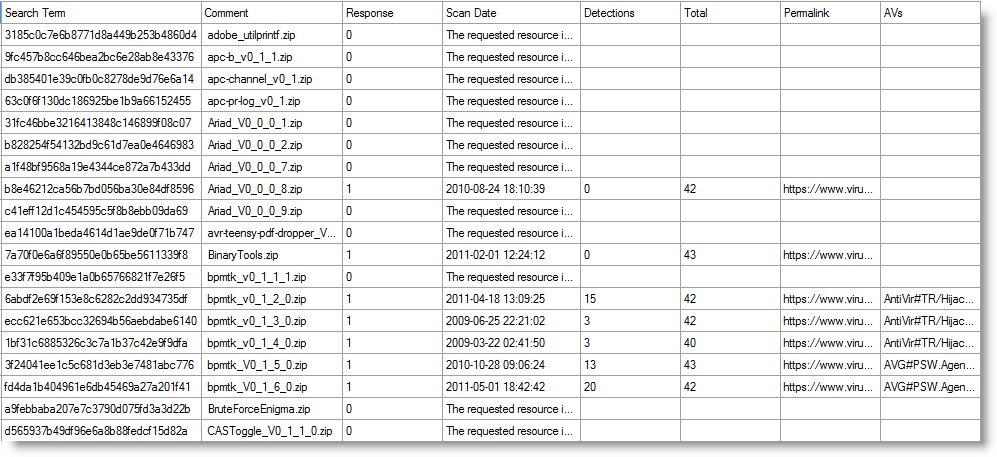
Thus I wrote my own Python program. It accepts a file with a list of hashes, and produces a CSV file with the result. Here is an example displayed with InteractiveSieve:

To get this program working, you need to get a VirusTotal API key and add it to this program. You need a VirusTotal account to get your API key.

And my program respects VirusTotal’s rate limitation (4 requests per minute), I don’t want it to DoS VirusTotal.

virustotal-search_V0_0_2.zip (https)
MD5: 0d3c70213dd59cc935ed999a038237d6
SHA256: BD213BBC55A9048DBB7B890209E2831EF81049B45ABE9091E01F0692F4F23283

Monday 14 May 2012

ExitProcess Shellcode

Filed under: My Software,Shellcode — Didier Stevens @ 0:19

I wrote shellcode that calls ExitProcess for my TaskManager.xls spreadsheet.

Now I’ve added the asm files (sc-ep.asm for 32-bit and sc-64-ep.asm for 64-bit) for this shellcode to my library.

Remark that the 32-bit version assembler code, that was generated with my simple shellcode generator, has a ret instruction after the call to ExitProcess. This instruction will never be executed, as a call to ExitProcess does not return.

You can find this shellcode on my shellcode page.

Tuesday 8 May 2012

Why Isn’t my PoC Launching calc.exe?

Filed under: Entertainment,Hacking,My Software,Nonsense — Didier Stevens @ 11:17

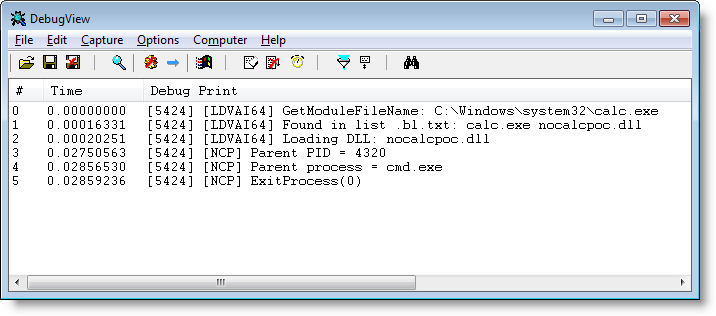
I quickly developed a dll that kills calc.exe when started from anything else than explorer.exe.

This way, you can mess with all those PoCs that launch calc.exe 😉

nocalcpoc_V0_0_0_1.zip (https)
MD5: 05798543571B45E19536181DC7346330
SHA256: ED0FEDC6096420F6F09F4980A1CE36F7C4BC0A8C9191F4DFC27FA4C77D547976

Tuesday 1 May 2012

Update: TaskManager.xls V0.1.3 Killer Shellcode

Filed under: My Software,Shellcode,Update — Didier Stevens @ 10:49

My TaskManager spreadsheet provides you with a couple of commands to terminate (malicious) programs. But sometimes these commands can’t terminate a process (for various reasons).

Today I’m adding a new command to our toolkit: injecting and executing shellcode in the target process. I’m providing 32-bit and 64-bit shellcode that calls ExitProcess. When this shellcode is injected and executed inside a process, the process will terminate itself.

Here I’m using the command “e ep64”: this command injects and executes the shellcode found in sheet ep64 (as hex strings) in process notepad:
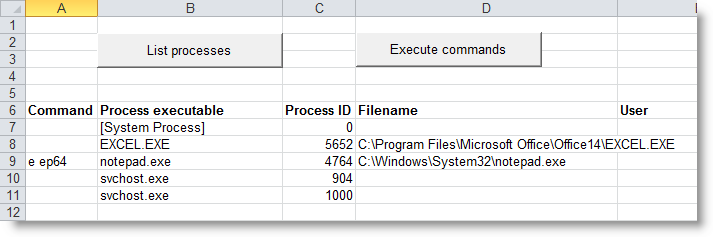
The result is that notepad will terminate itself.

When using TaskManager on a 64-bit system, you’ll have to pay attention to the following: to terminate a 32-bit process, you inject 32-bit shellcode (ep32) and for a 64-bit process, you use 64-bit shellcode (ep64). And a 32-bit process can’t access a 64-bit process’ memory through the Windows API, so if you are using 32-bit Excel on a 64-bit machine, you won’t be able to inject shellcode into 64-bit processes.

FYI: If you want to know more about 32-bit and 64-bit processes on x64 Windows, I’ll bedoing a workshop at Brucon this year: “Windows x64: The Essentials”.

TaskManager_V0_1_3.zip (https)
MD5: 38DED14A7A468923C3552A6135CC570C
SHA256: CABD1F73C8D069A85EA439D7AFF736723B5759A6ED929FB3F21A4ADD3D0605BC

« Previous PageNext Page »

Blog at WordPress.com.