Didier Stevens

Monday 14 October 2013

Update: XORSearch Version 1.9.2

Filed under: Forensics,My Software,Update — Didier Stevens @ 5:00

I’ve been asked many times to support 32-bit keys with my XORSearch tool. But the problem is that a 32-bit bruteforce attack would take too much time.

Now I found a solution that doesn’t take months or years: a 32-bit dictionary attack.

I assume that the 32-bit XOR key is inside the file as a sequence of 4 consecutive bytes (MSB or LSB).

If you use the new option -k, XORSearch will perform a 32-bit dictionary attack to find the XOR key. The standard bruteforce attacks are disabled when you choose option -k.

XORSearch will extract a list of keys from the file: all unique sequences of 4 consecutive bytes (MSB and LSB order). Key 0x00000000 is excluded. Then it will use this list of keys to perform an XOR dictionary attack on the file, searching for the string you provided. Each key will be tested with an offset of 0, 1, 2 and 3.

It is not unusual to find the 32-bit XOR key inside the file itself. If it is a self-decoding executable, it can contain an XOR x86 instruction with the 32-bit key as operand. Or if the original file contains a sequence of 0x00 bytes (4 consecutive 0x00 bytes at least), then the encoded file will also contain the 32-bit XOR key.

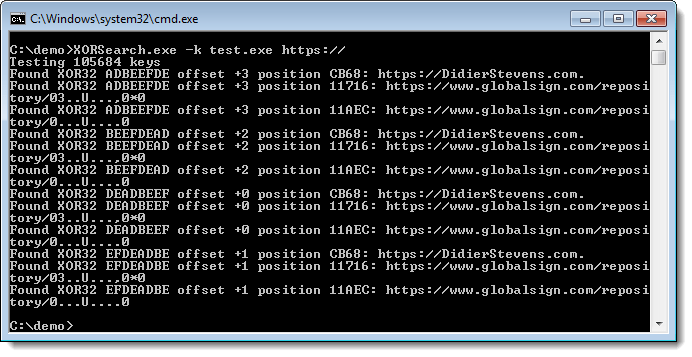
Here is a test where XORSearch.exe searches a 0xDEADBEEF XOR encoded copy of itself. With only 74KB, there are still 100000+ keys to test, taking almost 10 minutes on my machine:

20131013-233829

XORSearch_V1_9_2.zip (https)
MD5: BF1AC6CAA325B6D1AF339B45782B8623
SHA256: 90793BEB9D429EF40458AE224117A90E6C4282DD1C9B0456E7E7148165B8EF32

Monday 7 October 2013

Finding Contained Files

Filed under: Forensics,My Software — Didier Stevens @ 0:00

Some time ago I had to figure out if a file was embedded inside another file.

It’s not a file carving problem. I had both files. I just needed to be sure that file A was contained inside file B.

With a hex editor I could find parts of file A inside file B, but it looked like file A was split up and scattered at different locations in file B.

I Googled a bit for a tool, but nothing came up, so I wrote my own Python program.

With my new tool I was able to get assured that file msi49.tmp was inside file c8400.msi:

20131006-205525

You can see that file msi49.tmp is one contiguous sequence inside file c8400.msi starting at position 0x3A7200.

But I was more interested to know if file msi49.tmp was also inside file Cisco_Jabber.msi:

20131006-205656

And you can see it is, but not as one contiguous sequence. It’s split in 3 sequences.

This tool can also be used to find a downloaded file inside a pcap/pcapng file. I downloaded AnalyzePESig_V0_0_0_2.zip while taking a Wireshark capture.

20131006-205955

Or to find a file opened by an application. Here I look into the process dump:

20131006-210301

The only limitation is that both files need to be read into memory. But when I’ve time, I’ll turn this into a plugin for the Volatility framework.

The program looks for sequences of at least 10 bytes long (this is an option). If your file is divided in sequences smaller than 10 bytes, then my program will not find the embedded file. Unless you lower the minimum length, but don’t go as low as 1 byte, because then you’re likely to be finding random data.

I’m not 100% sure that my program will find all possible cases of embedded files. No problem if it’s one contiguous sequence, or several sequences in logical order. But I’ve to review my algorithm to be sure it will also find all possible cases of embedded files with sequences in random order. I think it will, but I need to prove it.

find-file-in-file_v0_0_1.zip (https)
MD5: 2984F01404770B92953823D39907B055
SHA256: 1AD124A9A31DACFE1FC9F3B89B3117D3A70D5BC15B712CC1748BEA893612686C

Monday 30 September 2013

Bugfix virustotal-submit.py Version 0.0.2

Filed under: My Software,Update — Didier Stevens @ 13:12

This is a bugfix for my virustotal-submit.py program.

I fixed a bug in the error handling code for unreadable ZIP files.

virustotal-submit_V0_0_2.zip (https)
MD5: 1152A8507FE7A668DCDF5C44DEAD11DF
SHA256: D5A4E5C3E80F98D4A82A128D8C9DBA395C2B9CDFE9F37E2B0882904D47673CE5

Wednesday 18 September 2013

Update: pdf-parser V0.4.3

Filed under: My Software,PDF — Didier Stevens @ 20:20

There’s still time to register for my “Hacking PDF” training at Brucon next week.

I introduced a bug in pdf-parser version 0.3.8 that changed the behavior of the -w option (raw).

This new version is a fix for this bug.

pdf-parser_V0_4_3.zip (https)
MD5: 2220FFE37AEA36FC593AE33440385E76
SHA256: 1416624938359FDD375108D922350D1B7B0E41B3A40A48F778D6D72D8A405DE6

Tuesday 13 August 2013

A Bit More Than A Signature

Filed under: Encryption,Forensics,Hacking,My Software — Didier Stevens @ 19:07

Soon I’ll release new versions of my Authenticode Tools.

Detecting extra data in the signature field is one of the new features. For example, it will analyze the size specified in the optional header data directory for security, the size specified in the WIN_CERTIFICATE structure and the size specified in the PKCS7 signature itself. These should be the same, taking into account some zero-byte padding.

In case you didn’t know: extra data can be added in the data directory that contains the signature, without invalidating the signature. My Disitool can do this.

With this new version of AnalyzePESig, I found some setup programs that contain extra data after the signature; data that seems to contain installation options for the installer. For example, the Google Chrome installer has this:

20130813-205011

As you can see, the size specified in the optional header data directory for security and the size specified in the WIN_CERTIFICATE structure are both 6272 bytes, but the size of the PKCS7 signature is 6079. So that leaves 181 extra bytes. You can see them here:

20130813-205744

And I found some other installers with extra data (config data or license information) in the signature directory: GotoMyPc, PowerGrep, RegexBuddy.

Thursday 25 July 2013

Update: Lookup Tools

Filed under: My Software,Networking,Update — Didier Stevens @ 20:11

It looks like I didn’t release this update to my lookup tools.

lookup-hosts.py has a new argument: -R. This does a reverse lookup of the IP addresses (thus after it resolved the hostname).

20130725-220124

And now you can also use letters as a counter: test-[a-z].com

lookup-tools_V0_0_2.zip (https)
MD5: 310904722F900FA34C567FC38634124E
SHA256: 85626574A99BF4D2AB786D8C2FF5B8F6649F1FC7410F1786A24EF0201AAF64AA

Thursday 18 July 2013

Update: js-unicode-unescape.1sc

Filed under: 010 Editor,My Software,Update — Didier Stevens @ 18:36

Because I had to use a workaround in my js-unicode-unescape.1sc script to copy an array of bytes to the clipboard, I asked the 010 Editor developers if they could add a function that does exactly this.

They included this new function, CopyBytesToClipboard, in their new version 5.0.

Here is a new version that uses this function:
js-unicode-unescape_v0_0_2.zip (https)
MD5: 6200C4F235CA527E8C0DCD5076CB1C09
SHA256: 2CACC9EE1BB1D1BC4C9FABC6EC3B3440CFF304AA560966B0B531279C369549BB

Wednesday 10 July 2013

The Art Of Defuzzing

Filed under: My Software — Didier Stevens @ 21:05

I had something of a puzzle to solve. A friend asked me to look at a set of files, all of the same size, but with some differences.

After some analysis, it dawned on me that these files were the result of a simple fuzzer applied to a single file. So I quickly wrote a program that took these files as input and reconstituted the original file. Later I wrote a more generic defuzzer. Here is an example:

defuzzer.py result.png a*.png

Number of defuzzed bytes: 171
Number of defuzzed sequences: 33
Length of shortest defuzzed sequence: 1
Length of longest defuzzed sequence: 10
Fuzz bytes:
'A': 171

From the result you can see that the program was able to reconstitute the original file, and that the fuzzer that was used to produce the different a*.png files, overwrote 33 byte-sequences with the character A. The longest sequence was 10 bytes long, the shortest only 1 byte. In total, 171 bytes were overwritten.

defuzzer_v0_0_2.zip (https)
MD5: 75188EF950625B78937C3473D825C582
SHA256: 056AB8BA7F3B2B52F8C7BFC2959D7F1AE3FEAC4BE90C675B2DFF6B521225D93E

Wednesday 3 July 2013

Update: virustotal-search.py

Filed under: My Software,Update — Didier Stevens @ 20:09

Mark Woan reported an issue with virustotal-search.py: sometimes VirusTotal returns a JSON object that the json parser can’t parse.

That’s something I didn’t expect. I’ve added error handling for this case.

virustotal-search_V0_0_9.zip (https)
MD5: FECD02796889CDFE9FA67287F2DE567C
SHA256: 0CE06CBAFC6341835EB8A62377F5C4EB067747EE28E7ED8BB25FD69A4B99FA97

Monday 24 June 2013

shellcode2vba

Filed under: Hacking,My Software,Shellcode — Didier Stevens @ 4:00

This update adds x64 shellcode support to my shellcode2vbs.py script.

shellcode2vba_v0_3.zip (https)
MD5: 44AF2685975346F9DE09E48E7FB855CE
SHA256: 04C42FA26717CCC7BC17A7BEDA02C746CA1A8BC8C6CE184670CD686796B5FF10

« Previous PageNext Page »

Blog at WordPress.com.