Didier Stevens

Wednesday 18 March 2015

Update: peid-userdb-to-yara-rules.py

Filed under: My Software,Update — Didier Stevens @ 0:00

Just some small changes.

peid-userdb-to-yara-rules_V0_0_2.zip (https)
MD5: BE287BE1CB4EAFC360B1105C47F81819
SHA256: DC673DC90420F880EBDC8A0298410B3B8D90AFBCCE868A3E075DB5AAF898A188

Tuesday 17 March 2015

Update oledump.py Version 0.0.12

Filed under: Malware,My Software,Update — Didier Stevens @ 0:00

This update adds support for metadata and fixes an XML parsing bug.

20150314-110037

oledump_V0_0_12.zip (https)
MD5: 0AB5F77A9C0F1FF3E8BE4F675440A875
SHA256: 6F87E65729B5A921079B9E5400F63BE6721673B7AC075D809B643074B47FB8D3

Monday 9 March 2015

A New Type Of Malicious Document: XML

Filed under: Malware,My Software — Didier Stevens @ 9:08

Since last week we see XML documents being spammed: they are actually Microsoft Word documents with VBA Macros.

I wrote an ISC Diary entry (I’m a SANS ISC Handler now) detailing the internals of these XML files.

oledump is updated to parse these XML documents.

oledump_V0_0_11.zip (https)
MD5: 02AEF764545213E1B1A5895AD0706F78
SHA256: 162EE94B1A4533956EE2CE0CB13ECDF2FF6C18A0597685E690B8524526FD694E

Friday 27 February 2015

Update oledump.py Version 0.0.10

Filed under: Malware,My Software,Update — Didier Stevens @ 0:00

This version handles corrupt VBA macro streams without crashing. Corrupt VBA macro streams are marked with an E indicator (error).

And an update to the plugin_http_heuristics and plugin_dridex plugins.

oledump_V0_0_10.zip (https)
MD5: 450C28232254F8FF3AF5E289F58D2DAB
SHA256: 139671E5E69200CECCE0EF730365C1BF1B7B8904B90E3B1E08E55AB040464C73

Thursday 19 February 2015

Update: oledump.py Version 0.0.9

Filed under: Malware,My Software,Update — Didier Stevens @ 22:19

The plugin_dridex plugin was updated.

And oledump.py has a new option: –quiet: only print output from plugins.

oledump_V0_0_9.zip (https)
MD5: 849C26F32397D2508381A8472FE40F90
SHA256: 74887EA3D4362C46CCBF67B89BB41D7AACE9E405E4CB5B63888FEDCE20FD6A07

Wednesday 18 February 2015

Analyzing A Fraudulent Document With Error Level Analysis

Filed under: Forensics,My Software,PDF — Didier Stevens @ 0:00

Some time ago I had the chance to try out an image forensic method (Error Level Analysis) on a PDF. It was a fraudulent document (a form), but with a special characteristic: the criminal converted the original form (a PDF) to JPEG, edited the JPEG with a raster graphics editor, and then inserted the edited JPEG in a PDF document. This gave me the opportunity to try out Error Level Analysis (ELA) on a “text document”.

I can’t share the PDF, but I recreated one to use in this blogpost.

First I search for images in the PDF document:

pdf-parser.py -s image example-edited.pdf

Result:

obj 4 0
 Type: 
 Referencing: 6 0 R

  <<
    /Font
    /XObject
      <<
        /Im4 6 0 R
      >>
    /ProcSet [/PDF/Text/ImageC/ImageI/ImageB]
  >>


obj 6 0
 Type: /XObject
 Referencing: 
 Contains stream

  <<
    /Type /XObject
    /Subtype /Image
    /Width 680
    /Height 965
    /BitsPerComponent 8
    /ColorSpace /DeviceRGB
    /Filter /DCTDecode
    /Length 233133
  >>

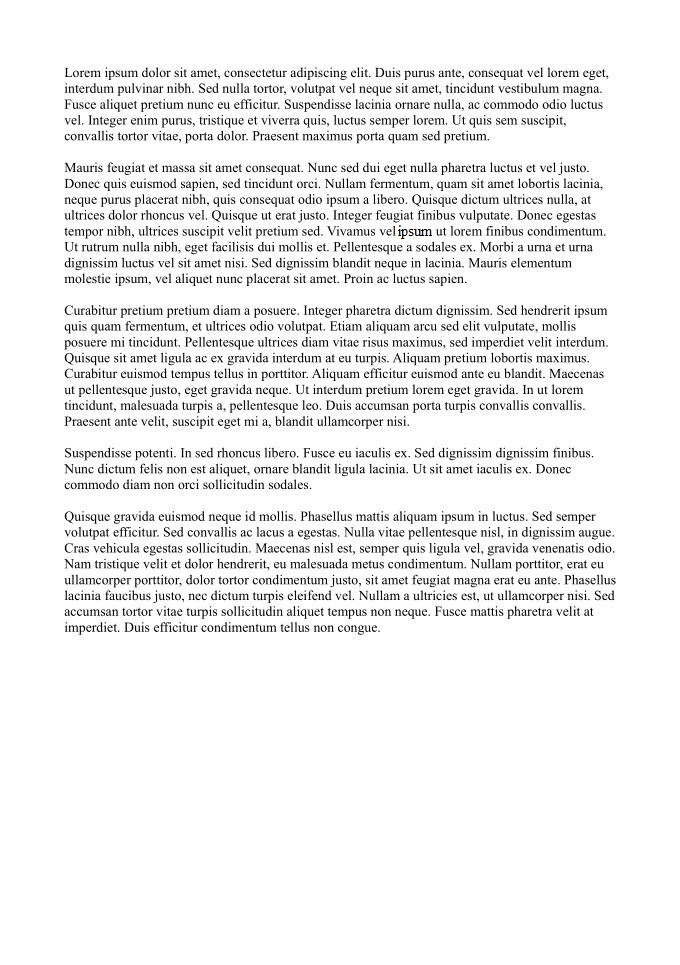
The image is in object 6. I extract the image:

pdf-parser.py -o 6 -d example-edited.jpeg example-edited.pdf

Here it is:

example-edited

If you Google for Error Level Analysis, you’ll find a couple of websites that provide online image forensics. But that was not an option for me, I could not share the document.

I found this C program for ELA, and later I wrote my own Python program (what else?), that I’ll use for this example:

image-forensics-ela.py example-edited.jpeg example-edited-ela.png

example-edited-ela

The colored pixels reveal the word I edited. You can see it better when I overlay the 2 images:

image-overlay.py -a 0.6 example-edited.jpeg example-edited-ela.png example-edited-overlay.png

example-edited-overlay

FYI: there is also a GIMP plugin for ELA.

You can download the examples and programs here:

blogpost-ela-files.zip (https)
MD5: 4F3071A9162C5CA8B7B10A41F662093A
SHA256: CBA786368D7BAF65E1E9F854C315BFB60FF89910429106513A0C41C180D8FCAB

Tuesday 17 February 2015

Update: oledump.py Version 0.0.8

Filed under: Malware,My Software,Update — Didier Stevens @ 0:00

This new version brings support for multiple YARA rule files.

The plugin_http_heuristics plugin was updated, and there is a new plugin: plugin_dridex.

oledump_V0_0_8.zip (https)
MD5: 29EBF73F5512B0BC250CD0A0977A2C72
SHA256: 09C451116FCDE7763173E1538C687734D92267A0D192499AFD118D8D923165B9

Monday 16 February 2015

Update EICARgen Version 2.1

Filed under: My Software,Update — Didier Stevens @ 0:00

Version 2.1 of EICARgen can create an Excel spreadsheet (.xls) with the EICAR test file embedded with OLE.

Tuesday 10 February 2015

Update: oledump.py Version 0.0.7

Filed under: Malware,My Software,Update — Didier Stevens @ 0:00

This new version adds support for the new office file format (.docx, .xlsx, …) stored inside a ZIP file (so a ZIP inside a ZIP) and an option to print YARA strings.

And the HTTP heuristics plugin has some extra heuristics.

oledump_V0_0_7.zip (https)
MD5: 7A953BAFFA1E5285651699996FA2DF84
SHA256: F5DC5F650F005E530A7D0CF510C33E3A4EF29AD85B1DA2618B237F53A46B86B5

Monday 2 February 2015

AirPcap Channel Hopping With Python

Filed under: Didier Stevens Labs,My Software,WiFi,Wireshark — Didier Stevens @ 0:00

I’m teaching a Wireshark WiFi and Lua 2-day class at Brucon Spring Training 2015. You get an AirPcap packet capture adapter when you attend this class.

I made a modification to my Python program to do channel hopping with the AirPcap adapter. Now you can specify a sequence of channels with option -c.

20150201-142106
apc-channel_v0_2.zip (https)
MD5: 52169F5CB679E6C0DF1F8D47DA38F779
SHA256: 59F4BEE229F5EF5B7AF27BAF6AA972DCDC9E6A6007E8E468AE7BC7C3F1CB89DD

« Previous PageNext Page »

Blog at WordPress.com.