This new version of virustotal-search.py accepts input from stdin.
virustotal-search_V0_1_4.zip (https)
MD5: 867D6272792965D11317BFB6308E20A9
SHA256: 8C033B3C46767590C54C191AEEDC0162B3B8CCDE0D7B75841A6552CA9DE76044
This new version of virustotal-search.py accepts input from stdin.
virustotal-search_V0_1_4.zip (https)
MD5: 867D6272792965D11317BFB6308E20A9
SHA256: 8C033B3C46767590C54C191AEEDC0162B3B8CCDE0D7B75841A6552CA9DE76044
I added dumps to this new version of cut-bytes.py:
cut-bytes_V0_0_4.zip (https)
MD5: A44D8BBE9BAB9309E732F8995CB5C7BB
SHA256: F95453DE1CC5855C320AB947D9AE354BE8E3ABFA52418C0CF623351A9DBF6344
This new version has a couple of new options (–decoderdir and –plugindir) and a bugfix.
oledump_V0_0_25.zip (https)
MD5: CED1602AEF505AE0388DB95414F9C00A
SHA256: 54510A54264E4EA3C4559545B5CE43A20D8AB290B4EDDA7B57983AD1396E29FC
There are Office maldocs out there with some complex payload decoding algorithms. Sometimes I don’t have the time to convert the decoding routines to Python, and then I will use the VBA interpreter in Excel. But I have to be careful not to execute the payload, just decode it. In the following video, I show how I do this.
Tools: oledump.py, decoder.xls
Sample: 2f918f49c3f926bb1538eaad6e8e6883
I produced 3 videos to show you how to use my rtfdump.py tool to analyze (malicious) RTF files.
Here is a video for sample 07884483f95ae891845caf0d50ce507f:
Here is a video for sample 4483ad299158eb54f6ff58b5346a36ee:
I threw a program together to add information to Radare2 disassembly listings: radare2-listing.py. I’m putting it in beta, because I hope there is another way to do this in Radare2 (e.g. without a program). So if you know of a better way to do this, please post a comment.
The tool looks for text pushed on the stack, and then adds a comment with the string build up on the stack.
Before:
After:
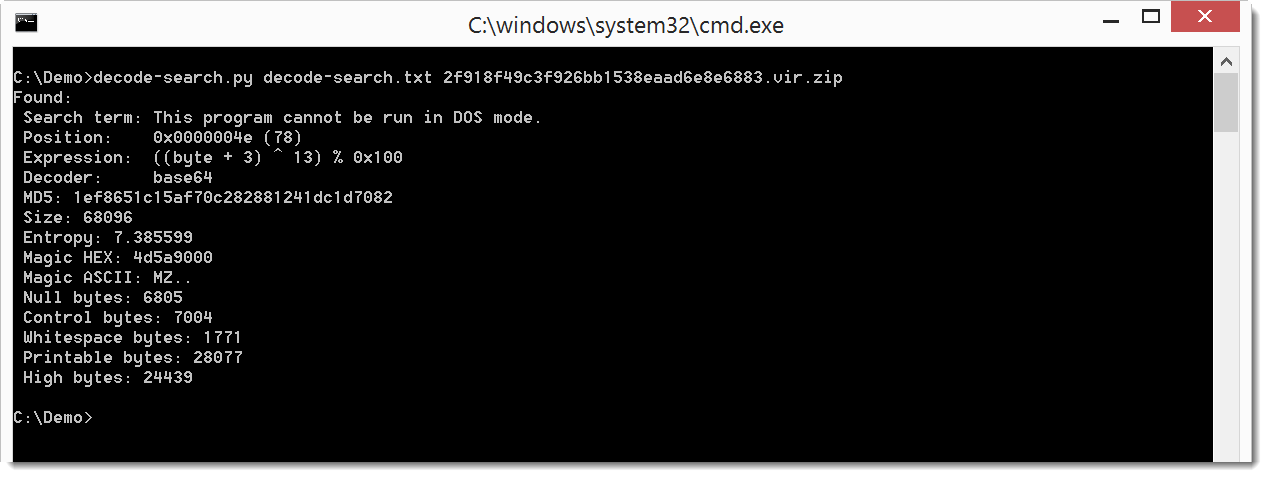
I’ve been developing a new Python program similar to XORSearch. decoder-search.py does brute-forcing and searching of a file like XORSearch, but it stead of simple operations like XOR, ROL, …, it can handle more complex translations. Templates for these translations have to be provided in a configuration file, for example like this:
expression ((byte + %i1:1-10%) ^ %i2:1-32%) % 0x100
This template specifies a translation expression that adds a number to each byte in the file, and then XORs the sum. The first integer added to each byte is brute-forced from 1 to 10 (%i1:1-10%), and the second integer used for the XOR operation is brute-forced from 1 to 32 (%i2:1-32%). Such an encoding has been used in the last hancitor maldoc samples.
Here is the result on a sample that contains an encoded EXE:
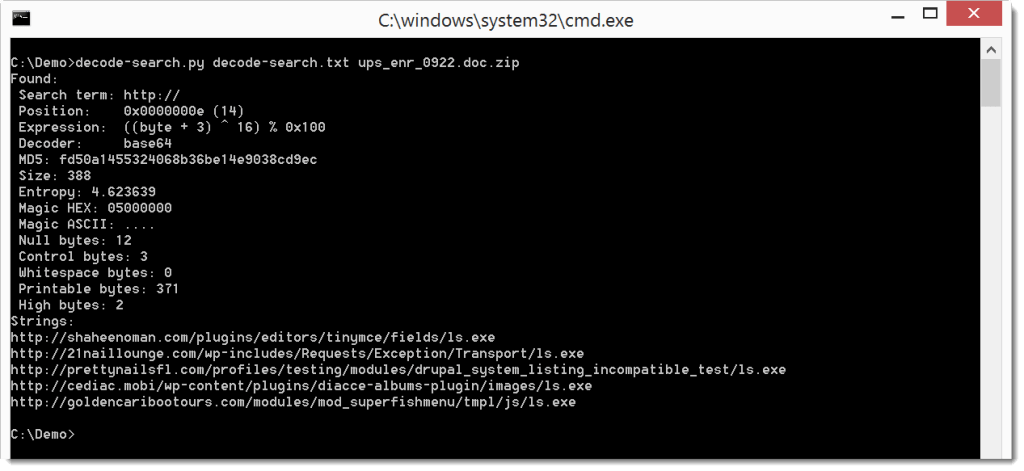
And here is the result on a sample that contains encoded URLs:
For me this tool is still in beta phase, because I might change the format of the configuration file in later versions, without providing backwards compatibility. You can find it in my GitHub Beta repository.
I needed to decompress the content of a Flash file (.swf). I thought of using my translate.py program with a command to inflate (zlib) the content (minus the header of 8 bytes): lambda b: zlib.decompress(b[8:])
Quite simple, but the problem is that translate.py doesn’t import zlib. I have to do that, but that can’t be done in a lambda function. So I added option -e (execute) to execute extra statements:
translate_v2_3_1.zip (https)
MD5: A3C30A3534DC96B28C1C18B425E2A82D
SHA256: BBD24406BC3038620807E8C4116B325BE6124BE92D041173A8E4BAB56D06C7E2
This version has a user-friendlier handling of files that are not rtf:
Last months, I’ve seen many maldocs that disguise .doc files as .rtf.
rtfdump_V0_0_4.zip (https)
MD5: C384FD5356DA4E2129E44903BA20966A
SHA256: 0B73AB16577BDB1DC0B1431013E28893004DD563DD4C4D00BA1D20B1DBAED917
This new version has a man page now (option -m):
Usage: xor-kpa.py [options] filename-plaintext [filename-ciphertext]
XOR known-plaintext attack
Predefined plaintext:
dos: This program cannot be run in DOS mode
Source code put in the public domain by Didier Stevens, no Copyright
Use at your own risk
https://DidierStevens.com
Options:
--version show program's version number and exit
-h, --help show this help message and exit
-m, --man Print manual
-n, --name Use predefined plaintext
-e EXTRA, --extra=EXTRA
Minimum number of extras
-d, --decode Decode the ciphertext
Manual:
xor-kpa performs a known-plaintext attack (KPA) on an XOR-encoded file. Take a
file with content "This is a secret message, do not share!". This file is XOR-
encoded like this: the key is ABC, the first byte of the file is XORed with A,
the second byte of the file is XORed with B, the third byte of the file is
XORed with C, the fourth byte of the file is XORed with A, the fifth byte of
the file is XORed with B, ...
If you know part of the plaintext of this file, and that plaintext is longer
than the key, then xor-kpa can recover the key.
xor-kpa tries to recover the key as follows. xor-kpa encodes the encoded file
with the provided plaintext: if you XOR-encode an XOR-encoded file
(ciphertext) again with its plaintext, then the result is the keystream (the
key repeated): ABCABCABC... xor-kpa detects such keystreams and extracts the
key.
Example:
xor-kpa.py "#secret message" encoded.txt
Output:
Key: ABC
Extra: 11
Keystream: BCABCABCABCABC
In this example, we assume that the plaintext contains "secret message". xor-
kpa finds one keystream: BCABCABCABCABC. From this keystream, xor-kpa extracts
the key: ABC.
Extra is the number of extra charecters in the keystream: the keystream is 14
characters longh, the key is 3 characters long, so extra is 14 - 3 = 11. It is
a measure for the probability that the recovered key is the actual key. The
longer it is, the better.
In this case, because the ciphertext is a small file, xor-kpa found only one
keystream. But for larger files or small plaintext, it will identify more than
one potential keystream.
Example:
xor-kpa.py #secret encoded.txt
Output:
Key: ABC
Extra: 3
Keystream: BCABCA
Key: 'KUW^'
Extra: 1
Keystream: '^KUW^'
Key: 'S@E'
Extra: 1
Keystream: 'S@ES'
In this example, xor-kpa has identified 3 potential keys. The potential keys
are sorted by descending extra-value. So the most promising keys are listed
first.
Keystreams with an extra value of 1 (1 extra character) rarely contain the
correct key.
Option -e (--extra) allows us to reduce the amount of displayed potential keys
by specifying the minimum value for extras.
Example:
xor-kpa.py -e 2 #secret encoded.txt
Output:
Key: ABC
Extra: 3
Keystream: BCABCA
With option -e 2 we specify that the keystream must at least have 2 extras.
That's why the keystreams with 1 extra are not listed.
xor-kpa can also decode the ciphertext file with the recovered key (the key
with the highest extra value). Use option -d (--decode) to do this:
Example:
xor-kpa.py -d #secret encoded.txt
Output:
This is a secret message, do not share!
xor-kpa takes one or two arguments. The first argument is a file containing
the plaintext, the second argument is a file containing the ciphertext.
xor-kpa can also read the ciphertext from stdin (for example via a pipe), in
that case the second argument is omitted.
The files can also be ZIP files containing one file (optionally password-
protected with 'infected'), in that case xor-kpa will decompress the content
of the ZIP file and use it.
In stead of putting the plaintext or the ciphertext in a file, it can also be
passed in the argument. To achieve this, precede the text with character #
(this is what we have done in all the examples up till now).
If the text to pass via the argument contains control characters or non-
printable characters, hexadecimal (#h#) or base64 (#b#) can be used.
Example:
xor-kpa.py -d #h#736563726574 encoded.txt
Output:
This is a secret message, do not share!
Example:
xor-kpa.py -d #b#c2VjcmV0 encoded.txt
Output:
This is a secret message, do not share!
Finally, the plaintext can be selected from a predefined list. For the moment,
the only text in the predefined list is 'This program cannot be run in DOS
mode', identified by the keyword dos. Use option -n (--name) to use predefined
plaintext.
Example:
xor-kpa.py -n dos malware.vir
xor-kpa_V0_0_3.zip (https)
MD5: 228B9DE1D3005F75190113369A91E1D4
SHA256: A30C20668BA0939DD936BB2706AEC636E5260EFB0B0F16F4770F9B1B59E780A9