I produced 3 videos to show you how to use my rtfdump.py tool to analyze (malicious) RTF files.
Here is a video for sample 07884483f95ae891845caf0d50ce507f:
Here is a video for sample 4483ad299158eb54f6ff58b5346a36ee:
I produced 3 videos to show you how to use my rtfdump.py tool to analyze (malicious) RTF files.
Here is a video for sample 07884483f95ae891845caf0d50ce507f:
Here is a video for sample 4483ad299158eb54f6ff58b5346a36ee:
I threw a program together to add information to Radare2 disassembly listings: radare2-listing.py. I’m putting it in beta, because I hope there is another way to do this in Radare2 (e.g. without a program). So if you know of a better way to do this, please post a comment.
The tool looks for text pushed on the stack, and then adds a comment with the string build up on the stack.
Before:

After:

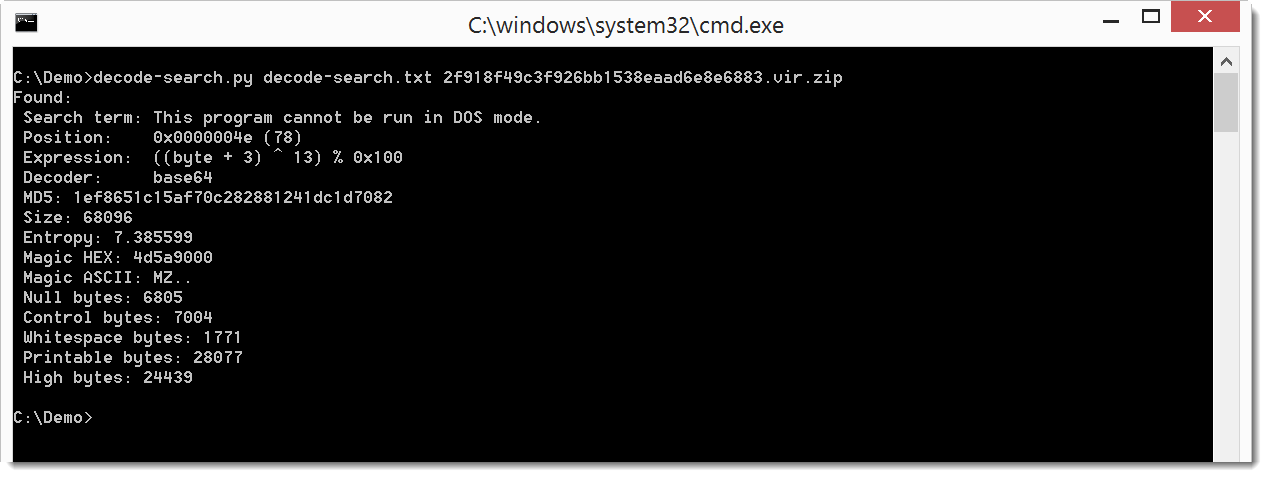
I’ve been developing a new Python program similar to XORSearch. decoder-search.py does brute-forcing and searching of a file like XORSearch, but it stead of simple operations like XOR, ROL, …, it can handle more complex translations. Templates for these translations have to be provided in a configuration file, for example like this:
expression ((byte + %i1:1-10%) ^ %i2:1-32%) % 0x100
This template specifies a translation expression that adds a number to each byte in the file, and then XORs the sum. The first integer added to each byte is brute-forced from 1 to 10 (%i1:1-10%), and the second integer used for the XOR operation is brute-forced from 1 to 32 (%i2:1-32%). Such an encoding has been used in the last hancitor maldoc samples.
Here is the result on a sample that contains an encoded EXE:
And here is the result on a sample that contains encoded URLs:

For me this tool is still in beta phase, because I might change the format of the configuration file in later versions, without providing backwards compatibility. You can find it in my GitHub Beta repository.
I needed to decompress the content of a Flash file (.swf). I thought of using my translate.py program with a command to inflate (zlib) the content (minus the header of 8 bytes): lambda b: zlib.decompress(b[8:])
Quite simple, but the problem is that translate.py doesn’t import zlib. I have to do that, but that can’t be done in a lambda function. So I added option -e (execute) to execute extra statements:

translate_v2_3_1.zip (https)
MD5: A3C30A3534DC96B28C1C18B425E2A82D
SHA256: BBD24406BC3038620807E8C4116B325BE6124BE92D041173A8E4BAB56D06C7E2
This version has a user-friendlier handling of files that are not rtf:

Last months, I’ve seen many maldocs that disguise .doc files as .rtf.
rtfdump_V0_0_4.zip (https)
MD5: C384FD5356DA4E2129E44903BA20966A
SHA256: 0B73AB16577BDB1DC0B1431013E28893004DD563DD4C4D00BA1D20B1DBAED917
This new version has a man page now (option -m):
Usage: xor-kpa.py [options] filename-plaintext [filename-ciphertext]
XOR known-plaintext attack

Predefined plaintext:
 dos: This program cannot be run in DOS mode

Source code put in the public domain by Didier Stevens, no Copyright
Use at your own risk
https://DidierStevens.com

Options:
  --version             show program's version number and exit
  -h, --help            show this help message and exit
  -m, --man             Print manual
  -n, --name            Use predefined plaintext
  -e EXTRA, --extra=EXTRA
                        Minimum number of extras
  -d, --decode          Decode the ciphertext

Manual:

xor-kpa performs a known-plaintext attack (KPA) on an XOR-encoded file. Take a
file with content "This is a secret message, do not share!". This file is XOR-
encoded like this: the key is ABC, the first byte of the file is XORed with A,
the second byte of the file is XORed with B, the third byte of the file is
XORed with C, the fourth byte of the file is XORed with A, the fifth byte of
the file is XORed with B, ...
If you know part of the plaintext of this file, and that plaintext is longer
than the key, then xor-kpa can recover the key.

xor-kpa tries to recover the key as follows. xor-kpa encodes the encoded file
with the provided plaintext: if you XOR-encode an XOR-encoded file
(ciphertext) again with its plaintext, then the result is the keystream (the
key repeated): ABCABCABC... xor-kpa detects such keystreams and extracts the
key.

Example:
 xor-kpa.py "#secret message" encoded.txt
Output:
 Key:       ABC
 Extra:     11
 Keystream: BCABCABCABCABC

In this example, we assume that the plaintext contains "secret message". xor-
kpa finds one keystream: BCABCABCABCABC. From this keystream, xor-kpa extracts
the key: ABC.
Extra is the number of extra charecters in the keystream: the keystream is 14
characters longh, the key is 3 characters long, so extra is 14 - 3 = 11. It is
a measure for the probability that the recovered key is the actual key. The
longer it is, the better.
In this case, because the ciphertext is a small file, xor-kpa found only one
keystream. But for larger files or small plaintext, it will identify more than
one potential keystream.

Example:
 xor-kpa.py #secret encoded.txt
Output:
 Key:       ABC
 Extra:     3
 Keystream: BCABCA

 Key:       'KUW^'
 Extra:     1
 Keystream: '^KUW^'

 Key:       'S@E'
 Extra:     1
 Keystream: 'S@ES'

In this example, xor-kpa has identified 3 potential keys. The potential keys
are sorted by descending extra-value. So the most promising keys are listed
first.
Keystreams with an extra value of 1 (1 extra character) rarely contain the
correct key.
Option -e (--extra) allows us to reduce the amount of displayed potential keys
by specifying the minimum value for extras.

Example:
 xor-kpa.py -e 2 #secret encoded.txt
Output:
 Key:       ABC
 Extra:     3
 Keystream: BCABCA

With option -e 2 we specify that the keystream must at least have 2 extras.
That's why the keystreams with 1 extra are not listed.

xor-kpa can also decode the ciphertext file with the recovered key (the key
with the highest extra value). Use option -d (--decode) to do this:

Example:
 xor-kpa.py -d #secret encoded.txt
Output:
 This is a secret message, do not share!

xor-kpa takes one or two arguments. The first argument is a file containing
the plaintext, the second argument is a file containing the ciphertext.
xor-kpa can also read the ciphertext from stdin (for example via a pipe), in
that case the second argument is omitted.
The files can also be ZIP files containing one file (optionally password-
protected with 'infected'), in that case xor-kpa will decompress the content
of the ZIP file and use it.

In stead of putting the plaintext or the ciphertext in a file, it can also be
passed in the argument. To achieve this, precede the text with character #
(this is what we have done in all the examples up till now).
If the text to pass via the argument contains control characters or non-
printable characters, hexadecimal (#h#) or base64 (#b#) can be used.

Example:
 xor-kpa.py -d #h#736563726574 encoded.txt
Output:
 This is a secret message, do not share!

Example:
 xor-kpa.py -d #b#c2VjcmV0 encoded.txt
Output:
 This is a secret message, do not share!

Finally, the plaintext can be selected from a predefined list. For the moment,
the only text in the predefined list is 'This program cannot be run in DOS
mode', identified by the keyword dos. Use option -n (--name) to use predefined
plaintext.

Example:
 xor-kpa.py -n dos malware.vir
xor-kpa_V0_0_3.zip (https)
MD5: 228B9DE1D3005F75190113369A91E1D4
SHA256: A30C20668BA0939DD936BB2706AEC636E5260EFB0B0F16F4770F9B1B59E780A9
I created a program with a graphical user interface to create a simple certificate. This program uses the OpenSSL library. Extract the program from the zip file (below) and run it:

You don’t have to install any dependencies, everything is linked into the program.
If you need more help, here is a video:
Download:
CreateCertGUI_V1_0_0_1.zip (https)
MD5: F5400736E7E38F30D35A02FEB6D99651
SHA256: 82D59AC494FEF1A8B219C591717359712C19E8845D02A457017045A9A4C3D989
And if you are interested, here is the source code:
CreateCertGUI_source_V1_0_0_1.zip (https)
MD5: 790CA083407032434A8DA1FF8AC1E512
SHA256: B15BB8A3504EF56D1C6C84CA181FFB6E5A73956EC79757C62B87B520C136AA2D
I made a small update to rtfdump and added new rules to rtf.yara.
This video is an intro to rtfdump:
This is a video on an RTF maldoc (MD5 07884483f95ae891845caf0d50ce507f) that contains an exploit for MS12-027 CVE-2012-0158:
This is a video on an RTF maldoc (MD5 4483ad299158eb54f6ff58b5346a36ee) that contains an exploit for MS10-087 CVE-2010-3333:
rtfdump_V0_0_3.zip (https)
MD5: 59DC23EE55F76C065A2A718DDFDB0E4E
SHA256: 46F9D768C6976AD5D4018EFDFD35DAE4212FEAE57871434A33CAEF028CB4CBA2
This is a small update for re-search.py to properly handle binary files.
re-search_V0_0_2.zip (https)
MD5: FC921EAF48774B6E113FAE76867B69E1
SHA256: B07BF53FE476E6FC4D5B568BA2B0B70DD3BC037478A2CBF3A08A1AA6CCDD402C
This is a bugfix for pdf-parser. Streams were not properly extracted when they started with whitespace after the normal whitespace following the stream keyword.
pdf-parser_V0_6_5.zip (https)
MD5: 7F0880EB8A954979CA0ADAB2087E1C55
SHA256: E7D2CCA12CC43D626C53873CFF0BC0CE2875330FD5DBC8FB23B07396382DCC85

 Didier Stevens