This update is just a definition update to detect MSO (ActiveMime files).
file-magic_V0_0_7.zip (http)MD5: 6EFF124D3D0854F62034E05DAE20AFD4
SHA256: A13ADD0A3F840FF535193CD07BF6218FF77164EB803E9004A0B66A4AC66183F9
This update is just a definition update to detect MSO (ActiveMime files).
file-magic_V0_0_7.zip (http)This new update can produce JSON output for each part (option–jsonoutput).
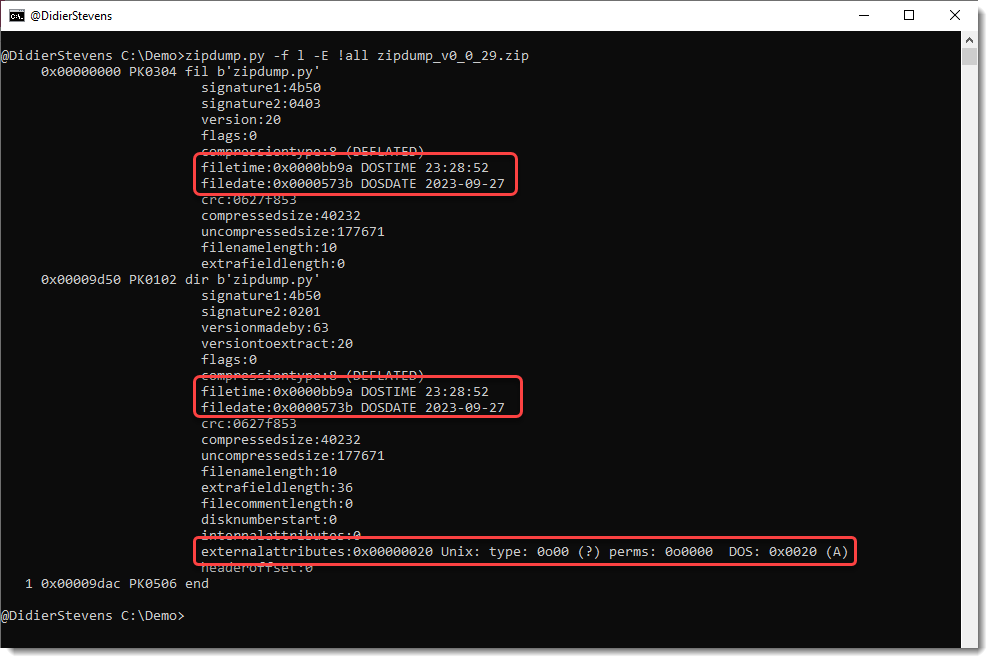
emldump_V0_0_13.zip (http)This is an update linked to option -f l to find PKZIP records.
When option -E all is used, field externalattributes is parsed now:

jpcert reported a new type of maldoc: “MalDoc in PDF – Detection bypass by embedding a malicious Word file into a PDF file –“.
These maldocs are PDF files that embed a Word document (ActiveMime) in MIME format.
ActiveMime documents can be analyzed by combining my emldump.py tool and oledump.py.
ActiveMime documents were heavily obfuscated in the past, and this is also the case here. As emldump.py version 0.0.11 was only able to handle the obfuscation of 2 of the 3 samples mentioned by jpcert, I released a new version to handle more obfuscation.
Here is an analysis example for sample 5b677d297fb862c2d223973697479ee53a91d03073b14556f421b3d74f136b9d.
Run emldump (version 0.0.12 or later) with option -F to fix the obfuscation of the mime-version header:

To find the part where the ActiveMime file was hidden, use option -E %HEADASCII% to view the first 20 characters of each part:

Here we can see that part 14 is not a JPEG file, but an ActiveMime file.
We extract it and pipe it into oledump.py:

That ActiveMime file contains VBA code:

These maldocs (at least the 3 samples shared by jpcert) can be detected by pdfid with option -e to display extra information:

There are a lot of bytes outside streams (usually for PDFs, there shouldn’t be) and the count of stream and endstream documents is different.
But like I said, these are detections for these 3 samples, it’s possible to modify those samples to remove the anomalies.
This update to emldump.py adds a new feature to fix (-F) some obfuscations.
For the moment, only one obfuscation method is fixed (many are already ignored with option -f –filter), used in polyglot PDF/Word files.
emldump_V0_0_12.zip (http)Some new options for my tool sortcanon.py to handle more inputs.
A bit of context: when one sorts a list of IPv4 addresses as text, one gets a result as follows. Take this list:

Just sorting this gives this result:

The IPv4 address starting with 185 comes first, because by default, sorting is string based and digit 1 comes before digit 3.
With sortcanon, one can provide a Python function that will be used to interpret the input and achieve the desired sorting. There are a couple of builtin functions, like ipv4. This is the result:

This time, the IPv4 address starting with 185 comes last, because it has the highest most significant byte.
Recently, I had to sort some files where with extra data, like IPv4 addresses with port numbers. Something like this list:

But this did not work:

Because the function that parses IPv4 addresses, does not expect a port number.
I could create a custom function to handle this, but I pursued another solution. I added an option to select the part of the line, that will be used for sorting, with a regular expression. This is done with option -s (select). Like this:

Regular expression “^([^ ]+) ” selects all characters from the beginning of the line (^) until the first space character (excluded). This selection is stored in a capture group (), and the ipv4 sorting function takes this capture group as input, in stead of the complete line.
The list I selected as example, has some duplicate IPv4 addresses:

If I use option -u (unique), duplicate lines are removed:

But of course the lines with identical IPv4 address 53… remain, because the lines themselves are different (different port number).
This is the desired result, most of the time. But I had an exceptional case, where I had to drop duplicate IPv4 addresses, but still keep one port number. This can be done with option –selectoptions u:

This is a bug fix release.
zipdump_v0_0_27.zip (http)In this new version, new features/updates are:
This update brings an new plugin: plugin_vba_dir.py (there are no changes to oledump).
This plugin parses the records found in the vba/dir stream to display project, references and modules information

Some changes to the translate option: now it supports this format (like some of my other tools):
i=codec[:error],o=codec[:error]
i= is input and o= is output. If you don’t specify an error handling mode, strict will be used.
An example of the format is: i=utf16,o=latin:ignore
This will read binary data in utf16 strict mode, and convert it to binary data in ANSI (latin) and ignore all utf16 characters that can not be represented in latin.