I have an analysis of a CVE-2017-0199 maldoc with my tools here, and produced 2 videos:
In the second video, I use nixawk‘s Metasploit module for cve-2017-0199 (not yet merged into the Metasploit GitHub repository at time of writing).
I have an analysis of a CVE-2017-0199 maldoc with my tools here, and produced 2 videos:
In the second video, I use nixawk‘s Metasploit module for cve-2017-0199 (not yet merged into the Metasploit GitHub repository at time of writing).
While reading-up on ClamAV and YARA, I came across something I wanted to try for some time: have ClamAV decrypt and scan a password protected ZIP file.
It can be done by creating a .pwdb password signature file, as explained in section 3.12 of Creating signatures for ClamAV.
I created one signature for password “infected”:
ZipPasswordInfected;Engine:81-255;0;infected
ZipPasswordInfected is the name I gave to the signature.
Engine:81-255 defines the required functionality level of the ClamAV engine. If I’m not mistaken, 81 is version 0.99.
0 indicates that the password is in ASCII.
infected is the password to attempt ZIP decryption.
And then I can pass the password signature file to clamscan with option -d. Or I can put the password signature file in the database directory.
In this example, notepad.exe is stored in a password protected ZIP file (password infected), and is_pe_file.yara is a YARA rule to detect PE files.
clamscan.exe -d is_pe_file.yara -d passwords.pwdb notepad.exe.zip
notepad.exe.zip: YARA.is_PE_File.UNOFFICIAL FOUND

----------- SCAN SUMMARY -----------
Known viruses: 1
Engine version: 0.99.2
Scanned directories: 0
Scanned files: 1
Infected files: 1
Data scanned: 0.21 MB
Data read: 0.14 MB (ratio 1.50:1)
Time: 0.063 sec (0 m 0 s)
I produced 4 videos covering the process hollowing maldoc “Maldoc With Process Hollowing Shellcode“.
This new version can produce a compact overview of all the resources in a PE file using option o: -o r. Here is the overview of resources in an exe (malware) created with iexpress:

It contains a cab file with 2 executables, which are executed after extraction (no surprise):

pecheck-v0_6_0.zip (https)
MD5: D3A9C71AAF63D83884B4FEF2C2C21D03
SHA256: 08DB82F190AEEB065A65FEE0DD03D20B0CC788878C4864B537BBD1807E4D6B71
Last week I came across a new Hancitor maldoc sample. This sample contains encoded shellcode that starts a new (suspended) explorer.exe process, injects its own code (an embedded, encoded exe) and executes it. This process hollowing technique bypasses application whitelisting.
This maldoc uses VBA macros (no surprise) to execute its payload.

The encoded shellcode is a property in stream 17:

I used my decoder.xls method to decode the shellcode (the name of the decoding function is apocope). And then Radare2 and my script to disassemble the shellcode (32-bit and 64-bit shellcode):

The shellcode uses WIN32 API functions like CreateProcess, ZwUnmapViewOfSection, GetThreadContext, ResumeThread, … to inject code into the newly created process (explorer.exe) and execute it. This method is called process hollowing or process replacement.
The explorer.exe process is created in a suspended state, the code for explorer.exe is removed, the code for the payload is injected, the context of the thread is updated and then the thread is resumed. This method bypasses application whitelisting, as explorer.exe is a whitelisted PE-file.
The payload is an PE-file (exe) embedded and encoded in the maldoc in stream 5. STARFALL is the string that indicates the start of the payload. The PE-file is encoded with base64 with each byte XORed with 15 and then 3 subtracted. This file can be detected and extracted with my decode-search.py tool:

This executable was not yet submitted to VirusTotal, most likely because it’s never written to disk. I did submit it: cdcd2ca36ed9a2b060dd4147bc5f7706.
This exe tries to download a payload from 3 URLs:

There are Office maldocs out there with some complex payload decoding algorithms. Sometimes I don’t have the time to convert the decoding routines to Python, and then I will use the VBA interpreter in Excel. But I have to be careful not to execute the payload, just decode it. In the following video, I show how I do this.
Tools: oledump.py, decoder.xls
Sample: 2f918f49c3f926bb1538eaad6e8e6883
This is a YARA rule to detect PE files that were created with PyInstaller (a tool to convert Python programs to binary executables).
More info in my ISC Diary entry: Python Malware – Part 1.
/*
  Version 0.0.1 2016/05/14
  Source code put in public domain by Didier Stevens, no Copyright
  https://DidierStevens.com
  Use at your own risk

  Shortcomings, or todo's ;-) :

  History:
    2016/05/14: start
*/

import "pe"

rule PE_File_pyinstaller
{
    meta:
        author = "Didier Stevens (https://DidierStevens.com)"
        description = "Detect PE file produced by pyinstaller"
    strings:
        $a = "pyi-windows-manifest-filename"
    condition:
        pe.number_of_resources > 0 and $a
}
yara-rules-V0.0.8.zip (https)
MD5: 83D10B0A18D3F8E2C744B8FEA10F5E67
SHA256: 2D47165757F909440F6D1A95FF5C0EA1355B355AE7475D2A0CF821D3B9A6235A
Malicious documents that drop VBE scripts (VBScript Encode scripts) are in the wild. Here is an example:
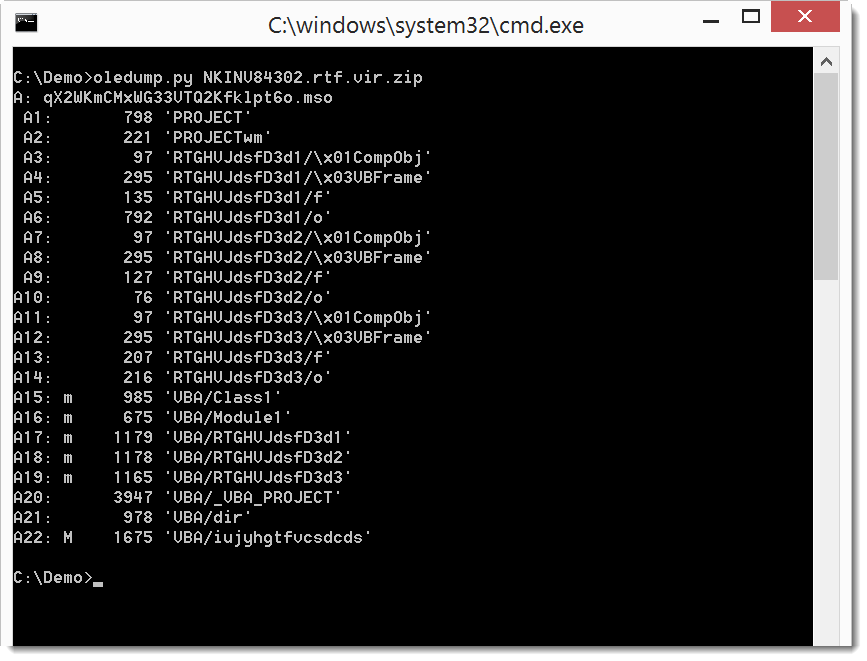

I have a YARA rule to detect VBE scripts:


yara-rules-V0.0.6.zip (https)
MD5: 01CB37759AC30EEA8D2B66226609C73E
SHA256: 1B56C1D7D0E1A8F500674B74F93F3E7DE6B2EFC85259ABE3A57F1DCA458CCFF8
I’m providing a 2-day training at Brucon Spring Training 2016: “Analysing Malicious Documents“. Use promo-code SPRING16 for a 10% discount.
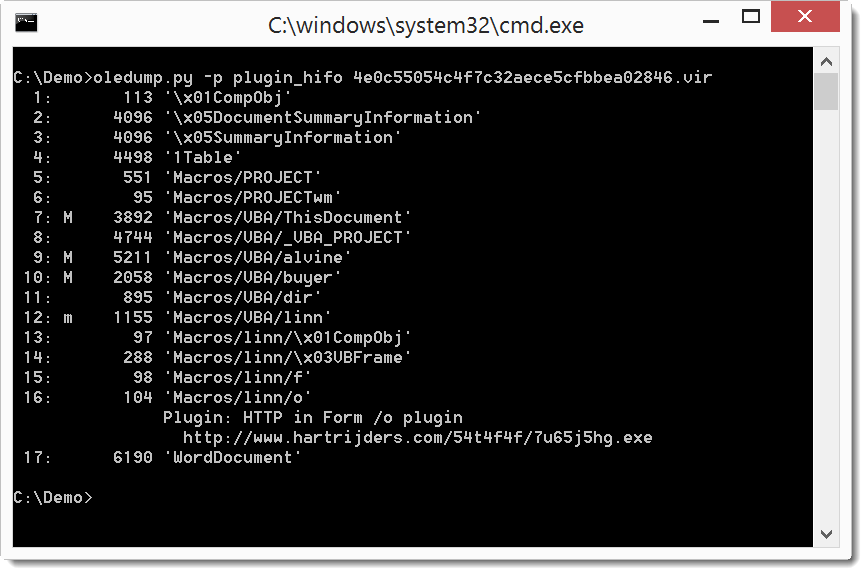
This new version of oledump brings an update to the –cut option and a new plugin: plugin_hifo.
As I documented in this ISC Diary entry, maldocs can store URLs in properties of userforms:
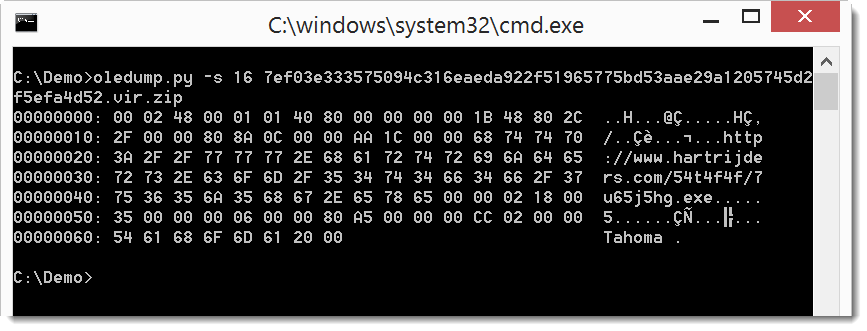
The plugin plugin_hifo is a simple plugin that looks for streams that end with /o and then searches for strings starting with http (hence the name: http in form /o).
oledump_V0_0_23.zip (https)
MD5: 991910FF4AA47808A5BBCE0CC109D41A
SHA256: 612B6FD06856C7790D2F66B29286E7B89D35D8354ADB167CA512CC1CDE3F6C47
I’m providing a 2-day training at Brucon Spring Training 2016: “Analysing Malicious Documents“. Use promo-code SPRING16 for a 10% discount.
I received another maldoc sample (MD5 73D06B898E03395DA3D60D11E49751CC):

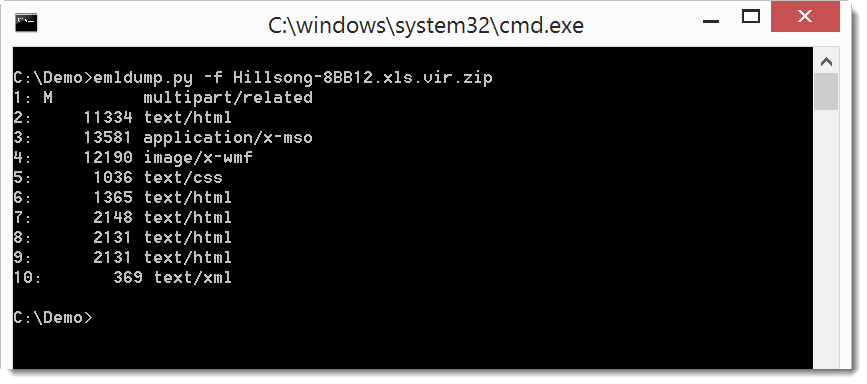
Lines 2, 3, 6, 7 and 8 are there to obfuscate this MIME type file. emldump.py now detects all lines without a colon in the first block (all lines before the empty line 9: 1 – 8).

You can filter out these lines with option -f:
emldump_V0_0_8.zip (https)
MD5: B6FBAF2AB403AFE30F7C3D7CA166793B
SHA256: 7A7016B29F291C3D42B43D43B265DAD86B96DA519DB426163CC2D15C556896E3

 Didier Stevens