Didier Stevens

Monday 29 February 2016

More Obfuscated MIME Type Files

Filed under: maldoc,Malware,My Software,Update — Didier Stevens @ 20:57

I’m providing a 2-day training at Brucon Spring Training 2016: ā€œAnalysing Malicious Documentsā€œ. Use promo-code SPRING16 for a 10% discount.

I received a maldoc sample (MD5 FAF75220C0423F94658618C9169B3568):

20160229-213357

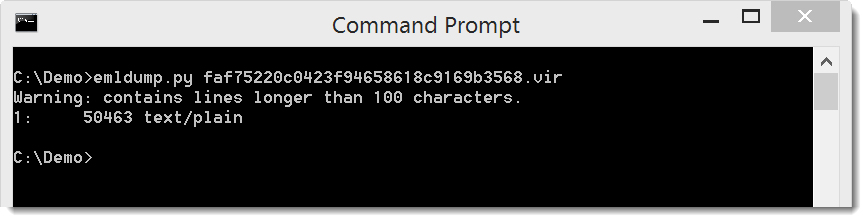
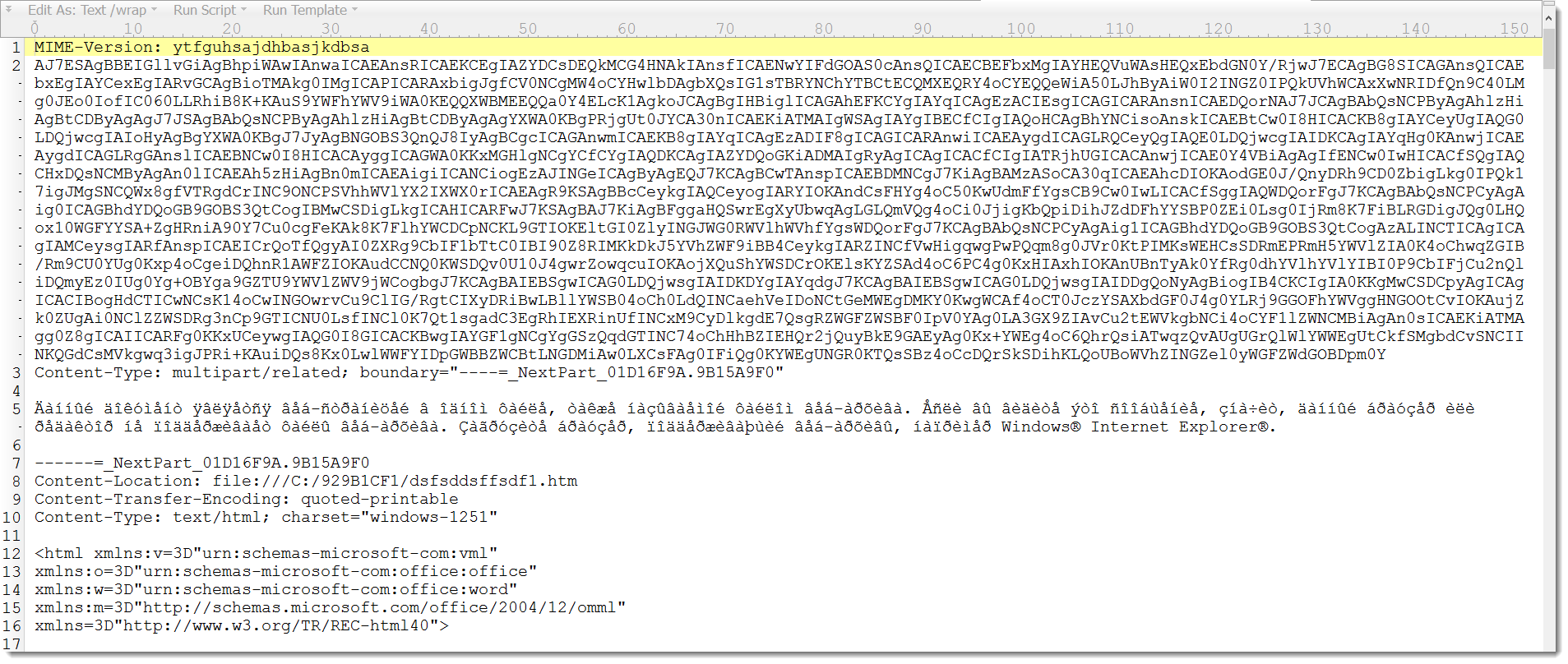
You can see it’s a MIME Type file, and that it is obfuscated. The second line is a very long line of seemingly random letters and digits. This throws of Python’s MIME parser used by my emldump tool:

20160229-214123

emldump just detects this as a text file, and not as a multipart MIME Type file.

If we remove that second line, for example with findstr /v (or grep -v), emldump recognizes the different parts:

20160229-214500

Since obfuscated MIME Type files are becoming more and more prevalent, I’m adding a filter option to emldump to filter out lines that obfuscate the MIME Type files. For the moment, option -f throws out lines longer than 100 characters and header lines that are not fields (just like option -H).

This new version of emldump.py detects some (simple) types of obfuscation:

20160229-215458

And with option -f you can filter out these obfuscating lines:

20160229-215704

Download:

emldump_V0_0_7.zip (https)
MD5: 819D4AF55F556B2AF08DCFB3F7A8C878
SHA256: D5C7C2A1DD3744CB0F50EEDFA727FF0487A32330FF5B7498349E4CB96E4AB284

Sunday 28 February 2016

Update: translate.py Version 2.2.0 for Locky JavaScript Deobfuscation

Filed under: maldoc,Malware,My Software,Update — Didier Stevens @ 10:45

Over at the ISC Diary I have an entry on Locky JavaScript Deobfuscation. I use my translate tool to perform part of the static analysis.

When you read this diary entry, you’ll see that I have to create 2 Python scripts to be used by translate.py to search with a regular expression and replace all matches with the output of a Python function.

I updated translate.py so that I don’t have to create Python scripts for this regex search-and-replace, but that I can do it from the command-line with a new option. This new option (-r, –regex) takes a regular expression and does a search-and-replace.

Here are the 2 “scripts” using this new option:

translate.py -r "\([^\\\(]+\\u([0-9a-f]{4})[a-z]+'\.e\(\)\)" "lambda oMatch: chr(39) + chr(int(oMatch.group(1), 16)) + chr(39)"
translate.py -r "('[^']*' ?\+ ?)+'[^']*'" "lambda oMatch: chr(39) + eval(oMatch.group(0)) + chr(39)"

If you just want to do a search-and-replace, you can use a constant regex and lambda function, like this (replace False with True):

translate.py -r "False" "lambda oMatch: 'True'"

translate_v2_2_0.zip (https)
MD5: D561D9987A3E5264E40A4B5C4057A732
SHA256: BC532BD5C7DD86DCADDF7B7B9A34453E983E226E103E0591E7D480BB43C350E0

Thursday 7 January 2016

BlackEnergy .XLS Dropper

Filed under: maldoc,Malware — Didier Stevens @ 0:00

I’m providing a 2-day training at Brucon Spring Training 2016: “Analysing Malicious Documents“.

I analyzed the spreadsheet (97b7577d13cf5e3bf39cbe6d3f0a7732) used in the recent BlackEnergy attacks against Ukrainian news media and electric industry.

numbers-to-hex_V0_0_1.zip (https)
MD5: 9050768633DDADF34900DAB0061F3B24
SHA256: 00B099F3939251F2027F2705AD08AE352C0FC447C86EB3271721FB2935CF71B6

hex-to-bin_V0_0_1.zip (https)
MD5: 18FC870888B333D8B081CE3E31428A1B
SHA256: 17B4257C6951C792FFE64EDDDFF20674AD07DE2699EF066BDF7A548DA09E6592

Monday 28 December 2015

Maldoc GET Range

Filed under: maldoc,Malware — Didier Stevens @ 13:06

I’m providing a 2-day training at Brucon Spring Training 2016: “Analysing Malicious Documents“.

I analyzed a malicious document (365a04140b3abe71c6cb4248d5bbbb57a172f37fe878eec49dc90745f5c37ae3) that does something I hadn’t seen done before in VBS.

This maldoc drops a VBS script, that proceeds to download an executable. The PE file is XOR-encoded and embedded in a valid JPEG file. Here is the image:

20151228-135434

Look at the obfuscated code:

20151228-135746

Notice SetRequestHeader: This code is using HTTP and is adding something to the headers. Here is the deobfuscated code:

20151228-140004

This code is downloading a picture (wp.jpg), but not the complete picture. It sets a header (Range: bytes=28141-) to download only the XOR-encoded PE file hidden in the JPEG image.


Tuesday 22 December 2015

MIME File With “Header”

Filed under: maldoc,My Software — Didier Stevens @ 0:00

I’m providing a 2-day training at Brucon Spring Training 2016: “Analysing Malicious Documents“.

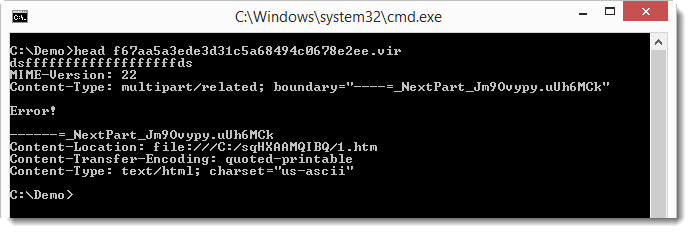
Malicious MS Office documents are also distributed as MIME files. A blog reader asked for help with a MIME file that gave him problems: f67aa5a3ede3d31c5a68494c0678e2ee.

Accoring to emldump.py, the file is just text (not a multipart file):

20151221-175808

But if you look at the file, you’ll notice a line preceding the MIME-Version line:

20151221-180149

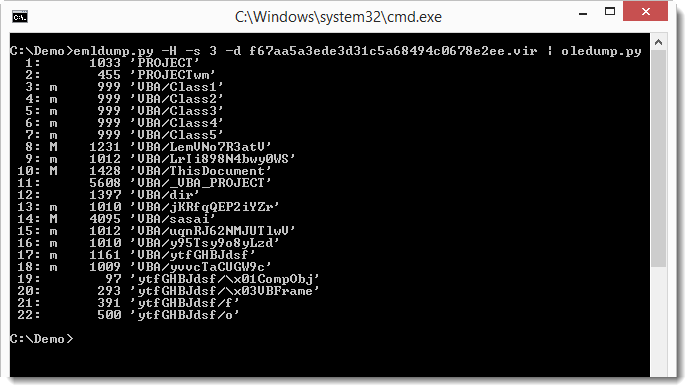
You can instruct emldump to skip this line with option -H:

20151221-180326

Now emldump is able to analyze the multipart MIME file, and detect the MSO file (part 3). oledump can analyze MSO files:

20151221-180513

Monday 21 December 2015

Update: oledump.py Version 0.0.22

Filed under: maldoc,My Software,Update — Didier Stevens @ 16:27

Some changes when you use the –raw option. Now plugins can also be used when the VBA code is corrupted.

oledump_V0_0_22.zip (https)
MD5: CA91850BBC92E82D705F707704000F82
SHA256: 16763BCF15BFB3301FFAE0BDA26F18EE2946EDD7478994B798127DBBEF5FF9E7

Wednesday 18 November 2015

Maldoc Social Engineering Trick

Filed under: maldoc — Didier Stevens @ 0:00

Xavier has an interesting SANS ISC Diary entry on a malicious Word document we analyzed. The VBA macro code contains a function (func_FormatDocument) for which Xavier has no clear explanation. This function pulls of a social engineering trick. It “decodes” the document by giving the text with a white font color (thus invisible) a black font color, and by removing the headers.

I created my own document to reproduce this trick in this video:

Saturday 7 November 2015

Analysis Of An Office Maldoc With Encrypted Payload: oledump plugin

Filed under: maldoc,Malware,My Software,Reverse Engineering — Didier Stevens @ 0:00

After a quick and dirty analysis and a “slow and clean” analysis of a malicious document, we can integrate the Python decoder function into a plugin: the plugin_dridex.py

First we add function IpkfHKQ2Sd to the plugin. The function uses the array module, so we need to import it (line 30):

20151106-222710

Then we can add the IpkfHKQ2Sd function (line 152):

20151106-222928

And then we can add function IpkfHKQ2Sd to the list in line 217:

20151106-223132

This is the code that tries different decoding functions that take 2 arguments: a secret and a key.

I also added code (from plugin_http_heuristics) to support Chr concatenations:

20151106-223608

The result is that the plugin can now extract the URLs from this sample:

20151106-222050

Download:
oledump_V0_0_19.zip (https)
MD5: DBE32C21C564DB8467D0064A7D4D92BC
SHA256: 7F8DCAA2DE9BB525FB967B7AEB2F9B06AEB5F9D60357D7B3D14DEFCB12FD3F94

Friday 6 November 2015

Analysis Of An Office Maldoc With Encrypted Payload (Slow And Clean)

Filed under: maldoc,Malware,My Software,Reverse Engineering — Didier Stevens @ 0:00

In my previous post we used VBA and Excel to decode the URL and the PE file.

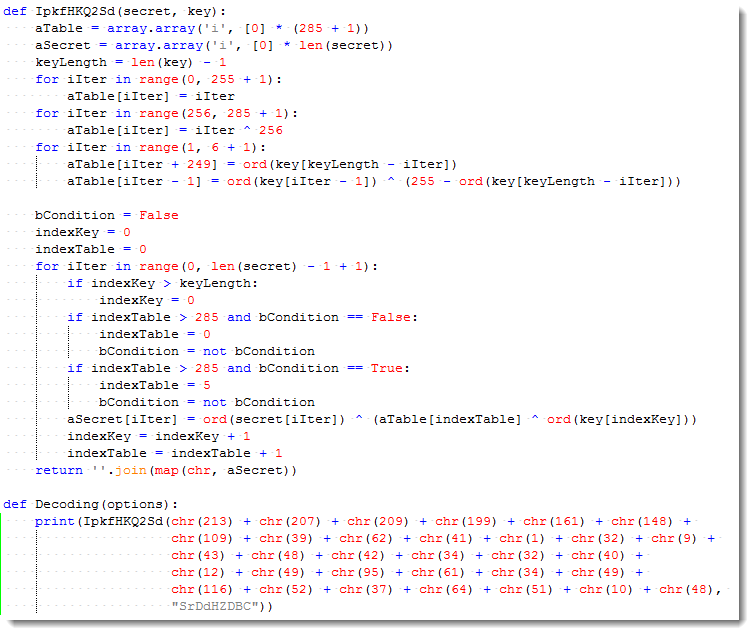
In thisĀ  post we will use Python. I translated the VBA decoding function IpkfHKQ2Sd to Python:

20151105-223017

Now we can decode the URL using Python:

20151105-223901

And also decode the downloaded file with my translate program and the IpkfHKQ2Sd function:

20151105-224328

20151105-224636


Thursday 5 November 2015

Analysis Of An Office Maldoc With Encrypted Payload (Quick And Dirty)

Filed under: maldoc,Malware,My Software,Reverse Engineering — Didier Stevens @ 0:00

The malicious office document we’re analyzing is a downloader: 0e73d64fbdf6c87935c0cff9e65fa3be

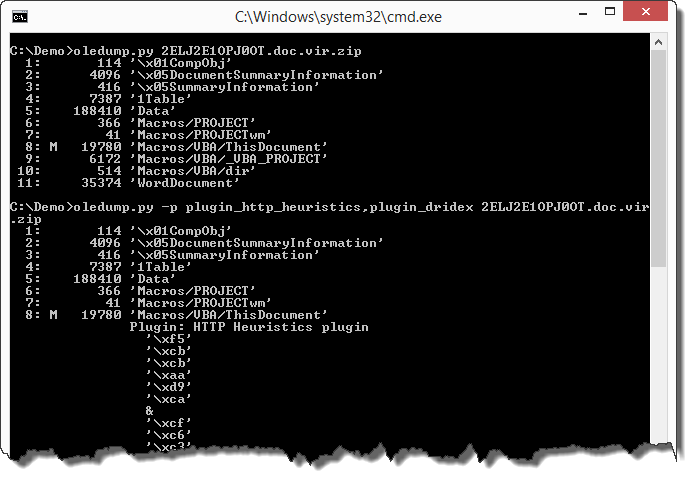
oledump reveals VBA macros in the document, but the plugins are not able to extract a URL:
20151104-194727

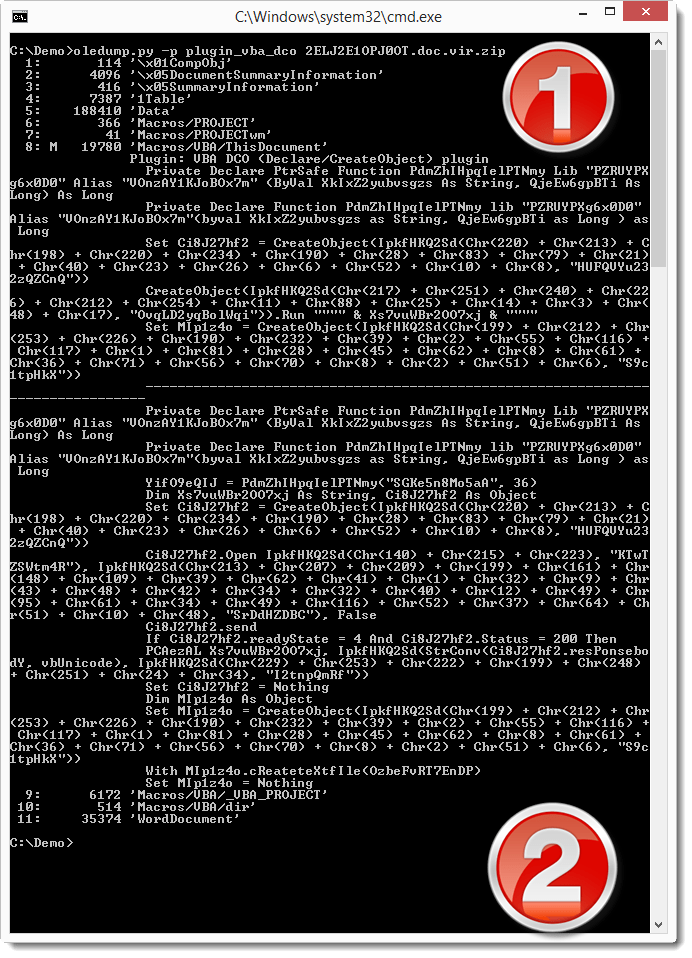
Let’s use a new plugin that I wrote: plugin_vba_dco. This plugin searches for Declare statements and CreateObject calls:
20151104-194827

In the first half of the output (1) we see all lines containing the Declare or CreateObject keyword. In the second half of the output (2) we see all lines containing calls to declared functions or created objects.

Although the code is obfuscated (obfuscation of strings and variable names), the output of this plugin allows us to guess that Ci8J27hf2 is probably a XMLHTTP object, because of the .Open, .send, .Status, … methods and properties.

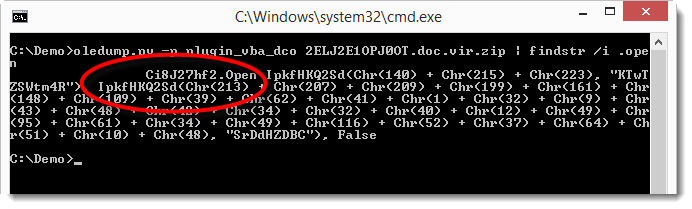
The Open method of the XMLHTTP object takes 3 parameters: the HTTP method, the URL and a boolean (asynchronous or synchronous call):
20151104-195006

As we can see, the third parameter is False and the first 2 parameters are the return value of a function called IpkfHKQ2Sd. This function takes 2 parameters: 2 strings. The first string is the result of concatenated Chr functions, and the second string is a literal string. Since the Open method requires the HTTP method and URL as strings, is very likely that function IpkfHKQ2Sd is a decoding function that takes 2 strings as input (meaningless to us) and returns a meaningful string.

Here is the original IpkfHKQ2Sd function. It’s heavily obfuscated:

20151104-195102

Here is the same function that I deobfuscated. I didn’t change the function name, but I removed all useless code, renamed variables and added indentation:

20151104-195144

We can now see that this function uses a key (sKey) and XOR operations to decode a secret string (sSecret). And now we can also see that this is just a string manipulation function. It does not contain malicious or dangerous statements or function calls. So it is safe to use in a VBA interpreter, we don’t need to translate it into another language like Python.

We are going to use this deobfuscated function in a new spreadsheet to decode the URL parameter:

20151104-195359

In the VBA editor of this new spreadsheet, we have the deobfuscated IpkfHKQ2Sd function and a test subroutine that calls the IpkfHKQ2Sd function with strings that we found in the .Open method for the URL argument. The decoded string returned by function IpkfHKQ2Sd is displayed via MsgBox. Executing this test subroutine reveals the URL:

20151104-195410

Downloading this file, we see it’s not a JPEG file, but contrary to what we could expect, it’s neither an EXE file:

20151104-195912

Searching for .responseBody in the VBA code, we see that the downloaded file (present in .responseBody) is passed as an argument to function IpkfHKQ2Sd:

20151104-195823

This means that the downloaded file is also encoded. It needs to be decoded with the same function as we used for the URL: function IpkfHKQ2Sd (but with another key).

To convert this file with the deobfuscated function in our spreadsheet, we need to load the file in the spreadsheet, decode it, and save the decoded file to disk. This can be done with my FileContainer.xls tool (to be released). First we load the encoded file in the FileContainer:

20151104-200044

20151104-200105

FileContainer supports file conversion: we have to use command C and push the Process Files button:
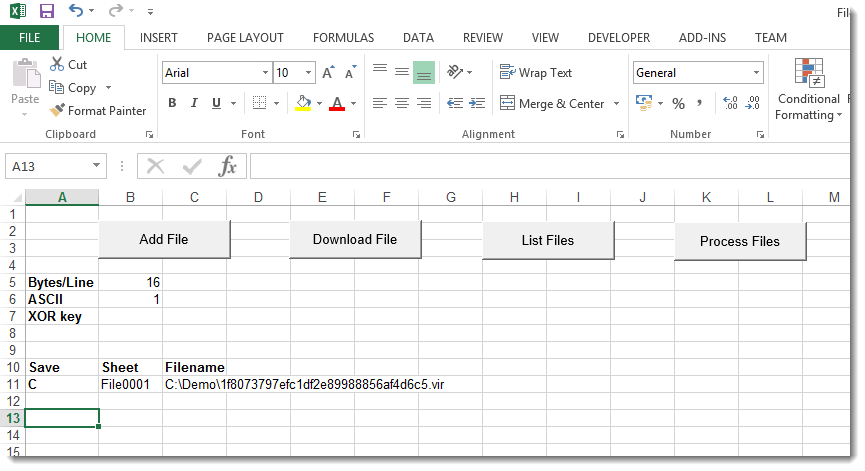
20151104-200125

Here is the default conversion function Convert. This default function doesn’t change the file: the output is equal to the input:

20151104-200214

To decode the file, we need to update the Convert function to call the decoding function IpkfHKQ2Sd with the right key. Like this:

20151104-200424

And then, when we convert the file, we obtain an EXE file:

20151104-200952

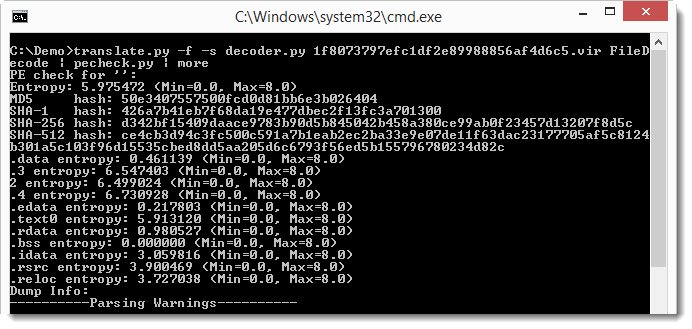
This EXE turns out to be Dridex malware: 50E3407557500FCD0D81BB6E3B026404

Remark: reusing code from malware is dangerous unless we know exactly what the code does. To decode the downloaded file quickly, we reused the decoding VBA function IpkfHKQ2Sd (I did not translate it into another language like Python). But to be sure it was not malicious, I deobfuscated it first. The deobfuscation process gave me the opportunity to look at each individual statement, thereby giving me insight into the code and come to the conclusion that this function is not dangerous. We could also have used the obfuscated function, but then we ran the risk that malware would execute because we did not fully understand what the obfuscated function did.

Translating the obfuscating function to another language doesn’t make it less dangerous, but it allows us to execute it in a non-Windows environment (like Linux), thereby preventing Windows malware from executing.
« Previous Page

Blog at WordPress.com.