Didier Stevens

Wednesday 31 October 2012

“Please Buy Our Competitor’s Products”

Filed under: Hacking,Vulnerabilities — Didier Stevens @ 19:55

I had a very good Samurai WTF training at Brucon by Raul Siles.

When Raul discussed the fact that clients are not worried about cross-site scripting when you demonstrate it with an alert box, I got the following idea:

Let’s redirect the customer to the competitor’s website. So instead of alert(“XSS”); let’s do window.location = “www.competitor.com”;. This will demonstrate that a cross-site script can cost your client money.

BTW, our training took place in a church:

Tuesday 8 May 2012

Why Isn’t my PoC Launching calc.exe?

Filed under: Entertainment,Hacking,My Software,Nonsense — Didier Stevens @ 11:17

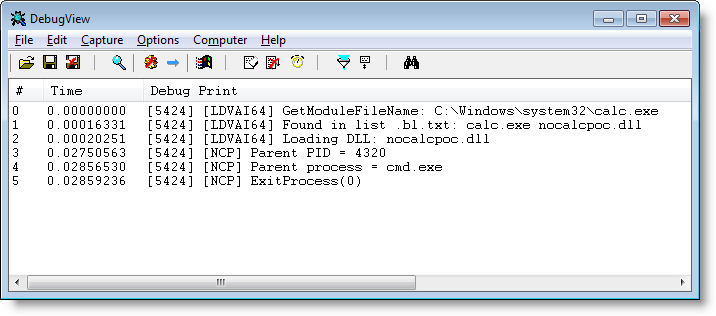
I quickly developed a dll that kills calc.exe when started from anything else than explorer.exe.

This way, you can mess with all those PoCs that launch calc.exe 😉

nocalcpoc_V0_0_0_1.zip (https)
MD5: 05798543571B45E19536181DC7346330
SHA256: ED0FEDC6096420F6F09F4980A1CE36F7C4BC0A8C9191F4DFC27FA4C77D547976

Monday 27 February 2012

Teensy PDF Dropper Part 2

Filed under: Hacking,My Software,PDF — Didier Stevens @ 0:00

Last year I showed how to use a Teensy micro-controller to drop a PDF file with embedded executable. But I was limited to a file of a few kilobytes, because of the Arduino programming language I used for the Teensy.

In this post, I’m using WinAVR and I’m only limited by the amount of flash memory on my Teensy++.

First we use a new version of my PDF tools to create a PDF file with embedded file:

Filter i is exactly like filter h (ASCIIHexDecode), except that the lines of hex code are wrapped at 512 hex digits, making them digestible to our C compiler.

Another new feature of my make PDF tools is Python 3 support.

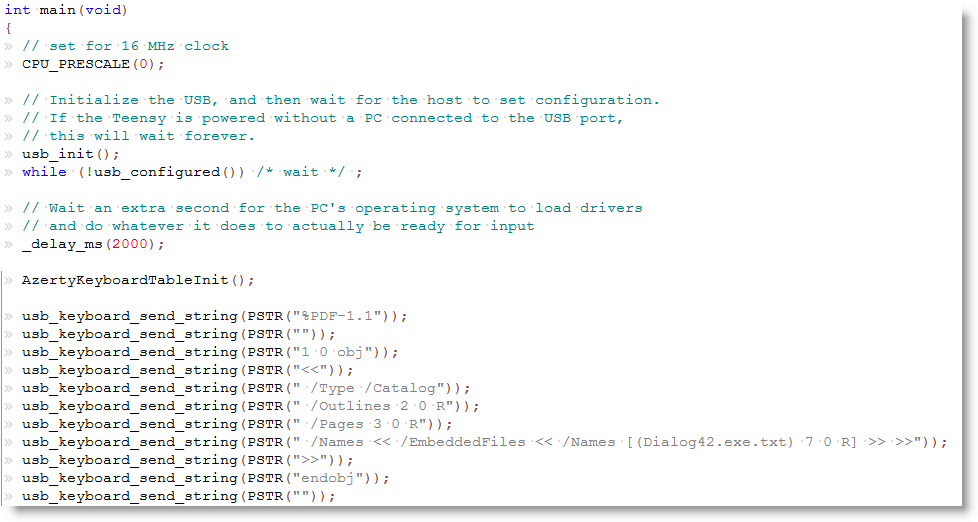
Here is a sample of our C code showing how to embed each line of the pure-ASCII PDF document as strings:

Macro PSTR makes that the string is stored in flash memory. The embedded executable is 57KB large, but still only takes half of the flash memory of my Teensy++.

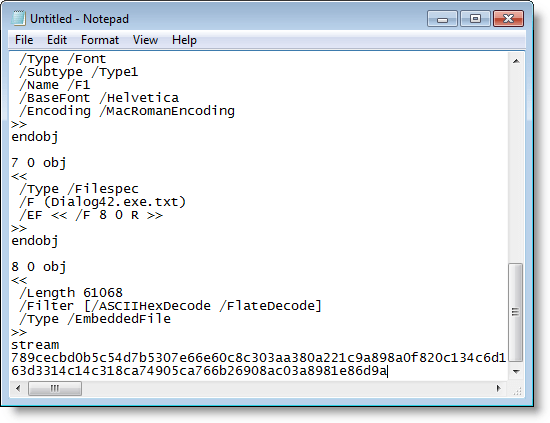
After programming my Teensy++, I can fire up Notepad and let my Teensy++ type out the PDF document:

You can download my example for the WinAVR compiler here:

avr-teensy-pdf-dropper_V0_0_0_1.zip (https)
MD5: EA14100A1BEDA4614D1AE9DE0F71B747
SHA256: 2C9A5DF1831B564D82548C72F1050737BCF17E5A25DCDC41D7FA4EA446A8FDED

Saturday 24 December 2011

Happy New Router

Filed under: Entertainment,Hacking,Networking — Didier Stevens @ 0:00

Friday 5 August 2011

My Home Surveillance System: Some Details

Filed under: Arduino,Hacking,Hardware — Didier Stevens @ 11:02

I use Phidgets USB interfaces and sensors for my home surveillance system. For the moment, my home surveillance system consists of Python programs running on a PC, but once I’m past the experimental phase, I will migrate this to a dedicated controller.
I particularly like the PIR motion sensor Phidget, because it gives you an analogue output. When there’s no movement, the output will be around 500. With movement, the output value will oscillate around 500, with larger amplitudes for larger movements.This allows me to differentiate between small and large movements, and to eliminate false positives which are only of a short duration. If you have to run wires for many meters to connect your analogue sensors to the interface module, I recommend you use shielded wires and connect the shield to the ground of the interface module. This allowed me to eliminate noise I had on the readings.

Another plus is that the sensors are powered by the interface module. So if you power the PC (or micro-controller) with a UPS, your home surveillance system will also operate when there’s a power cut.

To take pictures when an event occurs (like ringing the doorbell), I use an IP camera. Take a look at my vs.py program to see how that’s done.

Friday 29 July 2011

My Home Surveillance System

Filed under: Arduino,Hacking,Hardware — Didier Stevens @ 10:21

Aside from having installed my own Home Automation and CCTV system, I also designed and installed a surveillance system at home. This post will discuss some of the design decisions I took. Some of them are different from more conventional alarm systems.

The surveillance system has many sensors in and around the house (passive infrared (PIR) sensors, reed switches, temperature sensors, …) and can take several actions, like starting sirens, turning on lights, sending text messages, making phone calls, taking pictures, … Which  actions are taken depend on the alert level that was set.

First design decision : this system is designed to deter common burglars, not burglars with inside knowledge of the system.

Second design decision is that the system will log all events coming from sensors, regardless of triggering an alarm.

Third design decision is that there is no alarm delay: if a sensor triggers that would cause the alarm to sound, then the alert sounds immediately. There is no delay or pre-alarm phase. I believe an immediate alarm has a greater deterrent effect. With this design, it’s best to avoid false-positives as much as possible.

Fourth design decision : use analogue PIR detectors, not binary PIR detectors. A classic (binary) PIR detector will just tell you that movement occurred. With an analogue PIR detector, you get the amplitude and duration of the movement, which is useful information to weed out false alarms, or ignore movement from small pets.

Now on to some interesting or unusual use cases.

I have a sensor on the doorbell too. When someone rings the doorbell, the event is logged and the system takes pictures of the front door. I’ve seen some interesting events since this doorbell sensor was installed. For example, I expected a package to be delivered after 18:00. The sender had instructed our national courier company to deliver the package after 18:00. You can probably guess they didn’t follow the instructions. I have evidence they attempted to deliver well before 18:00, and what’s even worse, they left a note saying they had passed around 18:15…

Like modern, commercial alarm systems, I have several alarm zones. For example, I can set the alarm level for when we go to bed. In this mode, the alarm will go off if there is movement inside the house, except in the bedroom and nearby rooms/hall. But come morning, you have to remember to switch off the alarm before you leave the bedroom.
Not with my system. If my system detects movement in the protected zone, and if there has been movement in the bedroom zone just before, it will disable the alarm in stead of sounding the alarm. So no false-alarms triggered in my house by sleepy-heads.

Outside lights that switch on when movement is detected are supposed to deter burglars, but they are so common that I believe the deterrent effect is negligible. My system turns on some lights inside the house when it detects movement outside while it is dark and there is no movement inside. I believe this has a much greater deterrent effect, because it’s so uncommon. And it will also take pictures. I now have a large picture collection of neighborhood cats in my back garden 😉

I’ve recently installed wireless interconnected smoke alarms. I will connect one smoke alarm to my home surveillance system, so that my system is aware when smoke alarms trigger and can act appropriately.

Testing all these functions is fun. I’m ” testing in production “, you can imagine that I don’t have a second home that I can use as a test system.
So sometime you can see me run around the house like a madman, but I’m just testing a new feature I programmed… 😉

Wednesday 13 July 2011

Teensy PDF Dropper Part 1

Filed under: Hacking,Hardware,PDF — Didier Stevens @ 21:40

Pentesters need to drop files on targets. If a box is not connected to the Internet, and doesn’t accept removable storage, they need to come up with some tricks.

Inputting the file via the keyboard is an option, but typing several millions of bytes is not. This needs automation.

Irongeek uses a Teensy micro-controller to achieve this. My solution is a variation on this. If you need to drop a binary file, you need to find a way to convert the typed ASCII to bytes. There’s a solution with a debugger, but I’m using a PDF Reader.

It’s possible to create a pure ASCII PDF file that embeds a binary file. Here are the steps to drop a binary file:

  • open Notepad,
  • insert the Teensy and let it type the ASCII  PDF file into Notepad
  • save the PDF file
  • open it with a PDF Reader and save the embedded binary file

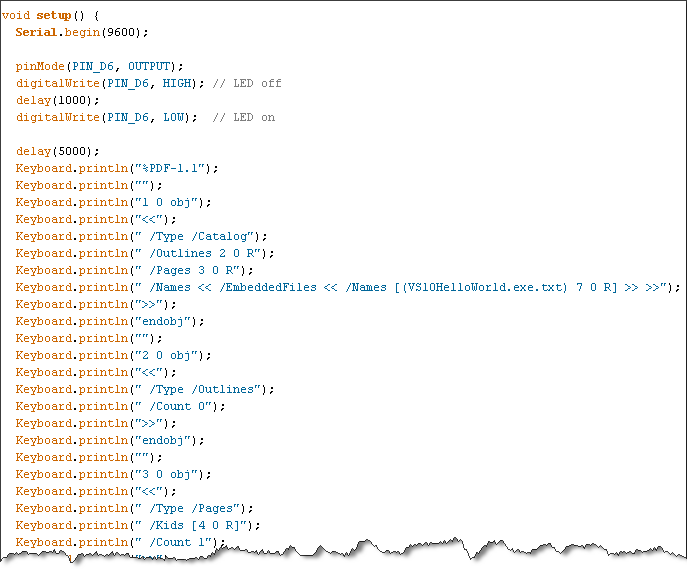
Writing a program with the Arduino IDE to type an ASCII PDF file is not difficult:

But with the Arduino IDE, your embedded file is limited to a couple of kilobytes. Handling larger files will be described in part 2 of this post.

Thursday 30 June 2011

Integrating My CCTV DVR And Alarm System

Filed under: Hacking,Hardware — Didier Stevens @ 20:49

I’ve designed and installed my own home automation system: it allows me to control lights and appliances, and monitor activity and environmental parameters at home.

I also have a CCTV DVR with a couple of cameras around the house.

Until now, these 2 systems were not linked. If a PIR sensor detected movement in the garden and later I wanted to see what caused the movement, I had to write down the timestamp and then rewind the DVR around the time the movement was detected. Not anymore. My CCTV DVR has an external IO connector, and now events detected by my alarm system are logged on my DVR. I just have to click on an event on my DVR and the video starts to play.

The problem I faced to achieve this integration, was the lack of documentation. There was no pinout of the external IO connector, not in the manual and not online. So I had to reverse engineer it.

My CCTV DVR is a DVR4L5 sold by Velleman, and is actually produced by AVTECH in Taiwan. The external IO connector is a 9 pin DSUB connector. I can use it to send 4 different alarms to the DVR. But for this to work, the alarm has first to be configured on the DVR:

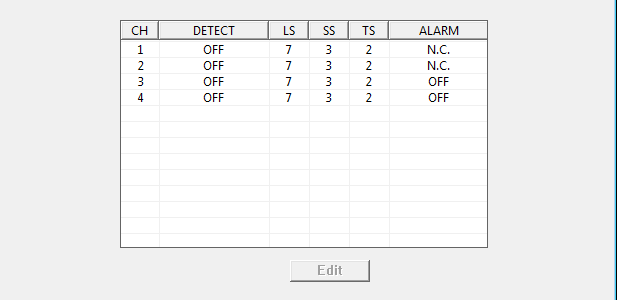
Set the channel for which you want the alarm to register to N.C. This means Normally Closed, which is counter-intuitive, because I’m using a Normally Open alarm. When I now close the circuit between pin 1 and pin 5 of the external IO connector, an alarm event gets logged and the DVR’s buzzer alerts me. Since I don’t need that buzzer to alert me, I disable it:

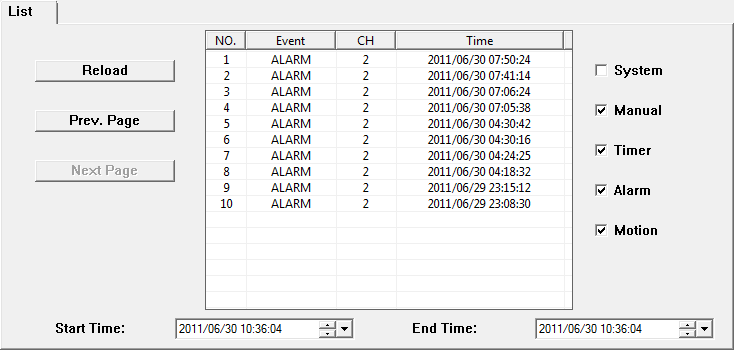
Here is an example of alarm events logged by the CCTV DVR:

The DVR can also send alerts to the alarm system. It does this by closing the circuit between pins 6 and 7. For example when it detects movement filmed by one of the cameras. But from experience I know you get a lot of false positives from this motion detection. For example when a cloud moves in front of the sun, the sudden shadow can trigger the simple motion detection algorithm of the DVR. A more useful alert to send to the alarm system is the loss of video signal. The DVR can be configured to sound the alarm when it loses a video signal from one of the cameras. For example when someone tampers with your camera.

Some weeks after I reversed the pinout, I received a reply from AVTECH that confirmed my findings. I’m including it here:

PIN

FUNCTION

DESCRIPTION

1~4

ALARM INPUT

Connect ALARM INPUT (PIN1 – 4) and GND (PIN5) connector with wires. Once an alarm is triggered, the DVR will start recording and the buzzer will be on.

PIN Alarm Corresponding video channel
PIN 1 1 CH1
PIN 2 2 CH2
PIN 3 3 CH3
PIN 4 4 CH4

*

5

GND GROUND

6

EXTERNAL ALARM COM Under the normal operation, COM disconnects with NO. But when any alarm is triggered, COM connects with NO.
Attention: The voltage restriction is under DC24V 1A.

7

EXTERNAL ALARM NO Under the normal operation, COM disconnects with NO. But when any alarm is triggered, COM connects with NO.
Attention: The voltage restriction is under DC24V 1A.

8

RS485-A  

9

RS485-B  

10~11

GND GROUND

Tuesday 19 April 2011

Signed Spreadsheet with cmd.dll & regedit.dll

Filed under: Hacking,My Software — Didier Stevens @ 14:05

Remember my Excel with cmd.dll & regedit.dll?

Paul Craig has a signed version of my spreadsheet on his iKAT site. Download ikat3.zip and look for officekat.xls.

These signed macros are handy when you’re working in a restricted environment that requires Office macros to be signed.

Tuesday 6 April 2010

Update: Escape From PDF

Filed under: Hacking,PDF,Update — Didier Stevens @ 0:01

Some new info after last week’s Adobe and Foxit escapes.

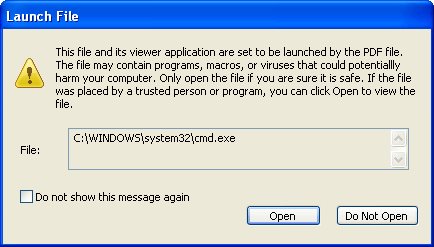
Foxit Software has release a new version to issue a warning when using a /Launch action, like Adobe Reader does:

The interesting thing about this fix is that it breaks my Foxit PoC, but that the Adobe PoC works for Foxit now!

This means that Foxit Software changed the way arguments are passed to the launched application (in the previous version, it didn’t work per the PDF standard, and that’s why I had to use a workaround). I draw some interesting conclusions from this:

  1. Nobody used the /Launch action in Foxit Reader with arguments. It didn’t work, and I assume Foxit would have received bug reports about this and fixed it by now.
  2. Nobody used the /Launch action in Foxit Reader with arguments via the workaround. Because this fix breaks the workaround, and I assume Foxit would not have broken a feature used by some of its users.
  3. From 1. and 2., I can say nobody used the /Launch action in Foxit Reader with arguments.

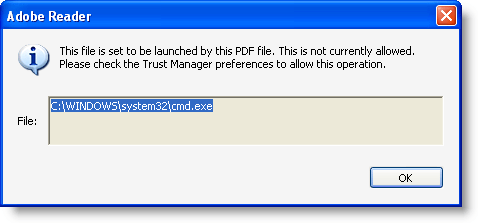
Adobe Reader has a Trust Manager setting to disable opening non-PDF attachments with external applications.

This setting also disables the /Launch action:

For more details about the PoC, I refer to my interview on the Eurotrash Security podcast.

« Previous PageNext Page »

Blog at WordPress.com.