Didier Stevens

Friday 26 July 2013

MSI: The Case Of The Invalid Signature

Filed under: Forensics,Malware,Windows 7 — Didier Stevens @ 22:01

I found a suspicious file on a Windows XP machine. I was able to trace its origin back to a Windows Installer package (.msi). This package in c:\windows\installer had an invalid digital signature. Like this:
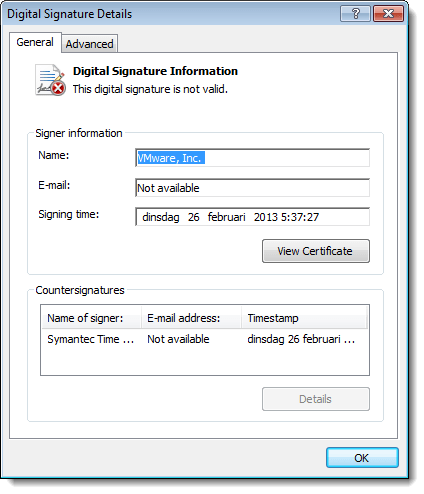
20130726-233848

Very suspicious.

A bit later I found another msi package containing the same suspicious file. But this time, the package had a valid digital signature. What’s going on?

After a deep dive into the internals of msi packages, I found the answer.

When an msi package is installed, it is cached inside the Windows Installer directory (%windir%\Installer). Prior to Windows Installer 5.0 (released with Windows 7), cached packages were stripped of their embedded cab files. But with digitally signed msi files, the signature remained inside the file: the digitally signed file was modified, hence the signature was invalidated. This behavior changed with Windows Installer 5.0: cached packages are no longer stripped, hence the signature remains valid.

This blogpost by Heath Stewart explains this change in more detail. Unfortunately, my Google-skills were not good enough to find this blogpost prior to my deep dive into msi files. Hindsight Googling FTW! 😉
Monday 15 April 2013

New Tool: XORStrings

Filed under: Forensics,My Software,Reverse Engineering — Didier Stevens @ 0:00

XORStrings is best described as the combination of my XORSearch tool and the well-known strings command.

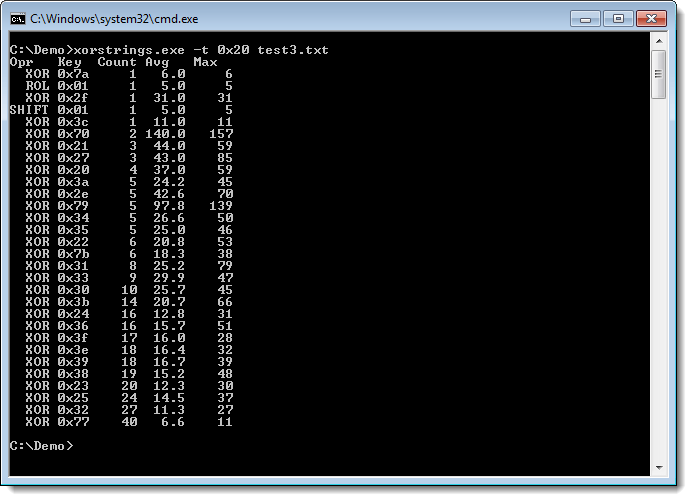
XORStrings will search for strings in the (binary) file you provide it, using the same encodings as XORSearch (XOR, ROL, ROT and SHIFT). For every encoding/key, XORStrings will search for strings and report the number of strings found, the average string length and the maximum string length. The report is sorted by the number of strings found, but can also be sorted by the maximum string length (use option -m). By default, the string terminator is 0x00, but you can provide your own with option -t, like the space character (0x20) in this example:

20130308-213053

I’ve used XORStrings to identify the encoding used in TeamViewer traffic.

There are more options than the ones I mentioned here. I’ll create a dedicated page for this tool, but for now, I invite you to discover the options yourself.

XORStrings_V0_0_1.zip (https)
MD5: 27DA0B3BC5296179CB58181BDFF99F8D
SHA256: 5EA7E063A41E38E9E6277F1CD73FCEA2AEF50C33C44D75C226900314FF84A1B5

Wednesday 27 March 2013

Cisco IOS Patching: Defense and Offense

Filed under: Forensics,Hacking,Networking,Reverse Engineering — Didier Stevens @ 22:39

I will give a talk on network forensics at my local ISSA chapter.

I’m preparing it with a couple of PoCs.

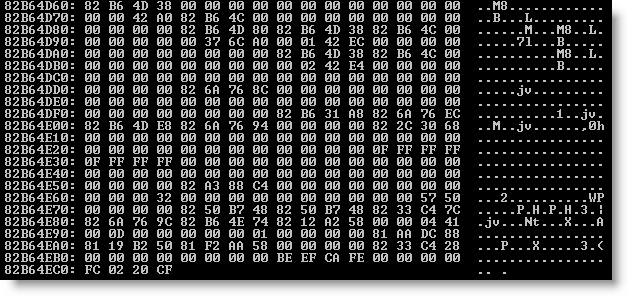
First PoC is how changing the canary value 0xFD0110DF to another value can provide defense against exploits like FX explained in this paper. I changed the appropriate instructions so that IOS uses canary value OxFC0220CF. You can see it at the bottom of this memory dump:

20130327-232310

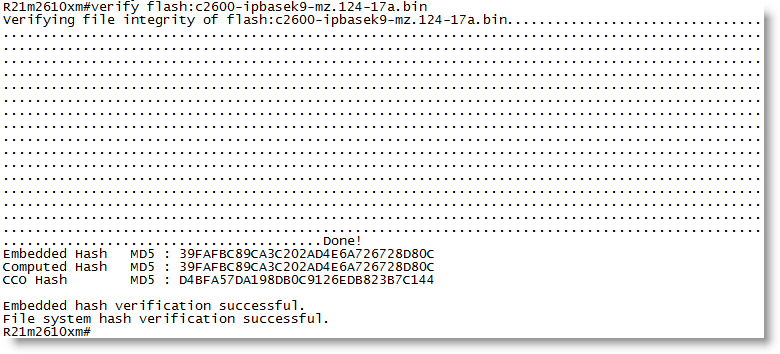
Second PoC is how I can change the behavior of an IOS command for offensive purposes. Topo mentioned this idea at Black Hat. The verify command checks the embedded MD5 signature in an IOS image. I patched the appropriate instructions so that the verify command always reports a valid signature, regardless of the actual embedded value:

20130327-233004

I did not change CCO hash. This is the MD5 hash of the complete IOS image. I did not change this on purpose, but it would be as easy as changing the embedded hash. If you lookup this CCO hash with Cisco, you will not find it.

Thursday 14 February 2013

Quickpost: TeamViewer and Proxies

Filed under: Forensics,Networking,Reverse Engineering — Didier Stevens @ 22:15

Sorry for the lack of recent posts, I’ve been ill and had to catch up with a lot of work.

Braden Thomas wrote an interesting series of posts on reversing the TeamViewer protocol.

I want to add my own observation: when TeamViewer is forced to communicate over an HTTP proxy, it will issue GET statements with parameter data that can be decoded in a similar way as Braden describes for the direct protocol (i.e. without proxy).

First of all, to identify TeamViewer traffic in proxy logs, you look for this User Agent String: “Mozilla/4.0 (compatible; MSIE 6.0; DynGate)”.

You will see HTTP GET requests like this one:

hxxp://178.77.120.6/dout.aspx?s=55194936&p=10000001&client=DynGate&data=FyQSAAExtjSytzoeqisTMbe3NzKxujS3tza3sjKemJMzHqkyu…

When you decode the value of the data= parameter as base64, you can identify the version of the protocol (first 2bytes) and the command (3rd byte):

0x1724 0x12

0x12 is a CMD_MASTERCOMMAND. By left-shifting the data from the 5th byte with 1 bit, you can decode the arguments of a MASTERCOMMAND, like this:

client=TV&connectionmode=1&f=RequestRoute2&homeserver=&ic=708710721&id=123456789&id1=123456789&id2=987654321&licensecode=…

When parameter f (the function) is RequestRoute2, you know that the TeamViewer user issued a command to connect to another TeamViewer client. Parameter id identifies the originating client (123456789 in my example), and parameter id2 identifies the destination (987654321 in my example).

Wednesday 16 January 2013

ISSA Journal Article ; HITB PDF Training

Filed under: Announcement,Forensics,Hacking,Networking,PDF — Didier Stevens @ 8:39

The ISSA Journal featured my article on Network Device Forensics, making it available to everyone.

And I’m giving a 2-day training on PDF at Hack In The Box Amsterdam 2013.

Tuesday 20 November 2012

Update: AnalyzePESig Version 0.0.0.2

Filed under: Encryption,Forensics,My Software,Update — Didier Stevens @ 20:59

I added several new fields to the output produce by my new tool AnalyzePESig:

  • countCatalogs
  • catalogFilename
  • signatureTimestamp
  • creationtime
  • lastwritetime
  • lastaccesstime
  • dwFileAttributes
  • uiCharacteristics
  • extensions
  • issuer unique id
  • sections
  • subject unique id
  • notBeforeChain
  • notAfterChain

AnalyzePESig_V0_0_0_2.zip (https)
MD5: 738F97F76921FA2220368B3F4190F534
SHA256: E0D43E04AFD242307E3E6B675A650952D2605F45FE55F0B883ACF5B22BA32A01

Thursday 8 November 2012

XORSearch for OSX

Filed under: Forensics,Malware,My Software,OSX — Didier Stevens @ 21:58

I made a very small change to XORSearch’s source code (dropped malloc.h) so that it compiles on OSX.

You can find the new version on XORSearch’s page.

Monday 1 October 2012

Searching For That Adobe Cert

Filed under: Encryption,Forensics,My Software — Didier Stevens @ 19:24

You probably know by now that Adobe will revoke a compromised code signing certificate in a couple of days. As we seem to have more code signing related security incidents recently, I started to develop a couple of new tools.

AnalyzePESig is a tool to check signatures in PE files, just like Sysinternals’ sigcheck. But with a couple of differences.

First, when a signature is not valid, AnalyzePESig will tell you why and still display information about the invalid signature and related certificates. Second, AnalyzePESig displays more information and third, it is open source.

Here is how you use AnalyzePESig to look for executables signed with that Adobe certificate that will soon be revoked:

analyzepesig -e -v -s -o windows.csv c:\windows

This will produce a CSV list of all executables found in the c:\windows directory.

Filter this list for lines including string fdf01dd3f37c66ac4c779d92623c77814a07fe4c (this is the fingerprint of the compromised certificate):

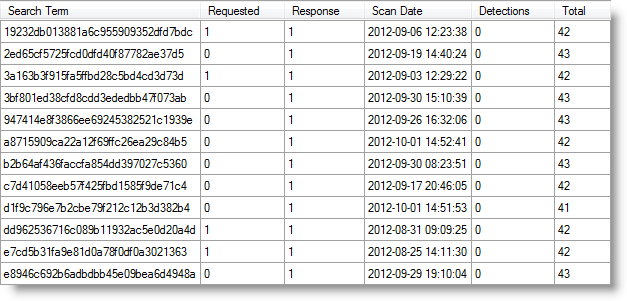
As you can see, I’ve Flash components signed with this compromised certificate. Now, this does not mean that these executables are compromised. To get a better idea, I can use my virustotal-search tool to search VirusTotal.

And here is another example, JP2KLib.dll, a DLL of Adobe Reader X:

AnalyzePESig_V0_0_0_1.zip (https)
MD5: 4BE29E4A5DE470C6040241FD069010C4
SHA256: FB83C6491690402273D42A3335777E77EA29328F5FE8503FF6F5EF62833D1FBC

Friday 14 September 2012

New Authenticode Tools

Filed under: Announcement,Encryption,Forensics — Didier Stevens @ 14:43

I’ve worked on a couple of new tools to analyze the digital signature found in PE files. In this post, I’m sharing some invalid signatures I found on my machines.

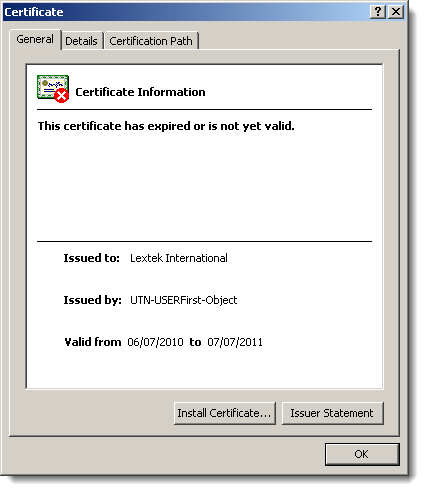
This signature is invalid because the certificate expired:

Normally, the fact that it expired shouldn’t cause the signature to become invalid, but here it does because the author forgot to countersign the signature with a timestamping service:

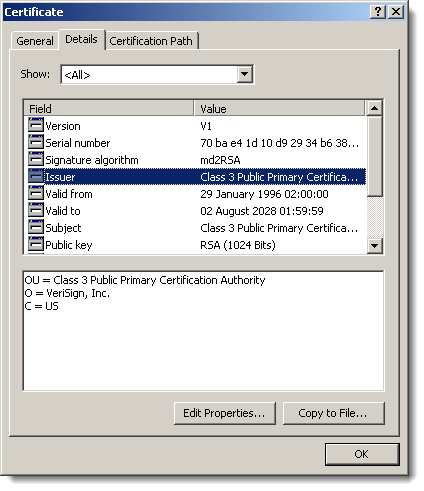
I also found several files where the root certificate used in the signatures uses a signature algorithm based on the MD2 hash:

And last a signature with a revoked certificate:

Remember Realtek Semiconductor? Their private key was compromised and used to sign Stuxnet components.

Friday 3 August 2012

Prefetch File 010 Template

Filed under: Forensics,My Software — Didier Stevens @ 9:49

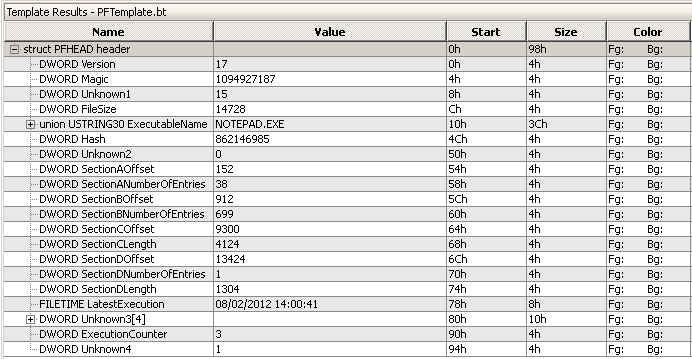
I had some problems with a Windows XP prefetch file, so I wrote a 010 Editor template using the Forensics Wiki’s information on prefetch files.

PFTemplate.zip (https)
MD5: 11F6BB8EC0D29CBCC7C2F269E9900AF0
SHA256: 4429380778C94E47427C1753BAF91E0D8AF78985AA9F3868CF3FC07456F7BAFA

« Previous PageNext Page »

Blog at WordPress.com.