Didier Stevens

Wednesday 5 July 2017

Update: re-search.py Version 0.0.8

Filed under: My Software,Update — Didier Stevens @ 17:26

This new version of re-search.py introduces options –script and –execute to provide your custom Python functions.

Regular expressions can contain comments, like programming languages. This is a comment for regular expressions: (?#comment).
If you use re-search with regular expression comments, nothing special happens:
re-search.py “(?#comment)[a-z]+\.com” list.txt

However, if your regular expression comment prefixes the regular expression, and the comment starts with keyword extra=, then you can use gibberish detection, whitelist/blacklist filtering and Python function matching.

Python function matching is defined via directive P (Python). If you want to validate a string with a Python function, you use the following regular expression comment: (?#extra=P:Validate). Validate is a Python function that takes a string as argument and returns a boolean: True for a match and False if there is no match. You can provide your custom Python function(s) in a file via option –script or as a commandline argument via option –execute.

Example: Bitcoin address matching. Regular expression [13][a-km-zA-HJ-NP-Z1-9]{25,34} will match Bitcoin addresses, but also other strings that look like a Bitcoin address but are not a valid Bitcoin address. A valid Bitcoin address has a particular syntax, and a valid checksum. The regular expression can check the syntax, but not validate the checksum. Python function BTCValidate can check the checksum of a Bitcoin address. The following regular expression matches Bitcoin addresses with a valid syntax and uses Python function BTCValidate to validate the checksum:
(?#extra=P:BTCValidate)[13][a-km-zA-HJ-NP-Z1-9]{25,34}

re-search_V0_0_8.zip (https)
MD5: D4895B54268683BFBE0126D02B01A4A2
SHA256: 85919EB964FF9CF0EDE7DA64E9BCE6619480DAC71D0CB65B5EE667322B18DDBB
Tuesday 4 July 2017

Update: pecheck.py Version 0.7.0

Filed under: My Software,Update — Didier Stevens @ 0:00

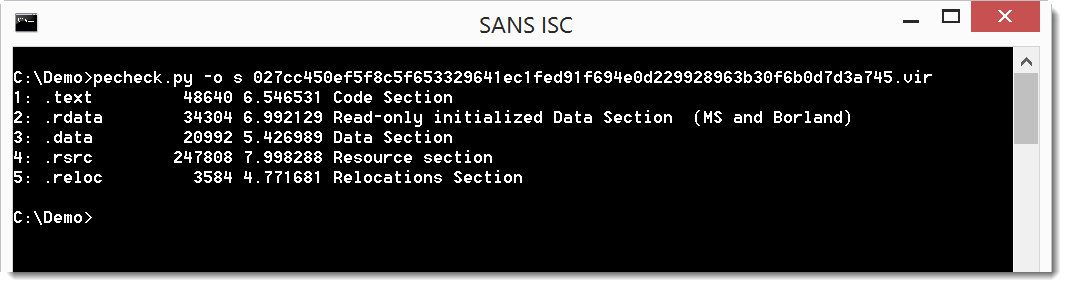
This new version of pecvheck.py adds an overview of sections. More details here.

pecheck-v0_7_0.zip (https)
MD5: 7BE550EC71BF99FC31704C2DD4ED3C8A
SHA256: 12C03369362045DF5A9AAB83002E59A4A31050EC008DF45F777C87186D611F6E

Monday 3 July 2017

Update: zipdump.py Version 0.0.9

Filed under: My Software,Update — Didier Stevens @ 0:00

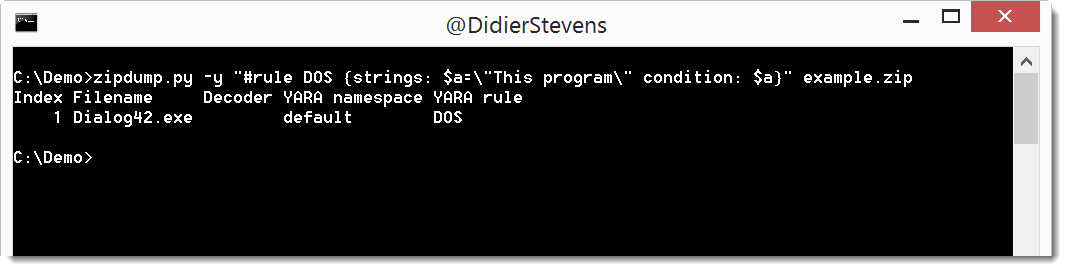
In this new version of zipdump.py, you can provide a YARA rule directly on the command line, without having to store it inside a file.

Just start the value of option -y with # and type your rule (use quotes because of spaces):

zipdump_v0_0_9.zip (https)
MD5: 2700AF663980204075107164AA12750A
SHA256: 5686F24373AF64E1F5D866C71B29A22CE97964EC563A2219681A6268CC9A1153

Sunday 2 July 2017

Update; base64dump.py Version 0.0.7

Filed under: My Software,Update — Didier Stevens @ 0:00

This new version of base64dump.py has a new option: -z. With this option, you can ignore leading null bytes (to be used for example to handle UNICODE).

You can see this option used in this video (starting 1:28):

base64dump_V0_0_7.zip (https)
MD5: D37DE7CEFDA55ADD1822EADDD84D5FFB
SHA256: 5F676DF8B36172A1D7B29F03E2B0CCB026BB9A96DF8830FDB137E65CBB59DD63

Saturday 1 July 2017

Overview of Content Published In June

Filed under: Announcement — Didier Stevens @ 15:01

Here is an overview of content I published in June:

Blog posts:

YouTube videos:

Videoblog posts:

SANS ISC Diary entries:

NVISO Labs blog posts:

NVISO YouTube videos:

Wednesday 7 June 2017

Overview of Content Published In May

Filed under: Announcement — Didier Stevens @ 0:15

Here is an overview of content I published in May:

Blog posts:

YouTube videos:

Videoblog posts:

NVISO Labs blog posts:

Tuesday 6 June 2017

Update: xor-kpa.py Version 0.0.5

Filed under: Encryption,My Software,Update — Didier Stevens @ 0:00

Some small changes to my XOR known plaintext attack tool (xor-kpa), which will be detailed in an ISC Diary entry.

xor-kpa_V0_0_5.zip (https)
MD5: 023D8E3725E0EF7CEC449085AA96BB3A
SHA256: 7517DD44AFBFA11122FD940D76878482F50B7A2A2BCD1D7A2AF030F6CAC4F4E3

Tuesday 23 May 2017

WannaCry Simple File Analysis

Filed under: Malware,My Software,Reverse Engineering — Didier Stevens @ 7:32

In this video, I show how to get started with my tools and a WannaCry sample.

Tools: pecheck.py, zipdump.py, strings.py

Sample: 84c82835a5d21bbcf75a61706d8ab549

Sunday 21 May 2017

Update: zipdump.py Version 0.0.8

Filed under: My Software,Update — Didier Stevens @ 14:48

Added handling of zlib errors when performing a dictionary attack.

zipdump_v0_0_8.zip (https)
MD5: 51B971B57800D126B2067DC53303355A
SHA256: 095EE6000E99B9193C830B8BA11139907CB9445FD7D94D81E3F97A8B458D5D16

Saturday 20 May 2017

Update: zipdump.py Version 0.0.7

Filed under: My Software,Update — Didier Stevens @ 8:05

After adding support for password lists in zipdump, I decided to add an internal password list to zipdump, based on John’s public domain password list.

This internal password list (a few thousand passwords) can be used by providing filename . (a single dot) to options -P and –passwordfilestop.

zipdump_v0_0_7.zip (https)
MD5: 7B3D165B68B4E66D7EFCF54B25E08115
SHA256: DC794679CFDEA57AC532E11BC338F6823EECC26A36CB844B29EF15F93B6BA1C1

« Previous PageNext Page »

Blog at WordPress.com.