Didier Stevens

Monday 18 May 2020

Quickpost: curl And SSPI Proxy Authentication

Filed under: Networking,Quickpost — Didier Stevens @ 0:00

curl with SSPI feature supports integrated authentication to a proxy: you don’t need to provide credentials.

The command is the following:

curl –proxy proxyname:8080 –proxy-ntlm -U : https://www.didierstevens.com/index.html

This curl command uses a proxy (–proxy) and authenticates to the proxy (–proxy-ntlm) without providing explicit credentials (-U :).

curl will use an SSPI to perform integrated authentication to the proxy. This is explained on curl’s man page:

If you use a Windows SSPI-enabled curl binary and do either Negotiate or NTLM authentication then you can tell curl to select the user name and password from your environment by specifying a single colon with this option: “-U :”.

curl’s SSPI feature can also be used to authenticate to an internal IIS server.

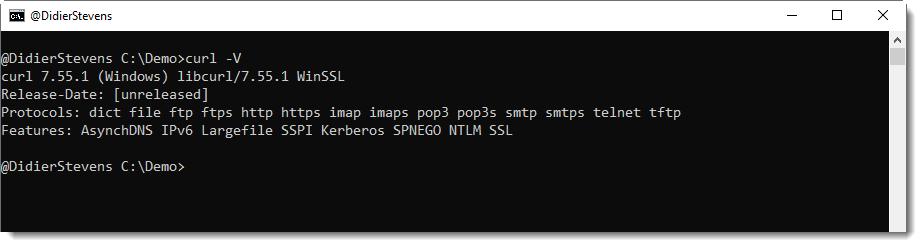
Windows’ built-in curl version supports SSPI. You can use the version option to check if your version of curl supports SSPI:


Quickpost info


Monday 11 May 2020

Update: XORSelection.1sc Version 5.0

Filed under: My Software,Update — Didier Stevens @ 0:00

XORSelection is a 010 Editor script I wrote some time ago, and it is included in the 010 Editor script repository. You provided it with an XOR key (ASCII or HEX), and then it will XOR-encode the file open in 010 Editor (or a selection of that file).

This new version brings options.

The input box of XORSelection can still be used to provide an ASCII key (e.g. Secret) or an HEX key (e.g. 0x536563726574), and the program will behave like before.

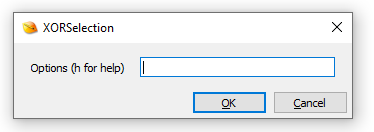
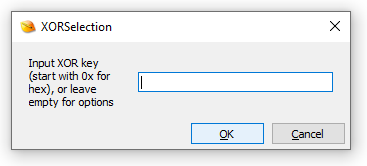
But if you provide no input and click OK, a second input box will be displayed, to input options (prior versions display an error message).

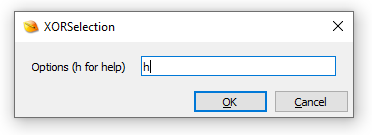
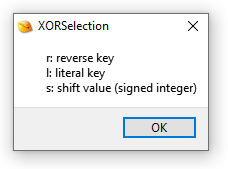
If you type h, you’ll get a simple help dialog, and then the program will terminate:

The options you can enter are r, l and/or s.

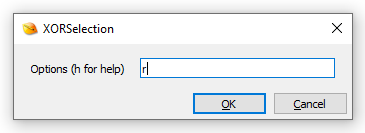
Use option r (reverse key) if the key has to be reversed before being used. Example: Secret -> terceS.

I introduced this option because I regularly need to use little-endian 4-byte XOR keys.

Use option l (literal key) if you need to use an ASCII key that starts with 0x (otherwise this key will be parsed as an HEX key).

Option s (shift) can be used to shift the key.

Here is an example to explain the shift option: assume the key is Secret, and that you want to decode a selection of an encrypted file. That selection will most likely not align with the key (e.g. the first byte of the selection was not encoded with the first byte of the key): lets assume you need to start decoding from the 3rd byte of the key: then you need a shift to the right of 2 positions, e.g. option s2. Remark that you can also shift to the left, then you use a negative integer, for example s-1.

XORSelection_V5_0.zip (https)
MD5: 0C2776C7E02235C4949A81AAEF079F66
SHA256: 4F82BC180264FC21802A43E2E5B078EDA7B24FC655815A37948317E8F043A5CA

Saturday 9 May 2020

Quickpost: Go: Building For Multiple Operating Systems

Filed under: Quickpost — Didier Stevens @ 11:34

To compile a Go program for multiple operating systems on a single machine, set environment variables GOOS and GOARCH accordingly.

GOOS (Go Operating System):

  • set GOOS=windows
  • set GOOS=linux
  • set GOOS=darwin

GOARCH (Go Architecture):

  • set GOARCH=386
  • set GOARCH=amd64

More values here.

Example program:

package main

import "fmt"

func main() {
	fmt.Printf("hello, world\n")
}

Build command on Windows for Linux 32-bit ELF file:
set GOOS=linux
set GOARCH=386
c:\Go\bin\go.exe build -o program.exe program.go


Quickpost info


Monday 4 May 2020

Quickpost: Empty ZIP File

Filed under: Quickpost — Didier Stevens @ 0:00

As a reminder to myself, here is the hexdump of an empty ZIP file: 50 4B 05 06 00 00 00 00 00 00 00 00 00 00 00 00 00 00 00 00 00 00

And here is the cut-bytes.py command to generate an empty ZIP file:

C:\Demo>cut-bytes.py -a : #e#’PK’+0x0506+repeat(0x12,0x00)
00000000: 50 4B 05 06 00 00 00 00 00 00 00 00 00 00 00 00 PK…………..
00000010: 00 00 00 00 00 00 ……


Quickpost info


Sunday 3 May 2020

Overview of Content Published in April

Filed under: Announcement — Didier Stevens @ 10:40

Here is an overview of content I published in April:

Blog posts:

YouTube videos:

Videoblog posts:

SANS ISC Diary entries:

NVISO blog posts:

Thursday 30 April 2020

Update: zipdump.py Version 0.0.19

Filed under: Encryption,My Software,Update — Didier Stevens @ 0:00

This new version of zipdump uses module pyzipper in stead of build-in module zipfile.

pyzipper supports AES encryption. It is not a built-in module, and needs to be installed (with pip for example). pyzipper does not support Python 2.

If module pyzipper is not installed, zipdump will fall back to module zipfile.

zipdump_v0_0_19.zip (https)
MD5: 6DDE072811D4B44B15D0B8EE4E7B4C03
SHA256: EB38D57E63B12EFAC531B4F0BA866BF47CAEC7F64E0C3CCF4557476FFF1C6226

Monday 27 April 2020

NVISO Innovation Coin

Filed under: Announcement,Hacking — Didier Stevens @ 0:00

I received an Innovation Coin for the research I conduct at NVISO.

An important element in research, that doesn’t get much (public) attention, is failure.

When you perform research, know that many of the things you will try, will fail: they will not lead to the desired outcome. This is inherent to research.

Publishing failed research is useful, if only to avoid others taking the same, dead-end path. And maybe to inspire future researchers to find other paths.


I would like to show an example of some simple research I did recently, that didn’t produce the desired outcome.


While adding a new feature to my zipdump.py tool, I got the idea to bypass anti-virus detection of a payload by putting it inside the comment of a ZIP archive.

The last record in a ZIP file, is the end-of-central-directory (EOCD) record. In normal situations, this record marks the end of the ZIP file: there is no data beyond this record. One of the last fields in this record, is the comment-length field. If there is no comment (most ZIP files have no comment), the comment-length field is zero and it it the last field in the record. So it marks the end of the ZIP file.

If there is a comment, the comment-length contains the length (in bytes) of the comment, and the comment itself is the last field in the record (right after the comment-length field).

Here is a binary view of the EOCD record of a ZIP file without comment. The comment-length field (2 bytes, little-endian) is equal to zero:

And here is an EOCD record with a comment: 18 bytes long (0x12). The comment-length field (2 bytes, little-endian) is equal to 0x12, and the comment itself is right after this field:
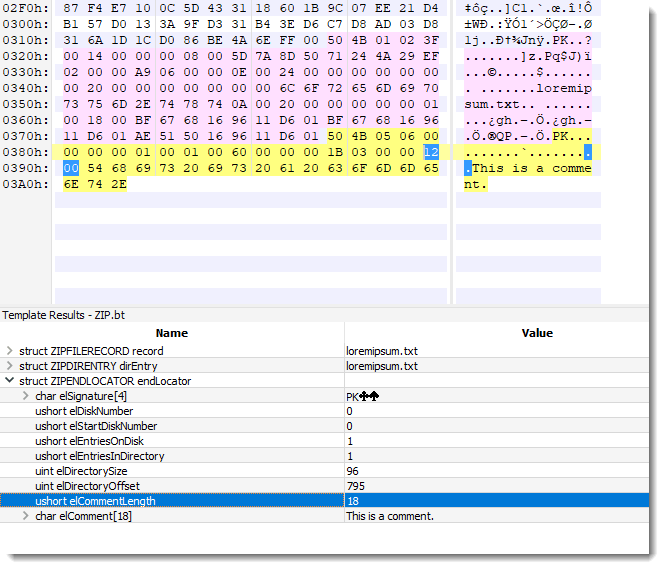
I created a ZIP file with the mimikatz driver as comment. Since the comment-length field is 2 bytes long, a comment can not be longer than 65536 bytes (0xFFFF). Hence I couldn’t use mimikatz.exe (it’s larger than 64KB) and had to use mimikatz.sys (33KB).

The version of mimikatz.drv I used has 55/70 detections on VirusTotal at time of writing, and stored inside a ZIP file, it has 43/62 detections.

A ZIP file containing a simple text file has 0 detections.

And the same ZIP file with mimikatz.sys as a comment, has 13/60 detections.

Here is a binary view of that file:

From these results, I could conclude that this is indeed a valid method to bypass static detection by several anti-virus products, and that my research yielded a useful bypass method.

However, I also created a file where mimikatz.sys is just appended to that ZIP file containing a text file. Not as a comment, just appending one file to another. And here the detection rate on VT is just 4/61.

This is a simpler and better method, one that is already known and used by many actors on the Internet.


Remark that I used VirusTotal here for quick results, but that the anti-virus products on VirusTotal are limited in their detection capability, compared to the same AVs deployed on endpoints.
Sunday 26 April 2020

Quickpost: My SpiderMonkey’s Cheat Sheet

Filed under: My Software,Quickpost — Didier Stevens @ 8:27

I have a modified version of SpiderMonkey, Mozilla’s (old) JavaScript parser, that helps me with JavaScript analysis.

Details here.

js.exe -e “document.output(‘x’);” sample.js
zipdump.py -s 1 -d sample.js.zip | js.exe -e “document.output(‘a’);” –
zipdump.py -s 1 -d sample.js.zip | js.exe -e “document.output(‘d’);” –
zipdump.py -s 1 -d sample.js.zip | js.exe -e “document.output(‘X’);” –
zipdump.py -s 1 -d sample.js.zip | js.exe -e “document.output(‘A’);” –
zipdump.py -s 1 -d sample.js.zip | js.exe -e “document.output(‘D’);” –
zipdump.py -s 1 -d sample.js.zip | js.exe -e “document.output(‘f’);” –
zipdump.py -s 1 -d sample.js.zip | js.exe –

Tuesday 21 April 2020

Handling Diacritics

Filed under: My Software — Didier Stevens @ 0:00

In many languages, letters (basic glyphs) can have accents (diacritics).

Take the common French given name André. It is written with a letter e with an acute accent.

A colleague had to create a list of email addresses from a list of names (given name + surname). Some of the names had letters with accents: these accents had to be removed to keep the basic letter, in order to form a list of email addresses. For example, “andré” had to be converted to “andre”.

I found the Python module Unicode, and told my colleague he could use that module together with my python-per-line.py to generate his list. It turned out I had to make a change to my python-per-line.py tool first, so that it would handle Unicode input properly.

It works as follows. Take this Unicode text file:

Using unidecode method unidecode with python-per-line.py is done like this:

Remark that “é” has been converted to “e”.

Here is a list of names:

And here is the command to convert this list to email addresses:

c:\python37\python python-per-line.py –encoding utf-16 -e “import unidecode” “‘.’.join(unidecode.unidecode(line).lower().split(‘ ‘))+’@target.tld'” unicode-names.txt

Remark that personal names might be more complex than the simple case of “given name + surname”, and that the Python expression might have to be adapted accordingly.

python-per-line_V0_0_7.zip (https)
MD5: 1353108BE499E07745A409568940977F
SHA256: 0086B3780C768717072AC705A0FFEFFA5DD74565B36D4795813BF89E10F88240

Monday 20 April 2020

Update: python-per-line.py Version 0.0.7

Filed under: My Software,Update — Didier Stevens @ 0:00

This new version of python-per-line.py, a utility to execute a Python expression for every line in its input text files(s), adds option –encoding to handle encodings like Unicode (Python 3.7 required).

python-per-line_V0_0_7.zip (https)
MD5: 1AF491C2AD45E7ADB83F121B40F60BFB
SHA256: 5CB1E7C17EE359090E9E7168692CF00347E9815DC47CCCA14A2B4C974832510B

« Previous PageNext Page »

Blog at WordPress.com.