Didier Stevens

Sunday 6 December 2020

Update: pecheck.py Version 0.7.12

Filed under: My Software,Update — Didier Stevens @ 13:28

This new version of my PE file analysis tool pecheck.py brings more info when locating PE files inside arbitrary files (option -l P).

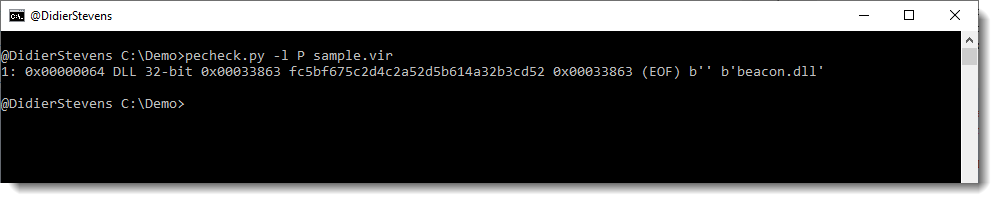
2 columns are added to the list of located PE files: original filename (version information) and DLL name (export section).

This can be used, for example, to detect Cobalt Strike beacons inside process dumps. Like in the following example, where the DLL name is beacon.dll:


pecheck-v0_7_12.zip (https)
MD5: 0AF2A99DD5AF742C9B688466EE3087C5
SHA256: 10B3B6903AB52381F7C8687F8284270CE060983CA001B4FC5DD88174744B705F

Saturday 5 December 2020

Update: oledump.py Version 0.0.56

Filed under: My Software,Update — Didier Stevens @ 0:00

This new version of oledump includes a few Python 3 fixes, and an update version of plugin_biff.py

plugin_biff now detects BIFF5/BIFF7 format and reports the file encryption mode (FILEPASS record).

oledump_V0_0_56.zip (https)
MD5: B26A75D36F3D47611F1D98200739EBB8
SHA256: C6C691E021273E75741EB1163F7FB70743EF2EC07C710EE7F15DFF513E38DAD4

Friday 4 December 2020

Overview of Content Published in November

Filed under: Announcement — Didier Stevens @ 11:04

Here is an overview of content I published in November:

Blog posts:

YouTube videos:

Videoblog posts:

SANS ISC Diary entries:

Sunday 29 November 2020

Update: emldump.py Version 0.0.11

Filed under: My Software,Update — Didier Stevens @ 21:50

This is the Python 3 version of my email file analysis tool (eml).

emldump_V0_0_11.zip (https)
MD5: 09408ED0C2183178BEA71459CE001995
SHA256: 01B3543CCBAE806E1536BF55E62DF7D30885737909DB4322348AC521138660CC

Saturday 28 November 2020

Update: disitool.py Version 0.4

Filed under: My Software,Update — Didier Stevens @ 11:08

This is a Python 3 update for my disitool.

disitool_v0_4.zip (https)
MD5: 3A41D8805340716913FAECE7C79B10A7
SHA256: 51EBFB0759FEEA69FFFB643659FD74DC5043338719A91CE36E427D175196661A

Wednesday 18 November 2020

Decrypting With translate.py

Filed under: Encryption,My Software — Didier Stevens @ 0:00

You’ve probably encountered malicious PowerShell scripts with an encrypted payload (shellcode, PowerShellScript, …).

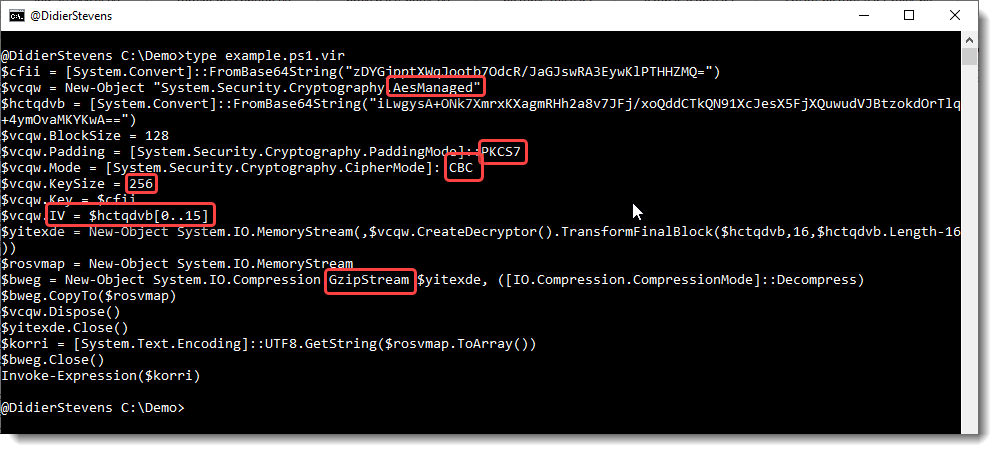
Here is an example that I created:
Update: this example is on pastebin: https://pastebin.com/QUGiWTHj

There are 2 BASE64 strings in this script. The first one (cfr. variable $cfii) is the encryption key. The second one (cfr. variable $hctqdvb) is the payload.

The script uses AES encryption, with a 256-bit key, CBC mode, PKCS7 padding and an initialization vector (IV) that is stored in the first 16 bytes of the payload (0..15).

And after the payload is decrypted, it has to be decompressed with the Gzip algorithm.

With base64dump.py, I can find the 2 BASE64 strings in the PowerShell script:

I select the second BASE64 string (payload) to pipe into translate.py, using the following small Python script (decrypt.py) to do the decryption:

from Crypto.Cipher import AES
from Crypto.Util import Padding

def Decrypt(data):
    iv = data[0:16]
    ciphertext = data[16:]
    key = binascii.a2b_base64(keybase64)
    oAES = AES.new(key, AES.MODE_CBC, iv)

return Padding.unpad(oAES.decrypt(ciphertext), 16)

This small script uses crypto functions from pycryptodome.

I use translate.py in fullread mode (-f –fullread, to “translate” the file in a single step, in stead of byte per byte) and use function Decrypt to decrypt the block of data, like this:

I load the script decrypt.py with option -s, and I pass the key as a BASE64 string via option -e.

The output is non-printable bytes, because the decrypted payload is Gzip compressed. I use translate.py again to do the decompression:

And now the “payload” I used is decrypted and decompressed: “This is a test!”
 

Sunday 15 November 2020

oledump Indicators

Filed under: maldoc,My Software — Didier Stevens @ 13:51

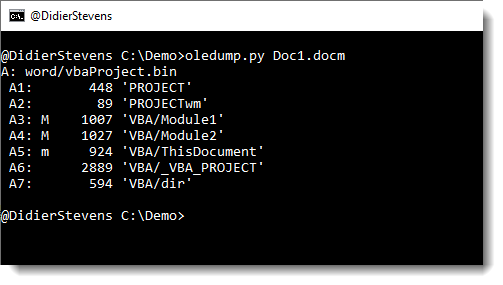
Each stream and storage can have an indicator in oledump.py‘s output:

You’ll probably know M and m: they are indicators that appear often.

Here is an overview of all possible indicators:

  • M: Macro (attributes and code)
  • m: macro (attributes without code)
  • E: Error (code that throws an error when decompressed)
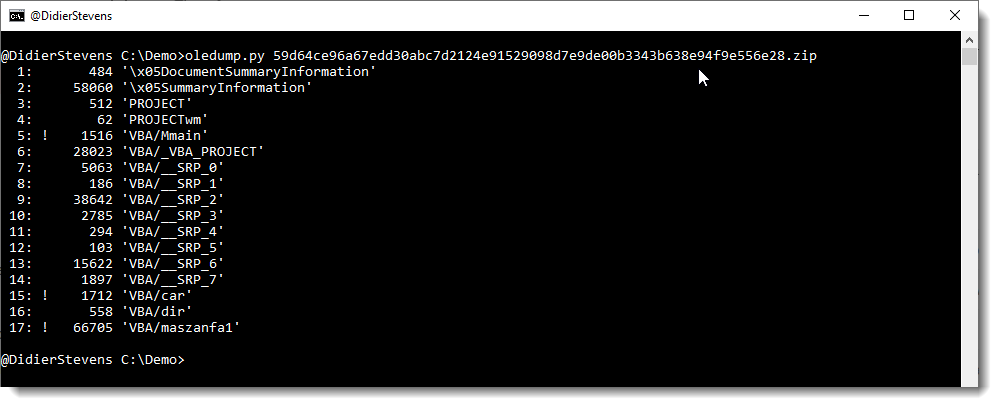
  • !: Unusual macro (code without attributes)
  • O: object (embedded file)
  • .: storage
  • R: root entry


Update: oledump.py Version 0.0.55

Filed under: My Software,Update — Didier Stevens @ 13:49

This new version of oledump.py brings extra JSON support and a new indicator.

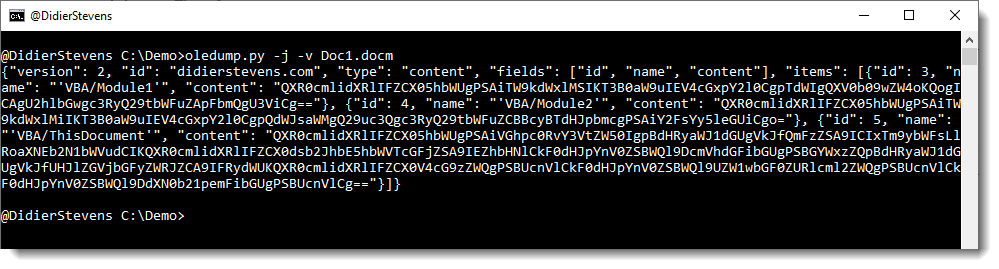
Existing option -j (–jsonoutput) produces JSON output: a JSON object with the content of each individual stream (BASE64 encoded).

This option (-j) can now be used together with option -v (–vbadecompress) to produce a JSON object with the VBA code (BASE64 encoded) of each VBA module stream.

And there is a new indicator (!) :

This indicator is used for VBA module streams for which oledump is not able to recognize “normal” VBA source code (e.g. starting with something else than attributes). Here is an example of a sample that would cause this ! indicator to appear: AV Cleaned Maldoc.

oledump_V0_0_55.zip (https)
MD5: 499B66DC3BAF86BDA4BC0370E3C18A1A
SHA256: ABEABFF0F1F5AA2239AFCDE73A676D4E8D9BA2F82C03B8663FFAB6F8D3A360E7

Wednesday 11 November 2020

Update: translate.py Version 2.5.10

Filed under: My Software,Update — Didier Stevens @ 0:00

This is a Python 3 bug fix version.

translate_v2_5_10.zip (https)
MD5: DB9574D664257263C51FE7C74C7B281E
SHA256: E8993B3F2C25A92A9F4583636E1CEF79D79649B29FFF56EAA9AF8A30FCF9B9A6

Monday 9 November 2020

The Qwerty Effect And Passwords

Filed under: technology — Didier Stevens @ 0:00

I recently learned about the Qwerty effect on a podcast: baby names are more likely to contain characters (percentual) from the right hand on a Qwerty keyboard than characters from the left hand.

This got me wondering: what about passwords?

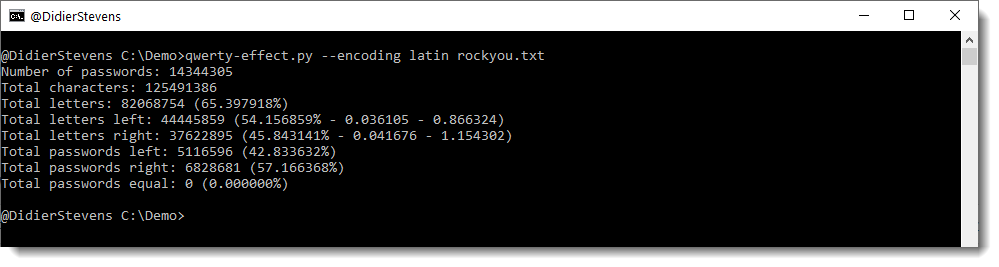
I wrote a Python program and let it run on the rockyou password list:

There is a qwerty effect in this list: 57% of the passwords have more letters from the right-side, and 43% from the left-side.

To decide if a password is “left” or “right”, I count the letters per password (I ignore all other characters), and if the ratio of “left” letters to the total amount of letters is higher than the ratio of “right” letters to the total amount of letters, then the password is “left”. And vice versa.

Remark that I don’t know if these passwords were created by users with a qwerty keyboard. It could be another layout. But for some layouts, the set of left and right letters doesn’t change, as with azerty for example.


« Previous PageNext Page »

Blog at WordPress.com.