Friday 4 June 2021
Overview of Content Published in May
Sunday 30 May 2021
New Tool: cs-dns-stager.py
cs-dns-stager.py is a quick & dirty tool I wrote to retrieve a Cobalt Strike DNS beacon from its server, if you only have the IP address of said server.

If you want to know more about Cobalt Strike and DNS, watch this video I recorded:
Tuesday 25 May 2021
Update: base64dump.py Version 0.0.14
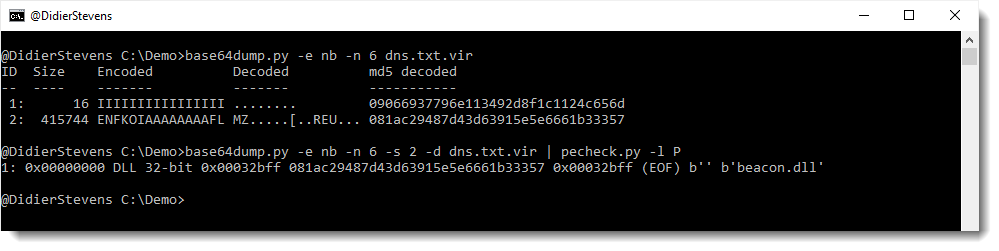
This new version of base64dump.py supports a new encoding: NETBIOS Name encoding.
NETBIOS Name encoding is very similar to hexadecimal encoding: in stead of hexadecimal digits 0-9 and a-f, letters A-P are used.
I encountered this in DNS TXT records of a Cobalt Strike DNS stager. More on that later.
MD5: 35BF4900BED40E828887C7601F9C8751
SHA256: 2F58F630D9B12D2B70CECF35728096A247890808E44DAB9C94400A073D5E29BF
Sunday 23 May 2021
Update: re-search.py Version 0.0.17
This new version of re-search.py adds gzip support and filtering of private IPv4 addresses:

MD5: 8945F435BDA03D73EF7A2BA1AA64A65E
SHA256: 0D74709B9F26FC7F6EEADAEE1BAA3AF7AADAA618F88B1C267BA5A063C8E3D997
Saturday 22 May 2021
Update: 1768.py Version 0.0.6
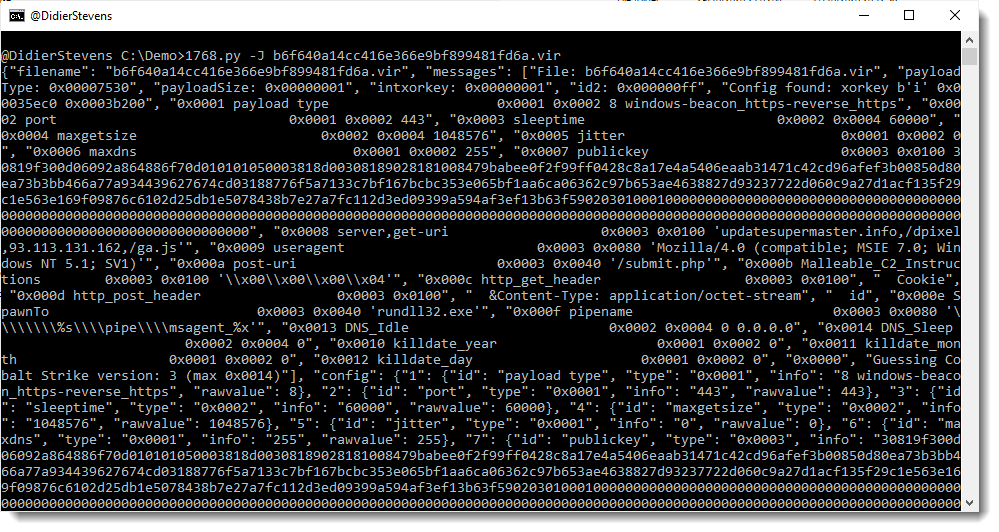
This new version of 1768.py, my tool to analyze Cobalt Stike beacons, has fixes, support for more encodings, and an option to output the config in JSON format.
MD5: EB9C949BB7B5DD3EF9ECEBF7F3C21184
SHA256: 3EC0BB7B41CC5C0E1534F09BAE67D62B220F8D83A7F02EC0F856F8741F86EB31
Sunday 2 May 2021
Overview of Content Published in April
Here is an overview of content I published in April:
Blog posts:
YouTube videos:
- YARA and CyberChef
- YARA and CyberChef: ZIP
- Decoding Cobalt Strike Traffic
- Lua CSV Wireshark Dissector
- The Security Toolsmith (NVISO Brown Bag 2021)
Videoblog posts:
- YARA and CyberChef
- YARA and CyberChef: ZIP
- Decoding Cobalt Strike Traffic
- Lua CSV Wireshark Dissector
- The Security Toolsmith (NVISO Brown Bag 2021)
SANS ISC Diary entries:
Monday 26 April 2021
Quickpost: Decrypting Cobalt Strike Traffic
I have been looking at several samples of Cobalt Strike beacons used in malware attacks. Although work is still ongoing, I already want to share my findings.
Cobalt Strike beacons communicating over HTTP encrypt their data with AES (unless a trial version is used). I found code to decrypt/encrypt such data in the PyBeacon and Geacon Github repositories.
This code works if you know the AES key: which is not a problem in the use cases of the code above, as it is developed to simulate a beacon. Beacons generate their own AES key, and thus these beacon simulations also generate their own AES key.
But what if you’re analyzing real beacons used in malware attacks? How do you obtain the AES key?
I found a way to extract the keys (AES and HMAC) from process memory of a running beacon.
I use the following procdump command to prepare process memory dumps:
procdump -mp -w -s 1 -n 5 malware.exeThen I start the beacon malware.exe in a malware analysis virtual machine while capturing traffic with Wireshark.
My new tool cs-extract-key.py looks in the dumped process memory for the unencrypted (RSA encryption) metadata that a beacon sends to the C2. This metadata contains the AES en HMAC keys.
Example:

This method does not always work: the metadata is overwritten after some time, so the process dump needs to be taken quickly after the beacon is started. And there are also cases were this metadata can not be found (I suspect this is version bound).
For those cases, my tool has another way of obtaining the keys. I extract the encrypted data of the first post of the beacon to the C2 (this is called a callback in the PyBeacon code):

And then I provide this to my tool, together with the process dump. My tool will then proceed with a dictionary attack: extract all possible AES and HMAC keys from the process dump, and try do authenticate and decrypt the callback. If this works, the keys have been found:

And once I have obtained the keys, I can pass them to my traffic decoding program that I have updated to include decryption (and that I have renamed to cs-parse-http-traffic.py):

Sunday 25 April 2021
isodump.py
This is a new tool (beta) to analyze ISO files. I made this for a webinar I presented: a demo on how to use my templates to create your own tools.
isodump.py is in my Github beta repository.
The complete webinar is here, if you want to jump directly to the demo where I explain how to make a tool like isodump.py, go here.
Monday 19 April 2021
Lua CSV Wireshark Dissector
In December 2020 I provided online Wireshark training to one of our NVISO clients. During the second day, when we cover the development of custom dissectors written in Lua, a question about CSV data came up. When the data exchanged over TCP, for example, has the CSV format (fields separated by a separator), how can I write a dissector for that?
While answering the question, I realized that this is a case that could be solved with a generic dissector. And the same night, I developed the first version.
Say you have a packet capture with a TCP connection. And the data exchanged over TCP consists of different fields, separated by a separator character.
Like this example:

Because Wireshark does not recognize the protocol used in this TCP connection, the content is just displayed as data.
With Lua dissector csv-dissector.lua, the data is dissected into different fields:

The separator character (pipe character | in this example) is something that can be configured:
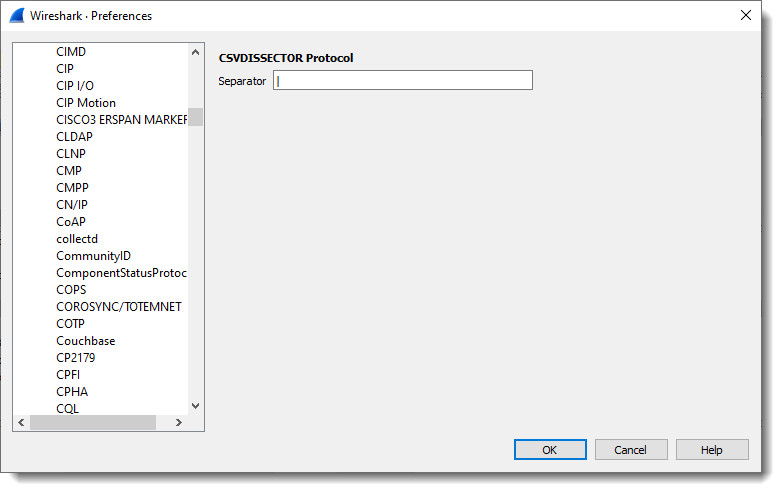
Other changes can be made, but these have to be made in the code of the dissector itself:
- Changing the port
- Changing the number of fields
- Change the name of the fields

Download:
csv_dissector_V0_0_2.zip (https)
MD5: E8CCE089FB0574775AB39DADED3B7AA2
SHA256: 5C8DC0F2BB97AA660E2576B23379B6F12FB88126F0EFC7A2F69E76EBA8E782BD
Sunday 18 April 2021
metatool.py
metatool.py is a tool to help with the analysis of Metasploit or Cobalt Strike URLs.
More info can be found in my SANS Internet Storm Center diary entry “Finding Metasploit & Cobalt Strike URLs“.
It is still in my Github beta repository here.

 Didier Stevens