This new version adds a sort function to sort email addresses by domain first.
sortcanon_V0_0_2.zip (http)MD5: ED6DBE384707778E765C9BD6B6880C05
SHA256: 190922F347AC1B32D0CE503D1763F27A250D9BFDD15CB911EA4435BAB7E69CD3
This new version adds a sort function to sort email addresses by domain first.
sortcanon_V0_0_2.zip (http)This new version adds JSON input support, allowing,for example, to detect encoded payloads inside the registry:
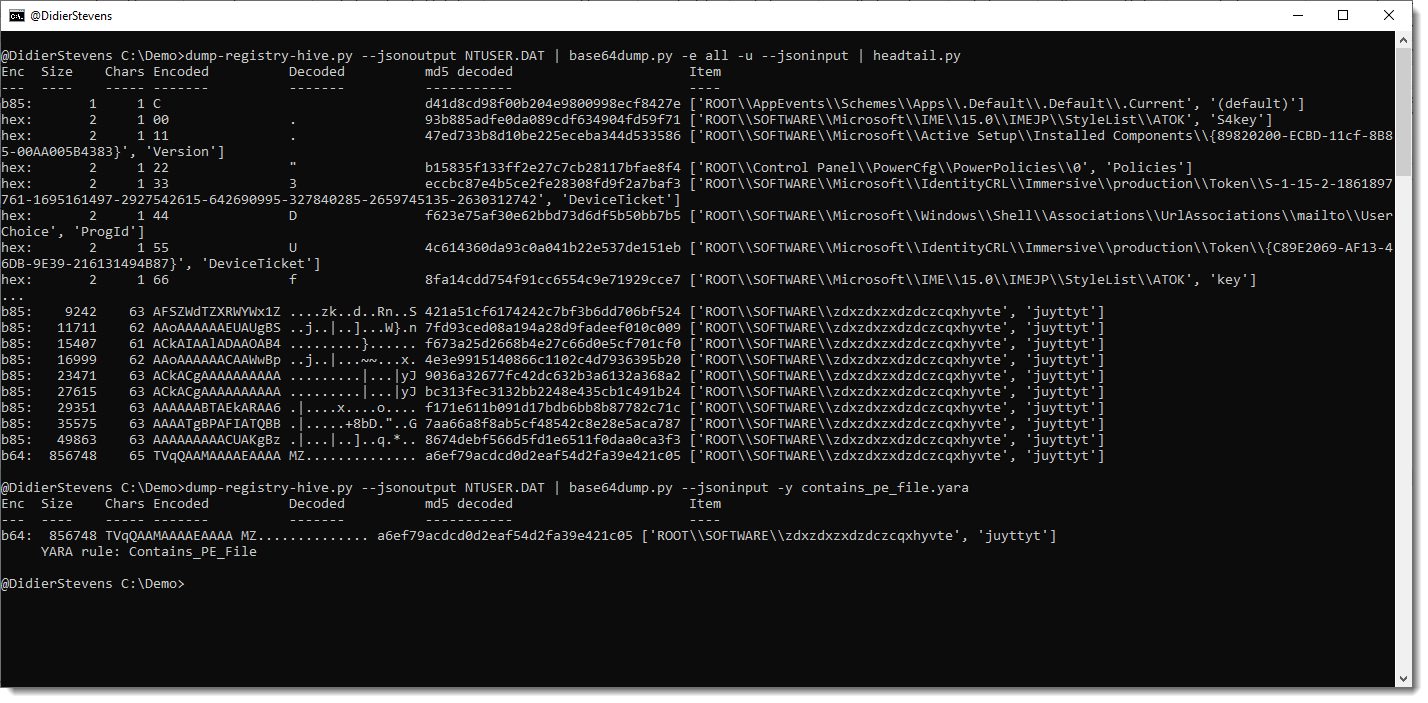
More info in an upcoming blog post.
base64dump_V0_0_23.zip (http)I did some tests with my USB chargers: how much power do they consume when plugged into a power socket without charging any device (standby)?
The devices I tested are:
I connected each one to a powermeter and let it measure the standby power consumption for 24 hours.
This is the result:
| Model | 24 hours (Wh) | 1 hour (Wh) | 1 year (Wh) |
| Apple A1357 | 2,8847 | 0,1202 | 1052,9155 |
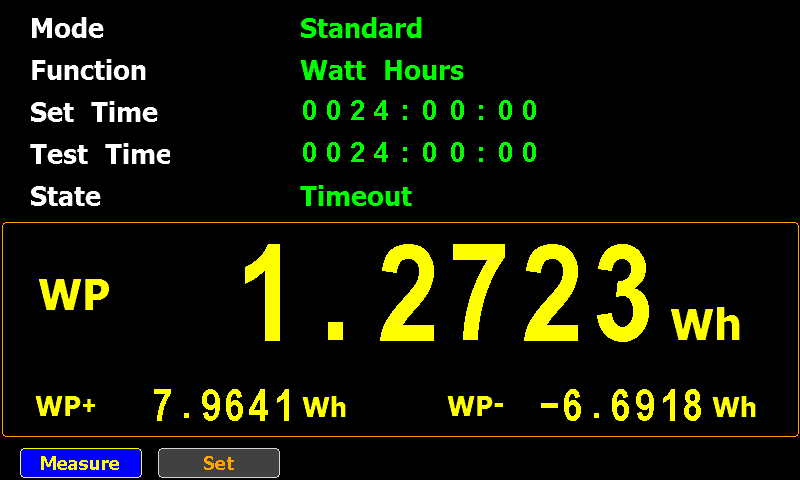
| Apple A2347 | 1,2723 | 0,0530 | 464,3895 |
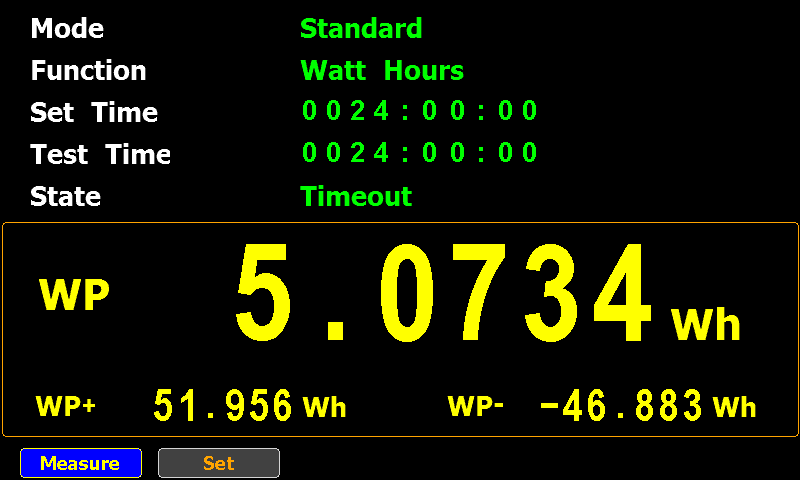
| Anker A2053 | 5,0734 | 0,2114 | 1851,7910 |
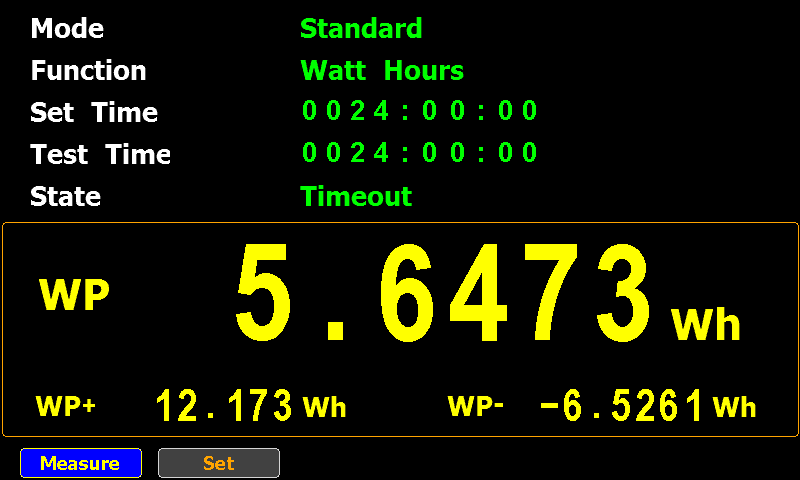
| No-brand: Chacon EMP604USB | 5,6473 | 0,2353 | 2061,2645 |
24 hours is the measured data, the “1 hour” and “1 year” columns are calculated based on the 24 hours data.
The no-brand USB charger consumes the most: around 2 kWh per year, which is still less than a switched off Philips Hue lamp.
Using the same cost as for the Philips Hue lamp, that no-brand charger costs me around €1 if I would leave it plugged in for a whole year without letting it charge anything.


This is the release of simple_listener.py, a Python program that can accept TCP and UDP connections and react according to its configuration. It has evolved from my beta program tcp-honeypot.py, that I will no longer maintain.
Everything you could do with tcp-honeypot, can be done with simple_listener.
I use simple_listener now whenever I need a server that listens for incoming TCP and/or UDP connections. For example, I have a configuration that can accept connections from Cobalt Strike beacons using leaked private keys.
simple_listener has a full man page, explaining all configuration items and options.
simple_listener_v0_1_2.zip (http)This new version of format-bytes.py adds a feature to search for a range of integers:

#iv5#6080 means: look for an integer (i) equal to 6080 with a variation of 5 (v5), e.g., look for integers between 6075 and 6085.
format-bytes_V0_0_14.zip (http)This new version contains a Python 3 fix.
cut-bytes_V0_0_15.zip (http)I added code to John the Ripper to crack PDF owner passwords (JtR cracks PDF user passwords only).
Source code can be found here.
Compiled Windows (Cygwin) and Linux (Ubuntu) executables can be found here.
This change introduces a new format: $pdfo$.
There is no tool for the moment to create this format. Just use pdf2john.pl to create a $pdf$ hash, and then change it into a $pdfo$ hash. To crack the owner password, one needs to recover the user password first.
This is the illustrated process:

There will be a PR for this change.
Cracking PDF owner passwords is just an academic exercise (writing this code was also just an exercise), as tools like QPDF can decrypt PDFs encrypted with a PDF owner password only without requiring the cleartext PDF owner password as argument.
I recently created 2 blog posts with corresponding videos for the reversing of encodings.
The first one is on the ISC diary: “Decoding Obfuscated BASE64 Statistically“. The payload is encoded with a variation of BASE64, and I show how to analyze the encoded payload to figure out how to decode it.
And this is the video for this diary entry:
And on this blog, I have another example, more complex, where the encoding is a variation of hexadecimal encoding, with some obfuscation: “Another Exercise In Encoding Reversing“.
And here is the video:
I also recorded a video for this blog post.
In this blog post, I will show how to decode a payload encoded in a variation of hexadecimal encoding, by performing statistical analysis and guessing some of the “plaintext”.
I do have the decoder too now (a .NET assembly), but here I’m going to show how you can try to decode a payload like this without having the decoder.
The payload looks like this:

Seeing all these letters, I thought: this is lowercase Netbios Name encoding. That is an encoding where each byte is represented by 2 hexadecimal characters, but the characters are all letters, in stead of digits and letters. Since my tool base64dump.py can handle netbios name encoding, I let it try all encodings:

That failed: no netbios encoding was found. Only base64 and 2 variants of base85, but that doesn’t decode to anything I recognize. Plus, for the last 2 decodings, only 17 unique characters were found. That makes it very unlikely that it is indeed base64 or base85.
Next I use my tools byte-stats.py to produce statistics for the bytes found inside the payload:

There are 17 unique bytes used to encode this payload. The ranges are:
This is likely some form of variant of hexadecimal encoding (16 characters) with an extra character (17 in total).
To analyze and try to decode this, I’m making a custom Python program based on my Python template for processing binary files.
You will find this default processing code in the template:

I am replacing this default code with the following code (I will post a link to the complete program at the end of this blog post):

The content of the file is in variable data. These are bytes.
Since I’m actually dealing with letters only, I’m converting these bytes to characters and store this into variable encodedpayload.
The next piece of code, starting with “data = []” and ending with “data = bytes(data)”, will read two characters from the encodedpayload, and try to convert them from an hexadecimal byte to a byte. If that fails (ValueError), that pair of characters is just ignored.
And then, the last statement, I do an hexadecimal/ascii dump of the data that I was able to convert. This gives me the following:

That doesn’t actually make me any wiser.
Looking at the statistics produced by byte-stats.py, I see that there are 2 letters that appear most frequently, around 9% of the time: d and q.
I do know that the payload is a Windows executable (PE file). PE files that are not packed, contain a lot of NULL bytes. Character 0 is by far the most frequent when we do a frequency analysis of the hexadecimal representation of a “classic” PE file. It often has a frequency of 20% or higher.
That is not the case here for letters d and q. So I don’t know which letter represents digit 0.
Let’s make a small modification to the program, and represent each pair of characters that couldn’t be decoded as hexadecimal, by a NULL byte (data.append(0):

This code produces the following output:

And that is still not helpful.
Since I know this is a PE file, I know the file has to start with the letters MZ. That’s 4D5A in hexadecimal.
The encoded payload starts with ydua. So let’s assume that this represents MZ (4D5A in hexadecimal), thus y is 4, d is d, u is 5 and a is a.
I will now add a small dictionary (dSubstitute) with this translation, and add code to do a search and replace for each of these letters (that’s the for loop):

This code produces the following output:

Notice that apart from MZ, letters DO also appear. DO is 444F in hexadecimal, and is part of the well-known string found at the beginning of (most) PE files: !This program cannot be run in DOS mode
I will know use this string to try to match more letters with hexadecimal digits (I’m assuming the PE file contains this string).
I add the following lines to print out string “!This program cannot be run in DOS mode” in hexadecimal:

This results in the following output:

Notice that the letter T is represented as 54 in hexadecimal. Hexadecimal digits 5 and 4 are part of the digits we already decoded. 5 is u and and 4 is y.
I add code to find the position of the first occurrence of string uy inside the encoded payload:

And this is the output:

Position 86. That’s at the beginning of the payload, so it’s possible that I have found the location of the encoded string “!This program cannot be run in DOS mode”.
I will now add code that does the following: for each letter of the encoded string, I will lookup the corresponding hexadecimal digit in the hexadecimal representation of the unencoded string, and add this decoding pair to the dictionary. If the letter that I add to the dictionary is already present in the dictionary, I compare the stored hexadecimal digit for that letter with the one I looked up, and if they are different, I generate an exception. Because if that happens, I don’t have a one-to-one relationship, and my hypothesis that this is a variant of hexadecimal, is wrong. This is the extra code:

After completing the dictionary, I do a return. I don’t want to do the decoding yet, I just want to make sure that no exception is generated by finding 2 different hexadecimal digits. This is the output:

No exception was thrown: we have a one-to-one relationship.
Next I add 2 lines to see how many and what letters I have inside the dictionary:

This is the output:

That is 14 letters (we have 17 in total). That’s a great result.
I remove the return statement now, to let the decoding take place:

Giving this result:

That is a great result. Not only do I see strings MZ and “!This program cannot be run in DOS mode”, but also PE, .text, .data, .rdata, …
I am now adding code to see which letters I’m still missing:

Giving me this output:

The letters I still need to match to hexadecimal digits are: b, c and q.
I want to know where these letters are found inside the partially decoded payload, and for that I add the following code:

Giving me this result:

The letter q appears very soon: as the 6th character.
Let’s compare this with the start of another, well-known PE file: notepad.exe:

So notepad.exe starts with 4d5a90000300000004
And the partially decoded payload starts with: 4d5a9q03qq04
Let’s put that right under each other:
4d5a90000300000004
4d5a9q03qq04
If I replace q with 000, I match the beginning of notepad.exe.
4d5a90000300000004
4d5a90000300000004
I add this to the dictionary:

And run the program:

That starts to look like a completely decoded PE file.
But I still have letters b and c.
I’m adding some code to see which hexadecimal characters are left unpaired with a letter:

Output:

Hexadecimal digits b and c have not been paired with a letter.
Now, since a translates to a, d to d, e to e and f to f, I’m going to guess that b translates to b and c to c.
I’m adding code to write the decoded payload to disk:

And after running one more time my script, I’m using my tool pe-check.py to validate that I have indeed a properly decoded PE file:

This looks good.
From the process memory dump I have for this malware, I know that I’m dealing with a Cobalt Strike beacon. Let’s check with my 1768.py tool:

This is indeed a Cobalt Strike beacon.
The encoding that I reversed here, is used by GootLoader to encode beacons. It’s an hexadecimal representation, where the decimal digits have been replaced by letters other that abcdef. With an extra twist: while letter v represents digit 0, letter q represent digits 000.
The complete analysis & decoding script can be found here.

 Didier Stevens