Didier Stevens

Monday 30 September 2013

Bugfix virustotal-submit.py Version 0.0.2

Filed under: My Software,Update — Didier Stevens @ 13:12

This is a bugfix for my virustotal-submit.py program.

I fixed a bug in the error handling code for unreadable ZIP files.

virustotal-submit_V0_0_2.zip (https)
MD5: 1152A8507FE7A668DCDF5C44DEAD11DF
SHA256: D5A4E5C3E80F98D4A82A128D8C9DBA395C2B9CDFE9F37E2B0882904D47673CE5

Wednesday 18 September 2013

Update: pdf-parser V0.4.3

Filed under: My Software,PDF — Didier Stevens @ 20:20

There’s still time to register for my “Hacking PDF” training at Brucon next week.

I introduced a bug in pdf-parser version 0.3.8 that changed the behavior of the -w option (raw).

This new version is a fix for this bug.

pdf-parser_V0_4_3.zip (https)
MD5: 2220FFE37AEA36FC593AE33440385E76
SHA256: 1416624938359FDD375108D922350D1B7B0E41B3A40A48F778D6D72D8A405DE6

Friday 30 August 2013

Brucon Hacking PDF Training

Filed under: Announcement,Didier Stevens Labs,PDF — Didier Stevens @ 8:56

When you register before September 7th with discount code MC201305 you will get 5% discount.

What do you want from training? I want to gain knowledge. I designed my “Hacking PDF” training with this goal in mind.

“Hacking PDF” is a 2-day training focusing on the PDF language, not on reversing PDF readers. By attending this training, you will first acquire knowledge about the PDF language. And then we will use this knowledge to analyze malicious PDFs (day 1) and create PDFs for fun and profit (day 2).

Learning to use tools is nice, and learning new skills is interesting. But I want more. I also want to get a deep understanding of the subject. Because with this knowledge, I can develop new tools and invent new techniques.

On day one I explain the fundamentals of the PDF language. We take a look at several features of the language that malware authors use and abuse. And then we start analyzing PDFs. You learn to use my tools pdfid and pdf-parser on 20 simple PDF exercises. The exercise is to find the malicious behavior of the PDF, the goal is to gain understanding of PDF malware. And then we move on to the real deal: analyzing real, in-the-wild PDF malware.
On day two we use our understanding of the PDF language and PDF malware to create our own PDF files and modify existing PDF files. This is done with pure Python tools and other free tools. Adobe products are not used in this training, except to view PDFs. We will learn to do simple and smart fuzzing of PDFs, create PDFs that exploit vulnerabilities in PDF readers, embed files and PDFs, and a lot of other interesting hacks …

You can find a “Hacking PDF” slideshow here.

There are not many pre-requisites for this training:
1)    You don’t need to know anything about PDF, I will teach you what we need to know.
2)    We use Python scripts, but you don’t need to be a Python programmer. We will modify existing scripts, so a bit of programming knowledge like if statements and loops is enough.
3)    Not need to understand assembly or shellcode, we use a shellcode emulator. And I will provide you the shellcode for day 2, you do not need to write it yourself.
4)    You need to be at ease with the command-line
5)    A security mindset is an advantage 😉

When you register before September 7th with discount code MC201305 you will get 5% discount.

Saturday 24 August 2013

Quickpost: Proxy Cookies

Filed under: Forensics,Networking,Quickpost — Didier Stevens @ 11:20

Cookies set bij network proxies can be identified by their name.

BlueCoat proxy cookies start with BCSI-CS-.

Cisco IronPort proxy cookies start with iptac-. The string after iptac is the serial number of the device.

Google for these and you’ll find some examples.

More info later.


Quickpost info


Tuesday 13 August 2013

A Bit More Than A Signature

Filed under: Encryption,Forensics,Hacking,My Software — Didier Stevens @ 19:07

Soon I’ll release new versions of my Authenticode Tools.

Detecting extra data in the signature field is one of the new features. For example, it will analyze the size specified in the optional header data directory for security, the size specified in the WIN_CERTIFICATE structure and the size specified in the PKCS7 signature itself. These should be the same, taking into account some zero-byte padding.

In case you didn’t know: extra data can be added in the data directory that contains the signature, without invalidating the signature. My Disitool can do this.

With this new version of AnalyzePESig, I found some setup programs that contain extra data after the signature; data that seems to contain installation options for the installer. For example, the Google Chrome installer has this:

20130813-205011

As you can see, the size specified in the optional header data directory for security and the size specified in the WIN_CERTIFICATE structure are both 6272 bytes, but the size of the PKCS7 signature is 6079. So that leaves 181 extra bytes. You can see them here:

20130813-205744

And I found some other installers with extra data (config data or license information) in the signature directory: GotoMyPc, PowerGrep, RegexBuddy.

Sunday 4 August 2013

Quickpost: Rovnix PCAP

Filed under: Forensics,Malware,Networking,Quickpost — Didier Stevens @ 21:04

Microsoft’s Malware Protection Center has a blogpost on a version of Rovnix that uses its own TCP/IP stack.

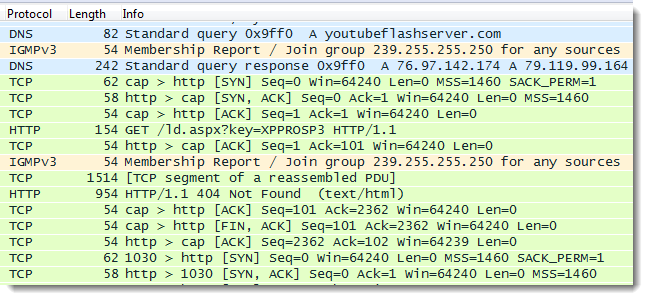
I used Wireshark to capture the network traffic generated by this sample when it is executed in a VMware guest.

20130804-225716

I ran the sample on a XP SP3 guest machine in VMware. The hostname is XPPROSP3 (this name will appear in the HTTP GET request).
The guest uses NAT.
I ran the Wireshark capture on my host machine on the VMware Virtual Ethernet Adapter.
I removed some traffic coming from my host machine (NetBIOS Name Service and DHCPv6 to be precise).

When I executed the sample on XPPROSP3, it rebooted after a few seconds.

The trace:
The 37 second gap between packet 6 and 7 is due to the reboot of XPPROSP3
Packet 44: DNS request for youtubeflashserver
There are 3 HTTP requests. Notice User-Agent FWVersionTestAgent in all 3 GET requests.
Packet 50: first GET request with hostname XPPROSP3 as a parameter. Response: 404
Packet 61: second GET request, malformed. Response: 400
Packet 70: third GET request, malformed. Response: 400

rovnix-capture-filtered.zip (https)
MD5: C941D1716B6248C3FBFB4DFFA8AD2E86
SHA256: 51EDA61199DD9EDC1E50C5A9B5A4B69F32DB74E90CF098849554C56217D06EFD


Quickpost info


Monday 29 July 2013

OHM2013

Filed under: Announcement — Didier Stevens @ 0:00

I’m attending OHM2013. To mark the occasion of this outdoor hacker conference taking place every 2 years, I’m doing a 20% promo on my workshop videos.

In case you missed it, I posted this during the weekend: MSI: The Case Of The Invalid Signature.

Friday 26 July 2013

MSI: The Case Of The Invalid Signature

Filed under: Forensics,Malware,Windows 7 — Didier Stevens @ 22:01

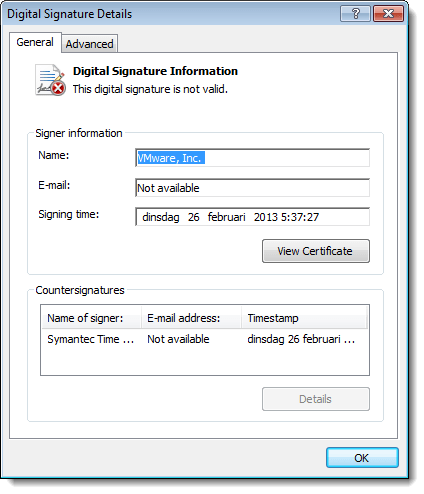
I found a suspicious file on a Windows XP machine. I was able to trace its origin back to a Windows Installer package (.msi). This package in c:\windows\installer had an invalid digital signature. Like this:

20130726-233848

Very suspicious.

A bit later I found another msi package containing the same suspicious file. But this time, the package had a valid digital signature. What’s going on?

After a deep dive into the internals of msi packages, I found the answer.

When an msi package is installed, it is cached inside the Windows Installer directory (%windir%\Installer). Prior to Windows Installer 5.0 (released with Windows 7), cached packages were stripped of their embedded cab files. But with digitally signed msi files, the signature remained inside the file: the digitally signed file was modified, hence the signature was invalidated. This behavior changed with Windows Installer 5.0: cached packages are no longer stripped, hence the signature remains valid.

This blogpost by Heath Stewart explains this change in more detail. Unfortunately, my Google-skills were not good enough to find this blogpost prior to my deep dive into msi files. Hindsight Googling FTW! 😉

Thursday 25 July 2013

Update: Lookup Tools

Filed under: My Software,Networking,Update — Didier Stevens @ 20:11

It looks like I didn’t release this update to my lookup tools.

lookup-hosts.py has a new argument: -R. This does a reverse lookup of the IP addresses (thus after it resolved the hostname).

20130725-220124

And now you can also use letters as a counter: test-[a-z].com

lookup-tools_V0_0_2.zip (https)
MD5: 310904722F900FA34C567FC38634124E
SHA256: 85626574A99BF4D2AB786D8C2FF5B8F6649F1FC7410F1786A24EF0201AAF64AA

Thursday 18 July 2013

Update: js-unicode-unescape.1sc

Filed under: 010 Editor,My Software,Update — Didier Stevens @ 18:36

Because I had to use a workaround in my js-unicode-unescape.1sc script to copy an array of bytes to the clipboard, I asked the 010 Editor developers if they could add a function that does exactly this.

They included this new function, CopyBytesToClipboard, in their new version 5.0.

Here is a new version that uses this function:
js-unicode-unescape_v0_0_2.zip (https)
MD5: 6200C4F235CA527E8C0DCD5076CB1C09
SHA256: 2CACC9EE1BB1D1BC4C9FABC6EC3B3440CFF304AA560966B0B531279C369549BB

« Previous PageNext Page »

Blog at WordPress.com.