Didier Stevens

Monday 27 February 2012

Teensy PDF Dropper Part 2

Filed under: Hacking,My Software,PDF — Didier Stevens @ 0:00

Last year I showed how to use a Teensy micro-controller to drop a PDF file with embedded executable. But I was limited to a file of a few kilobytes, because of the Arduino programming language I used for the Teensy.

In this post, I’m using WinAVR and I’m only limited by the amount of flash memory on my Teensy++.

First we use a new version of my PDF tools to create a PDF file with embedded file:

Filter i is exactly like filter h (ASCIIHexDecode), except that the lines of hex code are wrapped at 512 hex digits, making them digestible to our C compiler.

Another new feature of my make PDF tools is Python 3 support.

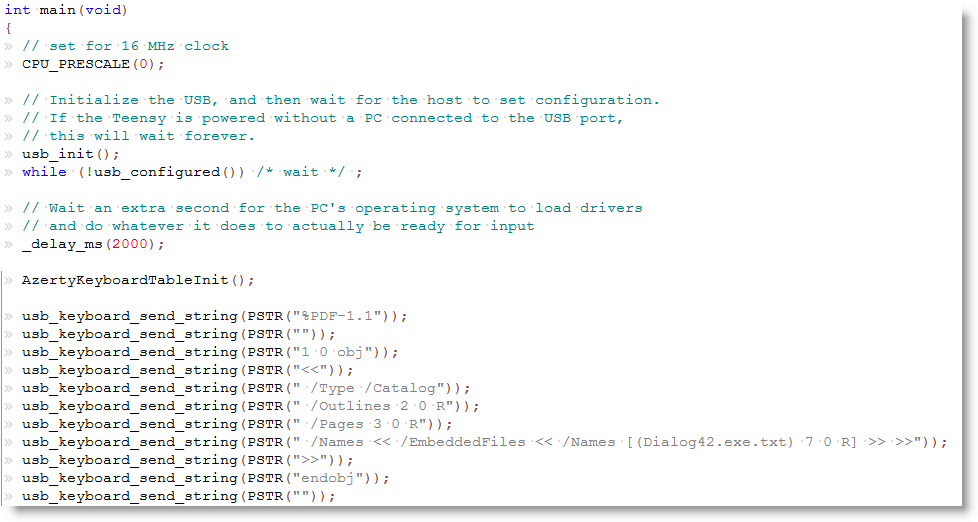
Here is a sample of our C code showing how to embed each line of the pure-ASCII PDF document as strings:

Macro PSTR makes that the string is stored in flash memory. The embedded executable is 57KB large, but still only takes half of the flash memory of my Teensy++.

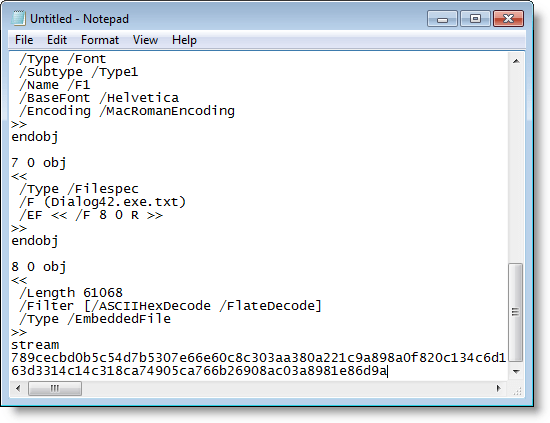
After programming my Teensy++, I can fire up Notepad and let my Teensy++ type out the PDF document:

You can download my example for the WinAVR compiler here:

avr-teensy-pdf-dropper_V0_0_0_1.zip (https)
MD5: EA14100A1BEDA4614D1AE9DE0F71B747
SHA256: 2C9A5DF1831B564D82548C72F1050737BCF17E5A25DCDC41D7FA4EA446A8FDED

Monday 20 February 2012

Peeking at NAFT

Filed under: My Software,Networking — Didier Stevens @ 20:02

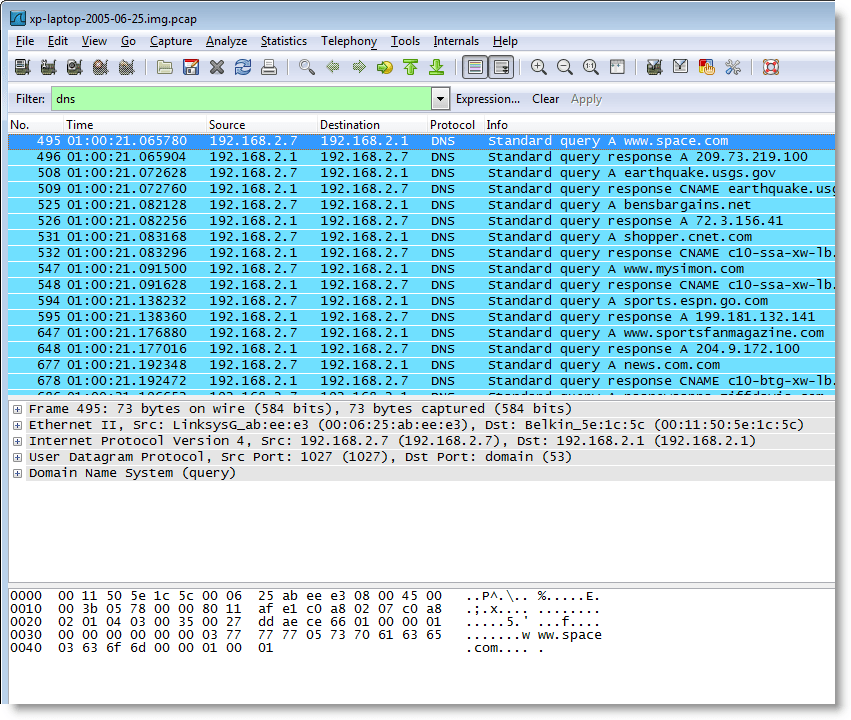
Here are DNS queries issued by a Windows XP machine:

And here is a command history of a Cisco router:

What do these results have in common?

Both were produced by analyzing RAM dumps with a new forensic toolkit I’m developing, the Network Appliance Forensic Toolkit, or NAFT.

More to be published soon.

But if you want a beta version now, provide me a Cisco core dump in exchange 😉

Friday 17 February 2012

Article: White Hat Shellcode

Filed under: Announcement,Shellcode — Didier Stevens @ 17:57

The latest (IN)SECURE Magazine issue includes my article on White Hat Shellcode.

Thursday 9 February 2012

Quickpost: Disassociating the Key From a TrueCrypt System Disk

Filed under: Encryption,Quickpost — Didier Stevens @ 21:05

TrueCrypt allows for full disk encryption of a system disk. I use it on my Windows machines.

You probably know that the TrueCrypt password you type is not the key. But it is, simply put, used to decrypt the master key that is in the volume header.

On a system drive, the volume header is stored in the last sector of the first track of the encrypted system drive (TrueCrypt 7.0 or later). Usually, a track is 63 sectors long and a sector is 512 bytes long. So the volume header is in sector 62.

When this header is corrupted or modified, you can no longer decrypt the disk, even with the correct password. You need to use the TrueCrypt Rescue Disk to restore the volume header. This rescue disk was created when you encrypted the disk.

I’m using Tiny Hexer on the Universal Boot CD For Windows to erase the volume header (you can’t modify the volume header easily when you booted from the TrueCrypt system disk; using a live CD like UBCD4WIN is one possible workaround).

First I’m checking the geometry of the system drive with MBRWizard:
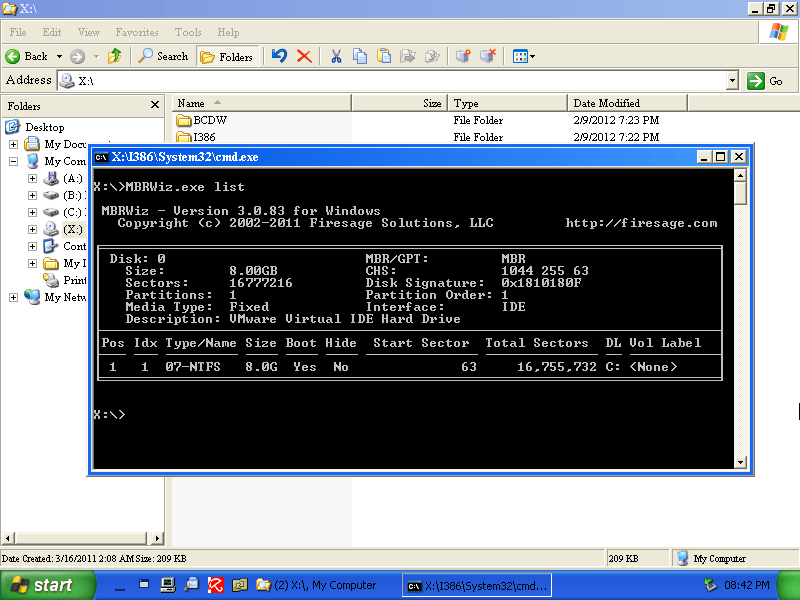
Take a look at the CHS (Cylinders Heads Sectors) value: S = 63 confirms that a track is 63 sectors long.

Then I open the system drive with Tiny Hexer (notice that the sector size is 512 bytes or 0x200 bytes):

I go to sector 62, the last sector of the first track:
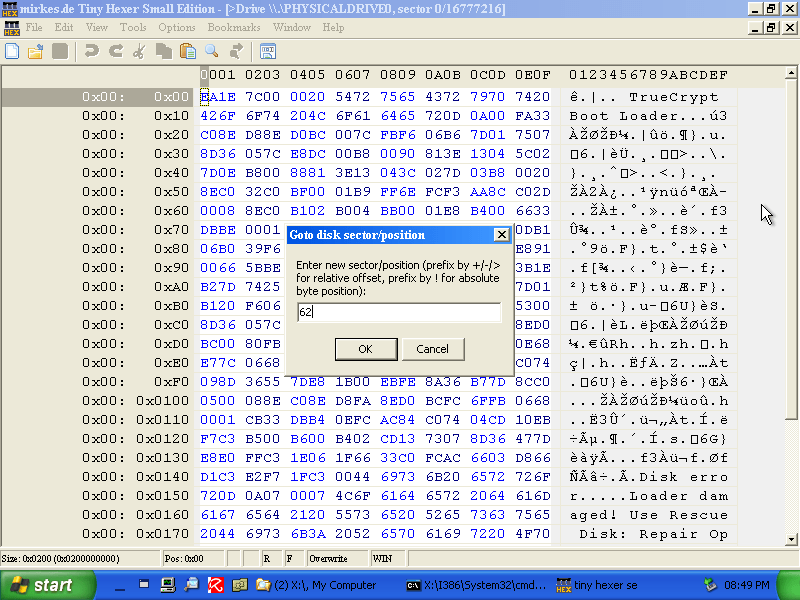
It contains the volume header (an encrypted volume header has no recognizable patterns, it looks like random bytes):

Then I erase the volume header by filling the sector with zeroes and writing it back to disk:
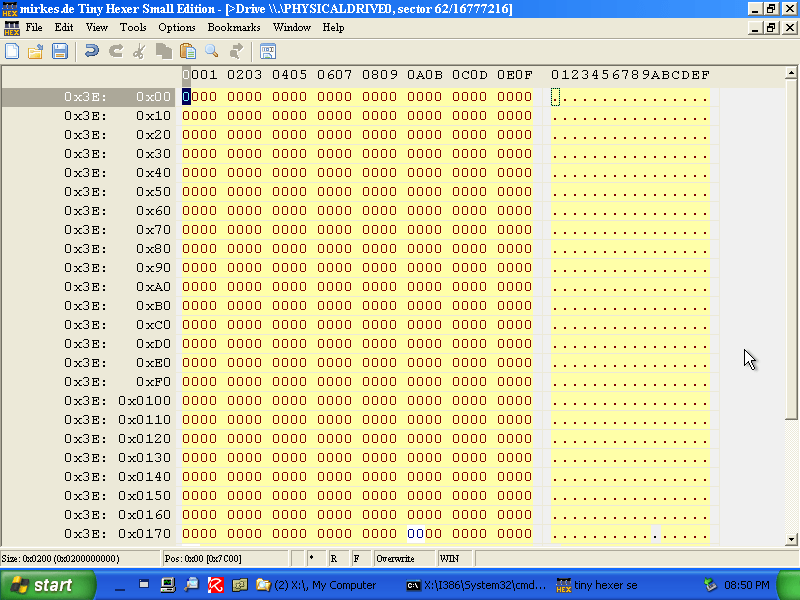
And if you absolutely want to prevent recovery of this erased sector, write several times to it with random data.

Booting is no longer possible, even with the correct password. The TrueCrypt bootloader will tell you the password is incorrect:
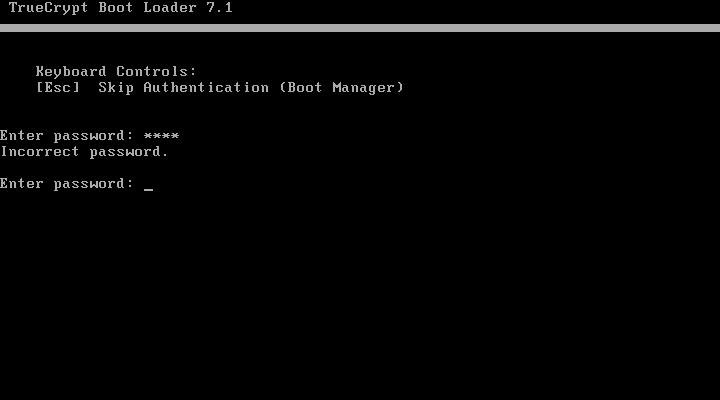
One can say that I’ve created a TrueCrypt disk that requires 2-factor authentication. To decrypt this disk, you need 2 factors: the password and the corresponding TrueCrypt Rescue Disk.

First you need to boot from the TrueCrypt Rescue Disk, and select Repair Options (F8):
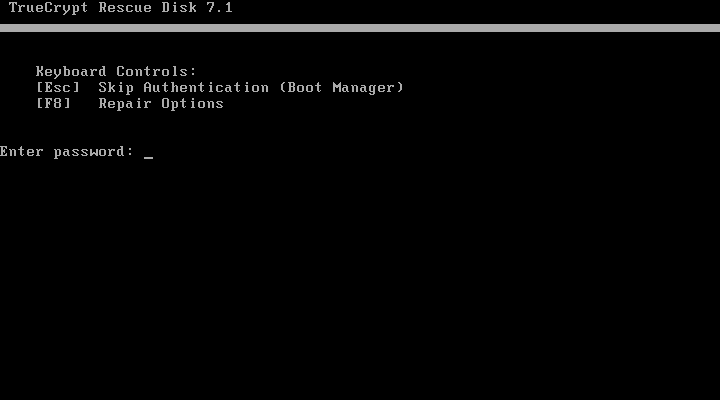
And then you write the volume header back to the system disk. Remark that the TrueCrypt Rescue Disk requires you to enter the password before it writes the volume header to the disk:
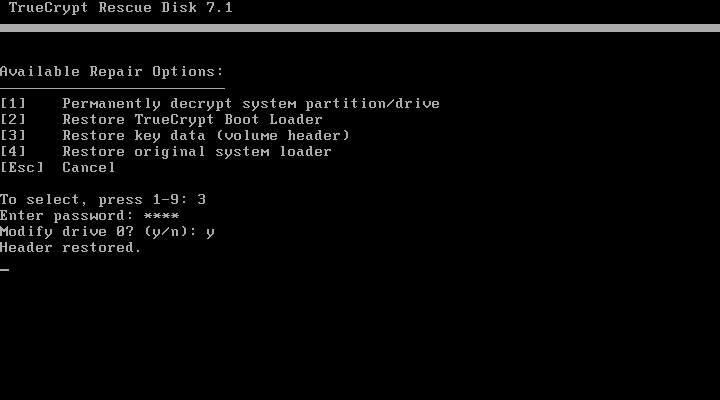
And now you can boot from the system disk with your password.

Use this method if you need to travel with or mail an encrypted system disk and want to be 100% sure there is no way to decrypt the drive while in transit. But don’t travel with the 2 factors on you, send the TrueCrypt Rescue Disk via another channel.

Remark: MBRWizard allows you to wipe sectors, but for whatever reason, it couldn’t successfully wipe sector 62 on my test machine.

Oh yeah, don’t forget to make a full backup before you attempt this technique 😉


Quickpost info


Thursday 2 February 2012

x64 Windows Shellcode

Filed under: My Software,Shellcode — Didier Stevens @ 20:00

Last year I found great x64 shellcode for Windows on McDermott’s site. Not only is it dynamic (lookup API addresses), but it even handles forwarded functions.

But it’s written for MASM, and I prefer to use NASM. Hence I translated it, but also normalized it to adhere to the x64 calling convention and fixed a bug in the error handling.

And I modularized it so you can use it like my 32-bit shellcode.

Here’s the classic MessageBox example:

; x64 shellcode to display a "Hello from injected shell code!" MessageBox, then return to caller
; Written for NASM assembler (http://www.nasm.us) by Didier Stevens
; Source code put in public domain by Didier Stevens, no Copyright
; https://DidierStevens.com
; Use at your own risk
;
; History:
;   2011/12/27: Refactored functions to include file sc-x64-api-functions.asm

%include "sc-x64-macros.asm"

INDEX_KERNEL32_LOADLIBRARYA        equ 0 * POINTERSIZE + STACKSPACE
INDEX_MESSAGEBOXA                            equ 1 * POINTERSIZE + STACKSPACE
APIFUNCTIONCOUNT                            equ 2

segment .text

; Setup environment
sub rsp, STACKSPACE + ROUND_EVEN(APIFUNCTIONCOUNT) * POINTERSIZE        ;reserve stack space for called functions and for API addresses

LOOKUP_API KERNEL32DLL, KERNEL32_LOADLIBRARYA, INDEX_KERNEL32_LOADLIBRARYA

lea rcx, [rel USER32DLL]
call [rsp + INDEX_KERNEL32_LOADLIBRARYA]

LOOKUP_API USER32DLL, USER32_MESSAGEBOXA, INDEX_MESSAGEBOXA, INDEX_KERNEL32_LOADLIBRARYA

; Display MessageBox
xor r9, r9
lea r8, [rel TITLE]
lea rdx, [rel HELLO]
xor rcx, rcx
call [rsp + INDEX_MESSAGEBOXA]

add rsp, STACKSPACE + ROUND_EVEN(APIFUNCTIONCOUNT) * POINTERSIZE
ret

%include "sc-x64-api-functions.asm"

KERNEL32DLL                            db    "KERNEL32.DLL", 0
KERNEL32_LOADLIBRARYA        db    "LoadLibraryA", 0

USER32DLL                                db    "USER32.DLL", 0
USER32_MESSAGEBOXA            db    "MessageBoxA", 0

HELLO                                        db    "Hello from injected shell code!", 0
TITLE                                        db    "Message", 0

Here’s what I changed exactly from the original MASM code:
1) non-volatile registers are preserved (by storing them on the stack)
2) building the DLL name for forwarded functions is done with a variable on the stack frame of lookup_api, and not of the caller
3) the address of LoadLibraryA is passed via r9, and no longer r15
4) lookup_api not only returns the function address in rax, but also stores it in memory at an address provided in r8
5) fixed the error handling bug (stack restoration)
6) added some EQUs to make it easier to use this code as a “library” (include)

You can get the code from my shellcode page. Look for filenames starting with sc-x64 in the zip file.

Monday 23 January 2012

IOS: Let Me Truncate That Password For You…

Filed under: Networking — Didier Stevens @ 0:40

When I configured this Cisco router (IOS version 15.0(1)M5) with dynamic dns, it failed to properly update its public IP address on the dynamic dns site. Turning on debugging (debug ip ddns update) revealed an authentication issue:

*Jan 20 22:53:55.591: HTTPDNSUPD: DATA START badauth

A simple test confirmed what I suspected: IOS truncates the password. In can’t be longer than 15 characters.

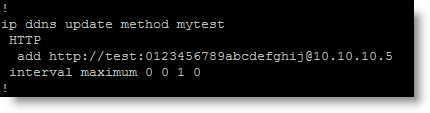
Here’s the config of my test, with username test and a 20 character password:

And here’s what the web server receives:

The password received by the webserver is 0123456789abcde. In other words, IOS has truncated the password to the first 15 characters and included it in headers of the http(s) GET request that updates the dynamic dns info.

It’s possible that the username also gets truncated to 15 characters, however I’ve not tested this.

The Cisco bug ID is CSCtx50249.

Thursday 19 January 2012

Analyzing IOS Core Dumps (SOPA-style)

Filed under: Announcement — Didier Stevens @ 9:30

Do you need to analyze a Cisco IOS Core Dump?

Read this.

But that doesn’t explain how to analyze a core dump“, you say? Correct, unfortunately. That’s all you get with SOPA/PIPA enacted.

But SOPA blackout day” was yesterday, you say? Correct. But I’m not following the crowd 😉

Friday 6 January 2012

Identifying IOS

Filed under: Forensics,Networking — Didier Stevens @ 10:33

Did you ever had to identify a Cisco IOS image when you couldn’t rely on the filename?

Look for strings starting with CW_ between strings CW_BEGIN and CW_END in the image file, for example like this:

You will find strings like CW_IMAGE, CW_FAMILY, CW_FEATURE, CW_VERSION, CW_MEDIA, CW_SYSDESCR and CW_MAGIC between strings CW_BEGIN and CW_END.

In this example, the IOS version is 12.4(6)T5 (CW_VERSION) and it is designed to run on 870 routers (CW_FAMILY).

The nice thing about these CW_ strings is that you will also find them in a core dump (in the data region), thus allowing you to identify the IOS version that was running on a router when the core dump was produced (provided the image runs from RAM, indicated by a letter m in the filename).

And they are also present in the uncompressed image (compressed image files are identified by a letter z in the filename).

Soon I will release a tool to validate IOS image files, you can use it to extract these CW_ strings too.

Sunday 1 January 2012

Calculating a SSH Fingerprint From a (Cisco) Public Key

Filed under: Forensics,Networking — Didier Stevens @ 17:03

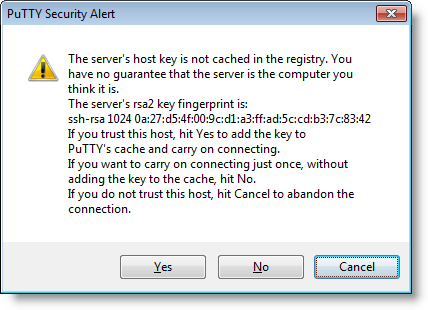
I’m sure some of you verify SSH fingerprints before you use a SSH server for the first time. You obtain the fingerprint via another channel, and you compare it with the fingerprint your SSH client presents you.

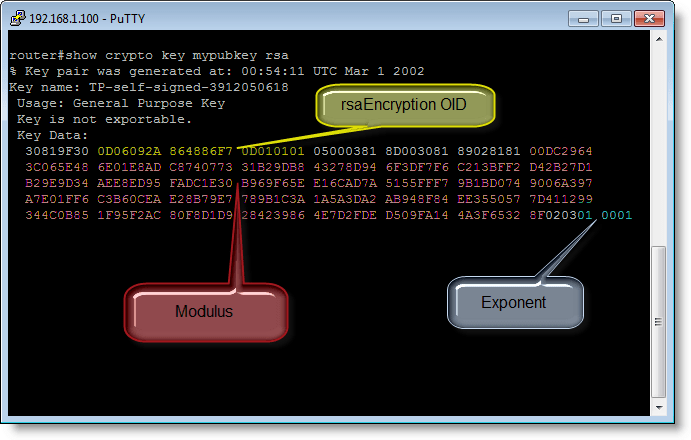
But have you done this with Cisco devices too? Recently I tried to obtain the SSH fingerprint of a Cisco router while connected via the serial console. Turns out there is no CLI command to display the fingerprint (well, at least I didn’t find one). What you can do, is dump the public key with command “show crypto key mypubkey rsa”.

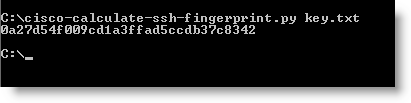
So I developed a small Python program that calculates a SSH fingerprint from the public key. You store the public key in hex format in a file and use that with this new tool.

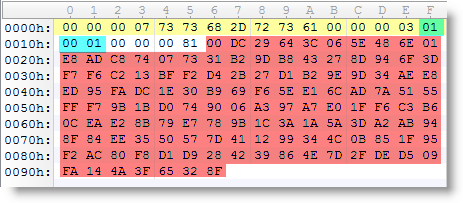
To calculate the fingerprint, I extract the modulus and exponent from the public key, store them in another format (ssh-rsa) and calculate the MD5 hash.

So now I can connect to a router via the serial console while there’s no “man in the middle”, obtain the public key and calculate the fingerprint. Next when I connect to the same router over SSH, I can validate the fingerprint my SSH client presents me. It’s too bad Cisco provides no feature to get the fingerprint directly.

cisco-calculate-ssh-fingerprint_V0_0_1.zip (https)
MD5: 5A6C3A2C466908EE7EFB06727E8D02B7
SHA256: 831CAF7BBF0F6C584436C42D9CEB252A089487B715ADBB81F9547EEB3ED6B0B8

« Previous Page

Blog at WordPress.com.