I will release free stuff on my company’s website Didier Stevens Labs. Like this new XORSearch video.
XORSearch is one of my popular tools, but I hadn’t made a video for it yet:
I will release free stuff on my company’s website Didier Stevens Labs. Like this new XORSearch video.
XORSearch is one of my popular tools, but I hadn’t made a video for it yet:
You probably know by now that Adobe will revoke a compromised code signing certificate in a couple of days. As we seem to have more code signing related security incidents recently, I started to develop a couple of new tools.
AnalyzePESig is a tool to check signatures in PE files, just like Sysinternals’ sigcheck. But with a couple of differences.
First, when a signature is not valid, AnalyzePESig will tell you why and still display information about the invalid signature and related certificates. Second, AnalyzePESig displays more information and third, it is open source.
Here is how you use AnalyzePESig to look for executables signed with that Adobe certificate that will soon be revoked:
analyzepesig -e -v -s -o windows.csv c:\windows
This will produce a CSV list of all executables found in the c:\windows directory.
Filter this list for lines including string fdf01dd3f37c66ac4c779d92623c77814a07fe4c (this is the fingerprint of the compromised certificate):

As you can see, I’ve Flash components signed with this compromised certificate. Now, this does not mean that these executables are compromised. To get a better idea, I can use my virustotal-search tool to search VirusTotal.
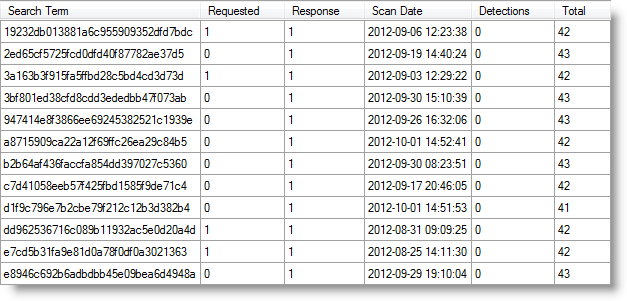
And here is another example, JP2KLib.dll, a DLL of Adobe Reader X:

AnalyzePESig_V0_0_0_1.zip (https)
MD5: 4BE29E4A5DE470C6040241FD069010C4
SHA256: FB83C6491690402273D42A3335777E77EA29328F5FE8503FF6F5EF62833D1FBC
I founded my own company: Didier Stevens Labs

You can find videos of my workshops for sale on this new website.
And I will give a brand new workshop at Brucon next week: Windows x64: The Essentials
I will sell CDs with my workshops videos at Brucon with a 20% discount.
I’ve worked on a couple of new tools to analyze the digital signature found in PE files. In this post, I’m sharing some invalid signatures I found on my machines.
This signature is invalid because the certificate expired:
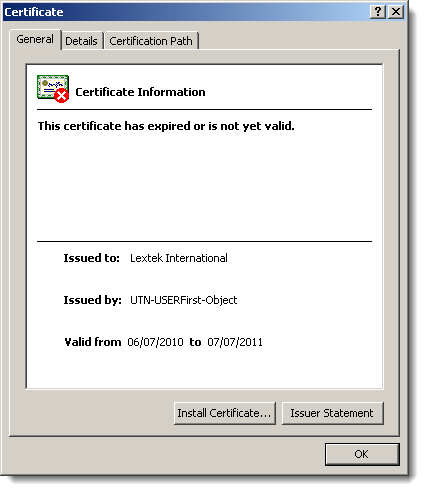
Normally, the fact that it expired shouldn’t cause the signature to become invalid, but here it does because the author forgot to countersign the signature with a timestamping service:

I also found several files where the root certificate used in the signatures uses a signature algorithm based on the MD2 hash:
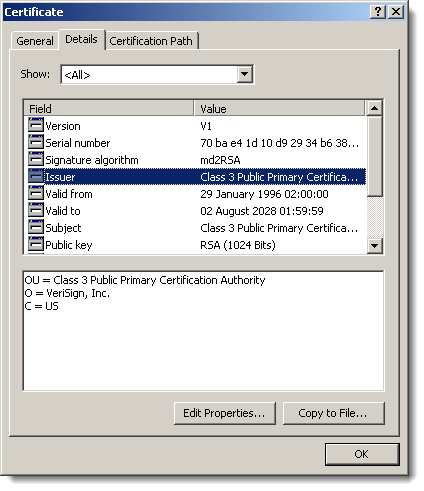
And last a signature with a revoked certificate:

Remember Realtek Semiconductor? Their private key was compromised and used to sign Stuxnet components.
This is a small fix for TaskManager suggested by goglev: he had 2 network drives pointing to the same share, and this triggered a bug.
Since it was brought to my attention that some AV products detect the version with shellcode, I’m forking the project:
TaskManager.xls has no shellcode injection features, while TaskManagerSC.xls does.
TaskManager_V0_1_4.zip (https)
MD5: FBB30486CF0E7A1BEB7342EF4672DE52
SHA256: 30779E09B5B0D1D1AFE9C33B12EDD0982E775A9FA0B0D2A1189835004750FB5F
TaskManagerSC_V0_1_4.zip (https)
MD5: 61C6657B2E36F3240A67960BCA413E56
SHA256: FAAB1044318A1EB6FEA09109ABDD982CDFFAEE54DC1C81D3416CC2A69DEEEC70
The most important feature in this new version is the pivot table. You can select 2 columns and generate a pivot table for the data in these columns. Here is an example with data from a new tool I’m working on:

FYI: this shows which root certificates are present in the AuthentiCode signatures using MD5 or SHA1.
Here’s a list of changes:
InteractiveSieve_V_0_7_6_0.zip (https)
MD5: 37C18D2E41CB311442E033F253818057
SHA256: 5758289A939388FDB73617DAD686EBD2B79D1E48444A772946E7606DAF49DB05
This new version of USBVirusScan displays a banner when a USB stick is inserted. You specify the text of the banner in text file banner.txt.
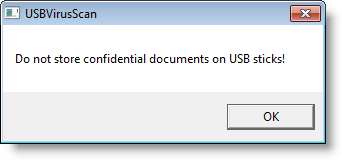
Option -b enables this banner and displays it the first time a removable drive is mounted. Option -B displays the banner each time a removable drive is mounted.
You can find this new version here.
I fixed InstalledPrograms as earthsound suggested: now I include 32-bit installations on 64-bit systems (provided you use 64-bit Excel).
InstalledPrograms_V0_0_2.zip (https)
MD5: 383D9EC2B520E930A8484F1BD0B99534
SHA256: B174A5A9A366799B5C7CB99D6FD83643E5AE8155FBC52ADCEDA836FFF9281766
Help Net Security recorded a video with me speaking about EMET and HeapLocker at Hack In The Box Amsterdam 2012.


 Didier Stevens