Didier Stevens

Thursday 1 September 2011

Bottom Up Randomization Saves Mandatory ASLR

Filed under: Vulnerabilities,Windows 7,Windows Vista — Didier Stevens @ 17:32

I recently found out that pseudo-ASLR (or mandatory ASLR in EMET) has a lower entropy than real ASLR. While real ASLR has a 8-bit entropy for base addresses, mandatory ASLR turned out only to have about 4 bits of entropy, and the distribution was far from uniform. What I forgot to tell you in that post, is that I just enabled Mandatory ASLR as mitigation in EMET, and nothing else:

Matt Miller told me that a new feature of EMET version 2.1, Bottom Up Randomization, would greatly improve the entropy of mandatory ASLR.

The results are spectacular. When I let my test program run around 500,000 times, I get almost 200 different base addresses. And the distribution is more uniform too, no address appears more frequently than 3% of the time.

To get decent protection from mandatory ASLR, be sure to use the latest version of EMET (2.1) and enable Bottom Up Randomization. This gives you the same entropy than real ASLR, with the added bonus that the base address will change each time the application is started, compared to real ASLR which requires a reboot.

Monday 22 August 2011

Quickpost: CCTV Over UTP

Filed under: Hardware,Quickpost — Didier Stevens @ 0:04

I knew it was possible to transmit a composite video signal over UTP, but I always assumed that this was a kludge: that the preferred way was to use RG59 cable.

But recently I discovered that UTP cabling is often used in professional CCTV installations, because it offers the same benefits of structured cabling (like standardization and cost reduction).

To send the video signal over UTP, you need video baluns (one at each end of the pair). It is not transmitted via Ethernet, but the video signal is transformed to be send over a pair. Since CAT5 cable has 4 pairs, you can send 4 video signals over 1 cable. That’s what I’ve done at home, to limit the number of cables I had to install.

You can also use some pairs in the CAT cable to provide power to the CCTV camera (typically 12V) or to transmit audio (when you add a microphone to your CCTV camera). Video baluns are passive components, they don’t need power to operate. I’ve used baluns to cover distances of about 30m, and I don’t notice a difference in the quality of the video signal (compared to a video signal transmitted over RG59 cable).
Most baluns advertise distances of several hundred meters.

I was also able to transmit a video signal without noticeable quality degradation over an untwisted pair of 10m.


Quickpost info


Tuesday 16 August 2011

So How Good is Pseudo-ASLR?

Filed under: Vulnerabilities,Windows 7,Windows Vista — Didier Stevens @ 0:29

Let me first define what I mean with pseudo-ASLR. Address Space Layout Randomization (introduced in Windows Vista) loads executable files at different memory addresses. Studies have shown that ASLR uses 256 different base addresses and that the distribution is pretty uniform.

Pseudo-ASLR is what EMET and my tool SE_ASLR enforce. When a DLL does not support ASLR, memory at the base address of this DLL is allocated right before the DLL is loaded into the process. Since the address is not free, the image loader will load the DLL at a different address, thereby « randomizing » the base address. But how good is this randomization?

As I pointed out in my article on EMET, this base address is different each time a new process is started (unlike ASLR which needs a reboot for the base address to change). So maybe this is better ?

I developed a test program that loads a DLL but pre-allocates memory at the address of the DLL before loading. Then I ran that program thousands of times on a Windows 7 32-bit machine.

Running this program about 50.000 times gives me 68 different addresses. That’s by far not as good as 256 with ASLR. But what’s more important, is that the distribution of these addresses is not uniform at all:

There’s one address (0x000E0000 in my test) that is used 30% of the time. 2 other addresses are used 10% of the time. Rebooting the machine does not change this distribution.

When I do the same test, but enforce ASLR with EMET, I get a similar result:

Again there’s an address that is selected 30% of the time, but it’s different from my previous test. Rebooting the Windows 7 machine doesn’t change the address.

In this test, EMET uses only 15 different addresses, compared to the 68 addresses in the first test. I’ll have to research this difference, I’ve no explanation for it.

Conclusion from this simple test: pseudo-ASLR is rather weak, because I can predict the base address and I will be right one time out of three, which is not bad at all when I can launch my attack several times.

Wednesday 10 August 2011

Force “ASLR” on Shell Extensions

Filed under: My Software,Vulnerabilities — Didier Stevens @ 0:49

I’ve written about Shell Extension without ASLR support before.

Not only do they open up explorer.exe to ROP attacks, but other applications too, like Adobe Reader and Microsoft Office.

You could use EMET to force ASLR on these DLLs, assuming you know which applications load shell extensions. Because shell extensions are not only loaded into explorer.exe, but other programs too, I wrote a tool to force Shell Extension DLLs to load at another address than their base address, effectively simulating ASLR.

When my tool, SE_ASLR.dll, is loaded into a process, it will check for the presence of comdlg32.dll inside the list of loaded modules. When comdlg32.dll is used by an application, the likelihood of shell extensions being loaded into the process by user interaction with the file dialogs is significant.

Hence SE_ASLR will patch the IAT to intercept calls to LdrLoadDll. Each time the application loads a DLL (all DLLs, not only shell extension), SE_ASLR will check if the DLL supports ASLR. If it doesn’t, SE_ASLR will pre-allocate a memory page at the base address of the DLL, thereby forcing the loader to load the DLL at another address.

Although SE_ASLR’s primary goal is to relocate shell extensions, it will effectively relocate all DLLs without ASLR support once SE_ASLR is loaded into the process.

You need to load my tool into all applications that could use shell extension, for example via the AppInit_DLLs registry key. But before you do, be sure to test this out on a test machine. Not all shell extensions support relocation.

SE_ASLR_V0_0_0_1.zip (https)
MD5: 9D6AE1A96D554AEE527EB802FE59FB20
SHA256: 8A6C1406A757CD9788A2630D76A497E2C058333EE4D44CA0B85B2A05A39F257E

Friday 5 August 2011

My Home Surveillance System: Some Details

Filed under: Arduino,Hacking,Hardware — Didier Stevens @ 11:02

I use Phidgets USB interfaces and sensors for my home surveillance system. For the moment, my home surveillance system consists of Python programs running on a PC, but once I’m past the experimental phase, I will migrate this to a dedicated controller.
I particularly like the PIR motion sensor Phidget, because it gives you an analogue output. When there’s no movement, the output will be around 500. With movement, the output value will oscillate around 500, with larger amplitudes for larger movements.This allows me to differentiate between small and large movements, and to eliminate false positives which are only of a short duration. If you have to run wires for many meters to connect your analogue sensors to the interface module, I recommend you use shielded wires and connect the shield to the ground of the interface module. This allowed me to eliminate noise I had on the readings.

Another plus is that the sensors are powered by the interface module. So if you power the PC (or micro-controller) with a UPS, your home surveillance system will also operate when there’s a power cut.

To take pictures when an event occurs (like ringing the doorbell), I use an IP camera. Take a look at my vs.py program to see how that’s done.

Friday 29 July 2011

My Home Surveillance System

Filed under: Arduino,Hacking,Hardware — Didier Stevens @ 10:21

Aside from having installed my own Home Automation and CCTV system, I also designed and installed a surveillance system at home. This post will discuss some of the design decisions I took. Some of them are different from more conventional alarm systems.

The surveillance system has many sensors in and around the house (passive infrared (PIR) sensors, reed switches, temperature sensors, …) and can take several actions, like starting sirens, turning on lights, sending text messages, making phone calls, taking pictures, … Which  actions are taken depend on the alert level that was set.

First design decision : this system is designed to deter common burglars, not burglars with inside knowledge of the system.

Second design decision is that the system will log all events coming from sensors, regardless of triggering an alarm.

Third design decision is that there is no alarm delay: if a sensor triggers that would cause the alarm to sound, then the alert sounds immediately. There is no delay or pre-alarm phase. I believe an immediate alarm has a greater deterrent effect. With this design, it’s best to avoid false-positives as much as possible.

Fourth design decision : use analogue PIR detectors, not binary PIR detectors. A classic (binary) PIR detector will just tell you that movement occurred. With an analogue PIR detector, you get the amplitude and duration of the movement, which is useful information to weed out false alarms, or ignore movement from small pets.

Now on to some interesting or unusual use cases.

I have a sensor on the doorbell too. When someone rings the doorbell, the event is logged and the system takes pictures of the front door. I’ve seen some interesting events since this doorbell sensor was installed. For example, I expected a package to be delivered after 18:00. The sender had instructed our national courier company to deliver the package after 18:00. You can probably guess they didn’t follow the instructions. I have evidence they attempted to deliver well before 18:00, and what’s even worse, they left a note saying they had passed around 18:15…

Like modern, commercial alarm systems, I have several alarm zones. For example, I can set the alarm level for when we go to bed. In this mode, the alarm will go off if there is movement inside the house, except in the bedroom and nearby rooms/hall. But come morning, you have to remember to switch off the alarm before you leave the bedroom.
Not with my system. If my system detects movement in the protected zone, and if there has been movement in the bedroom zone just before, it will disable the alarm in stead of sounding the alarm. So no false-alarms triggered in my house by sleepy-heads.

Outside lights that switch on when movement is detected are supposed to deter burglars, but they are so common that I believe the deterrent effect is negligible. My system turns on some lights inside the house when it detects movement outside while it is dark and there is no movement inside. I believe this has a much greater deterrent effect, because it’s so uncommon. And it will also take pictures. I now have a large picture collection of neighborhood cats in my back garden 😉

I’ve recently installed wireless interconnected smoke alarms. I will connect one smoke alarm to my home surveillance system, so that my system is aware when smoke alarms trigger and can act appropriately.

Testing all these functions is fun. I’m ” testing in production “, you can imagine that I don’t have a second home that I can use as a test system.
So sometime you can see me run around the house like a madman, but I’m just testing a new feature I programmed… 😉

Thursday 14 July 2011

Quickpost: Blocking and Detecting a Teensy Dropper

Filed under: Forensics,Hardware — Didier Stevens @ 9:58

A Teensy dropper presents itself as a keyboard (HID) to a PC and this is how it can be used to drop files even if you don’t allow removable drives.

You can prevent the installation of new HIDs, but this is an issue when you need to replace keyboards or mice. Irongeek has a good write-up.

Connected HIDs leave forensics traces in the registry, take a look under key HKEY_LOCAL_MACHINE\SYSTEM\CurrentControlSet\Enum\USB\

Connecting a Teensy leaves these entries:

HKEY_LOCAL_MACHINE\SYSTEM\CurrentControlSet\Enum\USB\Vid_16c0&Pid_0482\6&31417f27&0&3
HKEY_LOCAL_MACHINE\SYSTEM\CurrentControlSet\Enum\USB\Vid_16c0&Pid_0482&MI_00\7&becc88c&0&0000
HKEY_LOCAL_MACHINE\SYSTEM\CurrentControlSet\Enum\USB\Vid_16c0&Pid_0482&MI_01\7&becc88c&0&0001
HKEY_LOCAL_MACHINE\SYSTEM\CurrentControlSet\Enum\USB\Vid_16c0&Pid_0482&MI_02\7&becc88c&0&0002


Quickpost info


Wednesday 13 July 2011

Teensy PDF Dropper Part 1

Filed under: Hacking,Hardware,PDF — Didier Stevens @ 21:40

Pentesters need to drop files on targets. If a box is not connected to the Internet, and doesn’t accept removable storage, they need to come up with some tricks.

Inputting the file via the keyboard is an option, but typing several millions of bytes is not. This needs automation.

Irongeek uses a Teensy micro-controller to achieve this. My solution is a variation on this. If you need to drop a binary file, you need to find a way to convert the typed ASCII to bytes. There’s a solution with a debugger, but I’m using a PDF Reader.

It’s possible to create a pure ASCII PDF file that embeds a binary file. Here are the steps to drop a binary file:

  • open Notepad,
  • insert the Teensy and let it type the ASCII  PDF file into Notepad
  • save the PDF file
  • open it with a PDF Reader and save the embedded binary file

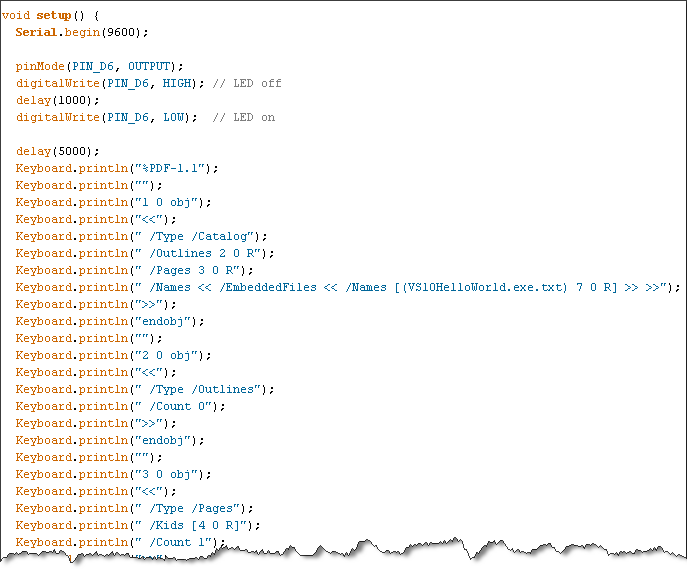
Writing a program with the Arduino IDE to type an ASCII PDF file is not difficult:

But with the Arduino IDE, your embedded file is limited to a couple of kilobytes. Handling larger files will be described in part 2 of this post.

Thursday 30 June 2011

Integrating My CCTV DVR And Alarm System

Filed under: Hacking,Hardware — Didier Stevens @ 20:49

I’ve designed and installed my own home automation system: it allows me to control lights and appliances, and monitor activity and environmental parameters at home.

I also have a CCTV DVR with a couple of cameras around the house.

Until now, these 2 systems were not linked. If a PIR sensor detected movement in the garden and later I wanted to see what caused the movement, I had to write down the timestamp and then rewind the DVR around the time the movement was detected. Not anymore. My CCTV DVR has an external IO connector, and now events detected by my alarm system are logged on my DVR. I just have to click on an event on my DVR and the video starts to play.

The problem I faced to achieve this integration, was the lack of documentation. There was no pinout of the external IO connector, not in the manual and not online. So I had to reverse engineer it.

My CCTV DVR is a DVR4L5 sold by Velleman, and is actually produced by AVTECH in Taiwan. The external IO connector is a 9 pin DSUB connector. I can use it to send 4 different alarms to the DVR. But for this to work, the alarm has first to be configured on the DVR:

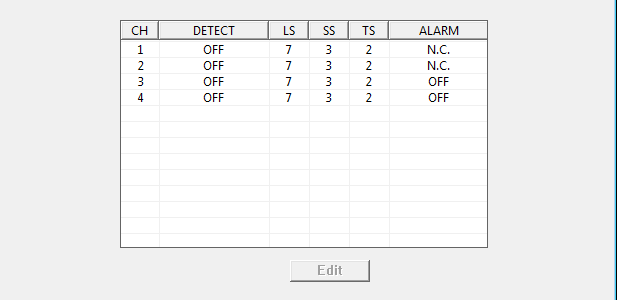
Set the channel for which you want the alarm to register to N.C. This means Normally Closed, which is counter-intuitive, because I’m using a Normally Open alarm. When I now close the circuit between pin 1 and pin 5 of the external IO connector, an alarm event gets logged and the DVR’s buzzer alerts me. Since I don’t need that buzzer to alert me, I disable it:

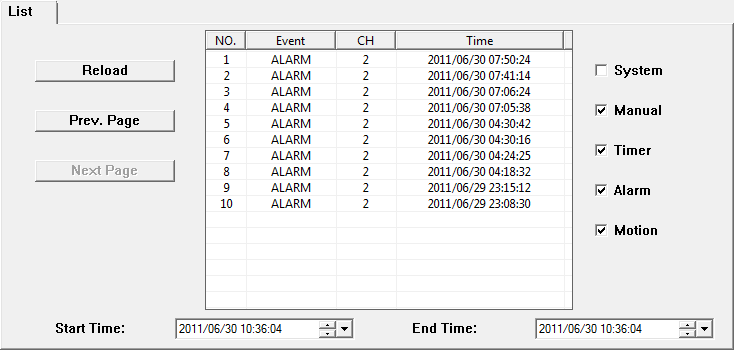
Here is an example of alarm events logged by the CCTV DVR:

The DVR can also send alerts to the alarm system. It does this by closing the circuit between pins 6 and 7. For example when it detects movement filmed by one of the cameras. But from experience I know you get a lot of false positives from this motion detection. For example when a cloud moves in front of the sun, the sudden shadow can trigger the simple motion detection algorithm of the DVR. A more useful alert to send to the alarm system is the loss of video signal. The DVR can be configured to sound the alarm when it loses a video signal from one of the cameras. For example when someone tampers with your camera.

Some weeks after I reversed the pinout, I received a reply from AVTECH that confirmed my findings. I’m including it here:

PIN

FUNCTION

DESCRIPTION

1~4

ALARM INPUT

Connect ALARM INPUT (PIN1 – 4) and GND (PIN5) connector with wires. Once an alarm is triggered, the DVR will start recording and the buzzer will be on.

PIN Alarm Corresponding video channel
PIN 1 1 CH1
PIN 2 2 CH2
PIN 3 3 CH3
PIN 4 4 CH4

*

5

GND GROUND

6

EXTERNAL ALARM COM Under the normal operation, COM disconnects with NO. But when any alarm is triggered, COM connects with NO.
Attention: The voltage restriction is under DC24V 1A.

7

EXTERNAL ALARM NO Under the normal operation, COM disconnects with NO. But when any alarm is triggered, COM connects with NO.
Attention: The voltage restriction is under DC24V 1A.

8

RS485-A  

9

RS485-B  

10~11

GND GROUND

Wednesday 22 June 2011

Quickpost: Need a PoC to Test Your Security Setup? Not Necessarily…

Filed under: Quickpost,Vulnerabilities — Didier Stevens @ 13:30

People regularly ask me for a PoC (PDF or other type) to test their security setup. For example, they sandboxed Adobe Reader and now they want to test that Adobe Reader can’t write to sensitive Windows directories like system32.

Well, you don’t need a PoC to test your setup in this way. Just develop and compile a DLL that writes to system32, and inject it in the target process.

The problem however, is that not everybody has the skills to develop and compile such a DLL. But almost everybody can write a VBScript that accomplishes the same. Here’s a one-liner that creates test.txt in system32:

CreateObject("Scripting.FileSystemObject").CreateTextFile("c:\windows\system32\test.txt")

But how do you get the target process to execute this script? That is something I worked out 2 years ago: bpmtk: Injecting VBScript. In a nutshell: I developed a DLL that once injected into a process, instantiates a VBScript engine and executes the provided script.

« Previous PageNext Page »

Blog at WordPress.com.