Here’s a small post with extra details on building an Ardubot; details I didn’t find online.
The missing info is which Arduino output lines control the 2 motors. Measuring with a multimeter reveals digital outputs 3, 5, 6 and 9.
I place and solder the motors like this:
The +-sign closest to the PCB:
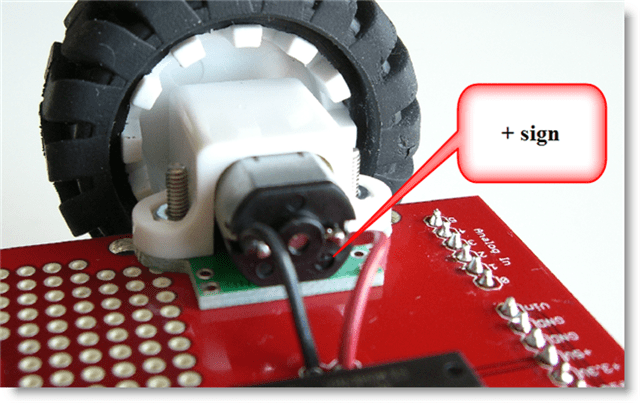
Red wire soldered to + connector, black wire soldered to – connector:

I defined left motor and right motor like this:
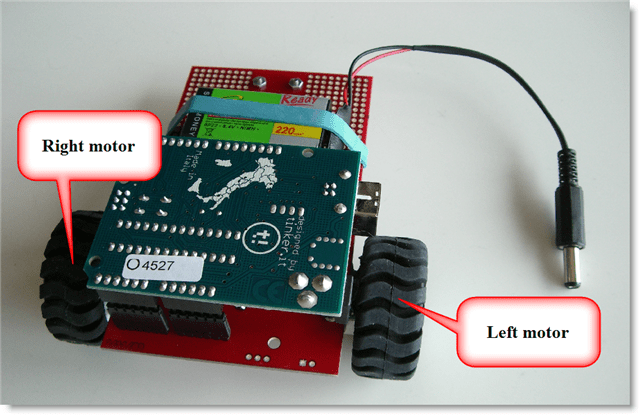
And here’s the schema:

To power the left motor in a forward drive, set digital output 9 high and digital output 6 low.
To power the left motor in a reverse drive, do the oposite of a forward drive (9 low and 6 high).
To power down a motor, set both digital outputs low.
To power the right motor in a forward drive, set digital output 5 low and digital output 3 high.
To power the right motor in a reverse drive, do the oposite of a forward drive (5 high and 3 low).
Arduino code:
/*
	Ardubot motor-driving example program
	Version 0.0.1
	Source code put in public domain by Didier Stevens, no Copyright
	https://DidierStevens.com
	Use at your own risk

	History:
	2009/08/21: Start development
	2009/08/23: refactoring
*/

unsigned char PIN_HBRIDGE_1A = 9;
unsigned char PIN_HBRIDGE_2A = 6;
unsigned char PIN_HBRIDGE_3A = 5;
unsigned char PIN_HBRIDGE_4A = 3;

void MotorLeftStop()
{
  digitalWrite(PIN_HBRIDGE_1A, LOW);
  digitalWrite(PIN_HBRIDGE_2A, LOW);
}

void MotorLeftForward()
{
  digitalWrite(PIN_HBRIDGE_1A, HIGH);
  digitalWrite(PIN_HBRIDGE_2A, LOW);
}

void MotorLeftReverse()
{
  digitalWrite(PIN_HBRIDGE_1A, LOW);
  digitalWrite(PIN_HBRIDGE_2A, HIGH);
}

void MotorRightStop()
{
  digitalWrite(PIN_HBRIDGE_3A, LOW);
  digitalWrite(PIN_HBRIDGE_4A, LOW);
}

void MotorRightForward()
{
  digitalWrite(PIN_HBRIDGE_3A, LOW);
  digitalWrite(PIN_HBRIDGE_4A, HIGH);
}

void MotorRightReverse()
{
  digitalWrite(PIN_HBRIDGE_3A, HIGH);
  digitalWrite(PIN_HBRIDGE_4A, LOW);
}

void setup() {
  pinMode(PIN_HBRIDGE_1A, OUTPUT);
  pinMode(PIN_HBRIDGE_2A, OUTPUT);
  pinMode(PIN_HBRIDGE_3A, OUTPUT);
  pinMode(PIN_HBRIDGE_4A, OUTPUT);
}

void loop(){
  MotorLeftStop();
  MotorRightStop();
  delay(2000);

  MotorLeftForward();
  delay(2000);

  MotorLeftStop();
  delay(2000);

  MotorLeftReverse();
  delay(2000);

  MotorLeftStop();
  delay(2000);

  MotorRightForward();
  delay(2000);

  MotorRightStop();
  delay(2000);

  MotorRightReverse();
  delay(2000);

  MotorRightStop();
  delay(2000);

  delay(5000);
}
One tip: if you use the large wheels, get a header kit to raise the Arduino Duemilanove, otherwise the wheel will block access to the power and USB connectors:


 Didier Stevens