Tuesday 7 September 2010 0:53
Microsoft introduced a new kernel security feature with Windows Vista: Integrity Levels. Each process has an integrity level: Low, Medium, High or System. A process with a lower integrity level can’t write to an object with a higher integrity level.
For processes, this means that a process with low integrity level can’t open a handle with full access to a process with medium integrity level. This is what I’ll show in this post: a process with low integrity level can’t inject a DLL in a process with medium (or higher) integrity level.
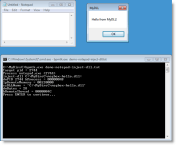
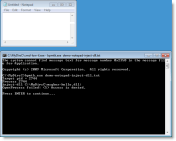
Normal, non-elevated processes run with medium integrity level by default. Here I inject a DLL into notepad.exe with my bpmtk utility:
The integrity level of the cmd.exe process is medium, and therefor the integrity level of bpmtk.exe (launched by cmd.exe) is also medium. Because the integrity level of the notepad.exe process is also medium, the DLL injection succeeds.
To help you identify the integrity level of processes on your machine, you can add an integrity level column to process explorer:
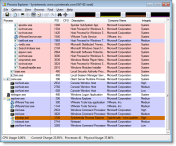
Now we’ll do the same DLL injection from a cmd.exe and bpmtk.exe process with low integrity level.
The icacls.exe utility can be used to view and set integrity levels. Because I don’t want to change the integrity level of the original cmd.exe, I’m making a copy of cmd.exe: cmd-low-il.exe. Cmd-low-il.exe has no explicit integrity level:
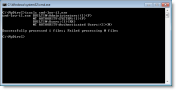
When we set an explicit integrity level (low) on cmd-low-il.exe with icacls.exe, cmd-low-il.exe will run with low integrity level in stead of medium. And every program started by this cmd-low-il.exe process will also run with low integrity level.
You need admin right to assign a low integrity level to cmd-low-il.exe:
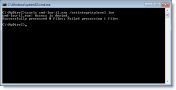
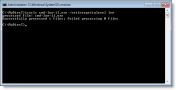
Here you can see the low integrity level setting:
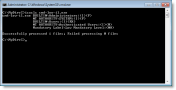
When we start cmd-il-low.exe, it will run with low integrity level. Executing bpmtk.exe from cmd-il-low.exe will force bpmtk.exe to run with low integrity level. bpmtk.exe fails to inject the DLL. When bpmtk.exe tries to open a handle with full access to notepad.exe, the call to OpenProcess fails with access denied. Notepad.exe runs with medium integrity level, and bpmtk.exe running with low integrity level has no right to open a handle to modify the notepad.exe process.
Integrity Levels look like a good security feature to sandbox vulnerable, Internet facing applications. But there are issues I’ll highlight in an upcoming post.
Posted by Didier Stevens
Categories: bpmtk, Windows 7, Windows Vista
Tags:
Mobile Site | Full Site
Get a free blog at WordPress.com Theme: WordPress Mobile Edition by Alex King.
Where Can I download this “bpmtk utility” ?
By Andro on Tuesday 7 September 2010 at 8:30
@Andro If you go through the posts I linked too, you’ll find downloads.
Here is a link: http://www.didierstevens.com/files/software/bpmtk_V0_1_6_0.zip
By Didier Stevens on Tuesday 7 September 2010 at 10:06
Let me see if I understand this. Basically, you’re opening a handle on the chosen process token and modifying its integrity level, right?
And another question. Does UAC warn you about this? This is with UAC activated, of course.
By Manu on Tuesday 7 September 2010 at 14:23
@Manu No, I don’t modify the integrity level of the “attacked” process, that’s what the kernel has to prevent.
UAC is activated, and you get no warning, because I don’t try to elevate.
By Didier Stevens on Tuesday 7 September 2010 at 14:55
Hi guys!
From Windows Vista and later versions, there are exists six possible integrity levels. There are from Highest to lowest.
Trusted Installer
System (operating system processes)
High (administrators)
Medium (non-administrators)
Low (temporary Internet files)
Untrusted
From icacls is not possible (I don`t know) to change the others IL.
Mark Minasi have a great tool to change IL in folders and files called chml.
http://www.minasi.com/apps/
http://technet.microsoft.com/en-us/magazine/2007.06.acl.aspx
By silverhack on Thursday 9 September 2010 at 10:07
@silverhack Mark’s tool is great, and he’s a great speaker too. His tool has more IL features than icacls, but icacls is installed with Windows.
By Didier Stevens on Thursday 9 September 2010 at 16:16
Hey Didier! Thanks a lot for posting so many useful articles one after another!
Keep it up, man! Videos, notes, tools… what else can we expect? Yes, something else: we are waiting you to release a book! 🙂
Thanks!
By MagicMac on Friday 10 September 2010 at 17:47
[…] Integrity Levels and DLL Injection – didierstevens.com For processes, this means that a process with low integrity level can’t open a handle with full access to a process with medium integrity level. […]
By Week 36 in Review – 2010 | Infosec Events on Monday 13 September 2010 at 3:51
[…] to read @ Didier’s Site. October 9, 2010 – 12:38 pm | By NaorP | Posted in Microsoft, Security | Comments (0) […]
By Integrity Levels and DLL Injection | HitIT on Saturday 9 October 2010 at 10:36
[…] Level is done by setting the appropriate ACE in the DACL of the application executable, see my post Integrity Levels and DLL Injection for […]
By PDF, DEP, ASLR and Integrity Levels « Didier Stevens on Monday 11 October 2010 at 8:41
[…] benefit the most of Adobe Reader’s sandbox, you need to use a Windows version that supports integrity levels (Windows Vista or later). Windows XP will not offer you this […]
By Quickpost: Adobe Reader X « Didier Stevens on Friday 19 November 2010 at 18:03
Are you going to post further details about IL vulns as you mention in the final line? It would be great
By __fastcall on Saturday 19 March 2011 at 23:36
@__fastcall I did: https://blog.didierstevens.com/2010/10/11/pdf-dep-aslr-and-integrity-levels/
By Didier Stevens on Sunday 27 March 2011 at 20:05
[…] If you want to know more about the security features of IntegrityLevels, then read Integrity Levels and DLL Injection. […]
By Sysmon not logging all process creation events (Calculator and other sandboxed apps) - Koen Van Impe - vanimpe.eu on Thursday 27 February 2020 at 12:15
Thank you! Yours is the only website I could find that explained the integrity levels in a concise manner that was easier to understand than the Microsoft “documentation”…
https://docs.microsoft.com/en-us/openspecs/windows_protocols/ms-azod/75e4ff94-ff5f-43d2-b2e4-4c1429c35261
https://docs.microsoft.com/en-us/openspecs/windows_protocols/ms-dtyp/ae69a089-473d-4c23-bf3d-7a12a9d11123
By Jon on Friday 10 April 2020 at 2:55